12 Oct 2026 · infrastructure, linux, backup · 4 min
A backup only counts once you test the restore
I backed up a 4.1 MB folder with rsync’s --link-dest, deleted a file, and pulled it back out of the snapshot: the sha256 hash matched. The whole test takes a few seconds. It is the only proof that the backup does anything, and most people find out it didn’t the day they need it.
A backup you never tested is just a promise. rsync handles the space side with --link-dest: files that didn’t change become hardlinks to the previous version, so each snapshot costs only what changed. In my run, three snapshots of a 4.1 MB source took 4.1 MB total, against 12.3 MB for three full copies. The second and third snapshots were 8 KB each, only the text I changed between runs.
The script
The backup.sh below creates a timestamped snapshot, reuses the previous one with --link-dest, deletes versions past the limit, and proves the restore at the end. Run it with no arguments and it does the demo in a temporary directory, without touching your files.
#!/usr/bin/env bash
# backup.sh - snapshot com rotacao e restauracao testavel.
#
# Uso:
#   ./backup.sh                     demo em diretorio temporario
#   ./backup.sh /origem /destino    snapshot de verdade, guardando 7 versoes
#   ./backup.sh /origem /destino N  guardando N versoes
#
# O que faz: copia a origem para um subdiretorio com data e hora. Arquivos que
# nao mudaram viram hardlink da versao anterior (rsync --link-dest), entao cada
# snapshot ocupa so o que mudou. Versoes que passam do limite sao apagadas. O
# demo prova a restauracao: apaga um arquivo da origem e o devolve do snapshot.
set -u

KEEP_DEFAULT=7
RSYNC=""

detecta() {
    if command -v rsync >/dev/null 2>&1; then
        RSYNC="$(command -v rsync)"
    fi
}

snapshot() {
    local src="$1" novo="$2" ultimo="$3"
    if [ -n "$RSYNC" ]; then
        if [ -n "$ultimo" ]; then
            "$RSYNC" -a --delete --link-dest="$ultimo" "$src/" "$novo/"
        else
            "$RSYNC" -a --delete "$src/" "$novo/"
        fi
    else
        mkdir -p "$novo"
        cp -a "$src/." "$novo/"
    fi
}

rotaciona() {
    local dest="$1" manter="$2"
    local snapshots total excedente antigos d vazio
    snapshots=$(ls -1d "$dest"/*/ 2>/dev/null | sort)
    total=$(printf '%s\n' "$snapshots" | sed '/^$/d' | wc -l)
    if [ "$total" -le "$manter" ]; then
        return
    fi
    excedente=$((total - manter))
    antigos=$(printf '%s\n' "$snapshots" | sed '/^$/d' | head -n "$excedente")
    if [ -z "$RSYNC" ]; then
        printf 'rotacao: sem rsync, nao vou apagar as %s versoes excedentes\n' "$excedente"
        return
    fi
    printf 'rotacao: apagando %s versao(oes) antiga(s)\n' "$excedente"
    for d in $antigos; do
        vazio=$(mktemp -d)
        "$RSYNC" -a --delete "$vazio/" "$d/"
        rmdir "$vazio"
        rmdir "$d"
        printf '  removida %s\n' "$d"
    done
}

run() {
    local src="$1" dest="$2" manter="$3"
    mkdir -p "$dest"
    local ts novo ultimo
    ts=$(date +%Y%m%d-%H%M%S)
    novo="$dest/$ts"
    ultimo=$(ls -1d "$dest"/*/ 2>/dev/null | sort | tail -n1)
    if [ -n "$RSYNC" ]; then
        printf 'copiador: %s\n' "$("$RSYNC" --version | head -n1)"
    else
        printf 'copiador: cp (rsync nao encontrado; sem dedup por hardlink)\n'
    fi
    snapshot "$src" "$novo" "$ultimo"
    printf 'snapshot criado: %s\n' "$novo"
    rotaciona "$dest" "$manter"
}

demo() {
    local tmp src dest hash_antes snap hash_depois
    tmp=$(mktemp -d)
    src="$tmp/origem"
    dest="$tmp/snapshots"
    mkdir -p "$src"
    echo 'relatorio de vendas de outubro' > "$src/nota.txt"
    echo 'registro de acessos' > "$src/outro.txt"
    hash_antes=$(sha256sum "$src/nota.txt" | cut -d' ' -f1)

    run "$src" "$dest" 3

    printf '== testando a restauracao ==\n'
    unlink "$src/nota.txt"
    printf 'nota.txt apagado da origem\n'
    snap=$(ls -1d "$dest"/*/ | sort | tail -n1)
    cp "$snap/nota.txt" "$src/nota.txt"
    hash_depois=$(sha256sum "$src/nota.txt" | cut -d' ' -f1)
    if [ "$hash_antes" = "$hash_depois" ]; then
        printf 'restauracao OK: nota.txt voltou identico (sha256 %s)\n' "$hash_depois"
    else
        printf 'restauracao FALHOU: hash antes %s, depois %s\n' "$hash_antes" "$hash_depois" >&2
        exit 1
    fi
}

detecta

if [ "$#" -eq 0 ]; then
    demo
elif [ "$#" -ge 2 ]; then
    run "$1" "$2" "${3:-$KEEP_DEFAULT}"
else
    echo "uso: $0 [origem destino [manter]]" >&2
    exit 2
fi
The part that matters is --link-dest="$ultimo". It points at the previous snapshot: rsync compares and, for every identical file, creates a hardlink instead of copying. Each version costs only the delta, which is what lets a daily backup fit on the same disk.
How to verify
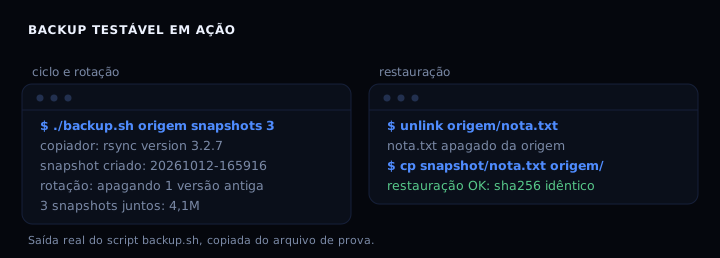
Run ./backup.sh with no arguments. You see the copier, the created snapshot, and at the end the restore confirmation:
copiador: rsync version 3.2.7
snapshot criado: .../snapshots/20261012-165916
== testando a restauração ==
nota.txt apagado da origem
restauração OK: nota.txt voltou idêntico (sha256 9bce...e443)
The number that matters is the last one: the hash matched the one from before the delete. If it matches, the backup restores. If it doesn’t, you found a problem a never-tested backup would have hidden. The same lesson that deleting doesn’t immediately fix anything applies to a certificate that expires without warning: the test is what separates what works from what looks like it works.
If it fails
Two snapshots with the same name. The name uses date +%Y%m%d-%H%M%S, which only changes every second. Two runs in the same second overwrite the first. Add sleep 1 between runs or a counter to the name.
rsync: command not found. Without rsync the script falls back to a full copy with cp, which works but loses the dedup. Install rsync to get --link-dest.
restauração FALHOU. The file in the snapshot is not the same as the one you deleted. Check that the snapshot it picked, with ls -1d destino/*/ | sort | tail -n1, is the one you expected.
rsync against the alternatives
| option | dedup | restore | install |
|---|---|---|---|
| rsync –link-dest | hardlinks | cp it back | already in the distro |
| rsnapshot | hardlinks, same idea | files visible | perl + config |
| plain cp copy | none | cp it back | nothing |
rsnapshot is the same idea packaged: config file, scheduling and rotation ready to go. If you want something that runs itself every day without writing a script, it gets the job done. The hand-written script is for people who want to see what happens inside, one line at a time. For the rest of the host routine, the same rule of letting infrastructure look after itself applies.
FAQ
How often should I test the restore? Every time you change the script or the schedule, and at least once a month, ideally automatically in the same cron that runs the backup.
Do hardlinks use space?
No. Two hardlinks point at the same disk block, and du counts it once. The risk is editing a file in place and changing the old snapshot with it, so rsync copies instead of overwriting when it sees a change.
Does this work for remote backups?
Yes. Change the source to user@host:/path and rsync uses ssh. --link-dest still points at a snapshot on the destination.
How many versions does the script keep?
Seven by default. The third argument changes it: ./backup.sh source dest 14.
Sources
- rsync(1) manpage,
--link-destoption. - rsnapshot, hardlink snapshots on top of rsync.