27 Oct 2026 · linux, container, namespace, cgroup · 4 min
A container is not a virtual machine: what it really is
A container is not a virtual machine. It has no own kernel, no init system, no emulated hardware. It is an ordinary Linux process that sees a different set of namespaces and a cgroup limit. Everything you call “container” fits on one line: clone() with flags CLONE_NEWPID, CLONE_NEWNS, CLONE_NEWNET and a cgroup applied to the process. The rest is packaging.
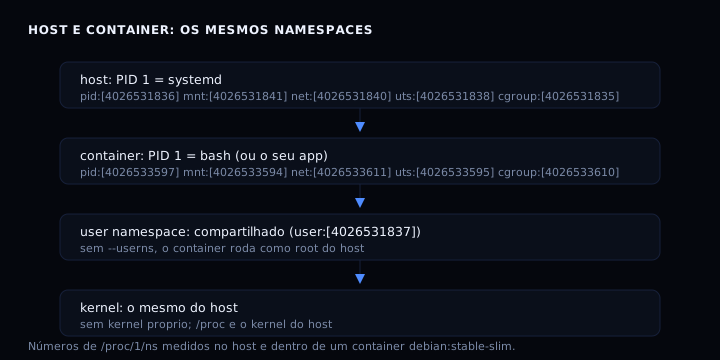
What actually changes
Three things separate a container from a normal process:
- Namespaces: the process sees its own process table, network, hostname and filesystem. The kernel is still the host’s.
- Cgroup: the process has a CPU, memory and I/O limit imposed by the kernel. Without a cgroup, there is no limit.
- Image: the process filesystem comes from an image (layers of files), mounted in a mount namespace. It is just a directory with files, not a virtual disk.
What does not change: the kernel, the system calls, the security. A container is a host process with a restricted view. If the kernel has a flaw, the container does not protect you.
The experiment
Run the script below wherever you are (host or container). It prints namespaces, cgroup, network and visible processes of the current process, with no docker dependency:
#!/usr/bin/env bash
# inspect-namespace.sh
echo "PID 1: $(cat /proc/1/comm) ($(tr '\0' ' ' < /proc/1/cmdline))"
echo "this process: $$ ($(tr '\0' ' ' < /proc/$$/cmdline))"
echo "hostname: $(hostname)"
echo "kernel: $(uname -r)"
echo "cgroup: $(cat /proc/self/cgroup)"
echo "namespaces:"; ls -l /proc/self/ns
echo "interfaces:"; cat /proc/net/dev
echo "visible processes: $(ls /proc | grep -cE '^[0-9]+$')"
To compare host and container, run the same script inside a container. If docker is installed, use:
docker run --rm -it debian:stable-slim bash -c '
echo "PID 1: $(cat /proc/1/comm)"
echo "hostname: $(hostname)"
echo "kernel: $(uname -r)"
echo "cgroup: $(cat /proc/1/cgroup)"
echo "namespaces:"; ls -l /proc/1/ns
echo "interfaces:"; cat /proc/net/dev
echo "visible processes: $(ls /proc | grep -cE "^[0-9]+$")"
'
What you see:
- PID 1: on the host it is
systemd; in the container it is the process you launched (orbash). The container thinks it is the first process of the system. - Hostname: different, because the UTS namespace isolated the name.
- Interfaces: on the host, all of them; in the container, only
lo(with--network none) or one virtual interface (with a bridge). The network namespace isolated the stack. - Namespaces: the numbers in brackets (
pid:[...],mnt:[...],net:[...]) differ between host and container. That is the isolation.user:[...]is the same: the user namespace is not isolated by default, and the container root is the host root. - Visible processes: hundreds on the host, a few in the container. The PID namespace filtered the view.
- Kernel: the same version number. There is no own kernel.
How to verify
Run both blocks and check:
uname -ris the same in both. If different, you are in a VM, not a container.- The
net:[...]number differs. If equal, the container shares the host network (--network host). user:[...]is the same in both. If different, you enabled user namespace (--userns-remap), which changes security.
If it goes wrong
- “Permission denied” on
/proc/1/ns: the file is readable only by root. Run withsudoor use/proc/self/ns, which belongs to your own process. /proc/1/nsdoes not exist: old kernel (before 3.8) or old container runtime. Update the kernel.- Container shows no isolation: you used
--privilegedor--pid host/--net host. Then there is no isolation by design.
Container, VM and process: the table
| Feature | Normal process | Container | Virtual machine |
|---|---|---|---|
| Kernel | shared with host | shared with host | own (guest) |
| PID 1 | host init | container process | guest init |
| Network isolation | none | network namespace | virtual interface + NAT |
| Filesystem | host’s | image layers | virtual disk |
| Resource limit | cgroup (if configured) | cgroup (always) | hypervisor |
| Boot time | immediate | seconds | minutes |
| Memory overhead | none | low | high (guest kernel) |
FAQ
Is a container more secure than a VM? No. A VM isolates the kernel; a container isolates only what the kernel allows. A container escape compromises the host. A VM requires hypervisor escape, which is a smaller surface.
Can I run a different kernel in a container? No. The kernel is the host’s. For a different kernel, use a VM.
Is Docker the only way to make containers? No. Docker uses the same kernel primitives (namespaces, cgroups, overlayfs). Podman, containerd, LXC and systemd-nspawn do the same. The difference is user experience, not technology.
What is the container “runtime”?
The program that calls namespace and cgroup syscalls for you. runc is the most common. Docker is a client that talks to a daemon that calls the runtime.
Sources: namespaces(7), cgroups(7). Internal links: running containers as non-root, how to limit memory, logs and restarts of a container, docker compose from scratch, what cgroups are.