15 Oct 2026 · tools, linux, api · 5 min
What one curl call can measure
One https request to a public host took 63.3 ms averaged over ten calls. The TLS handshake alone took 41.5 ms of that, more than half. None of those five phases show up when you ask -w for the total. Splitting the call by phase is what turns 63 ms into a decision.
-w is the instrument
-w writes a measurement line instead of talking to the server. Every %{...} is a variable from curl itself. The five phases come from a single call:
curl -sS -o /dev/null \
  -w 'dns=%{time_namelookup} tcp=%{time_connect} tls=%{time_appconnect}\nttfb=%{time_starttransfer} total=%{time_total}\n' \
  https://example.org
-o /dev/null throws the body away, -sS silences the progress bar but keeps errors. The variables come out accumulated, like a stopwatch that never resets: time_connect already contains DNS. To see what each phase costs, subtract.
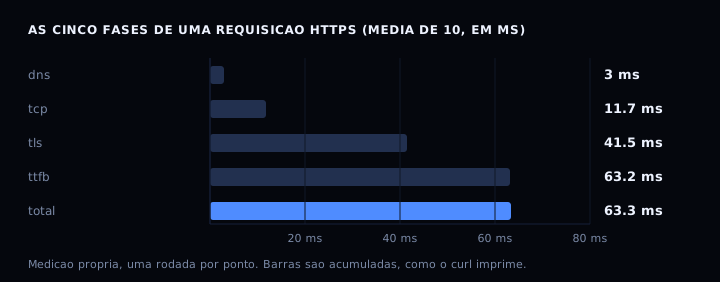
DNS cost 3.0 ms, the TCP connect another 8.7 ms, TLS another 29.8 ms, and the server another 21.7 ms. If your API is slow, that last step is the number that matters. If it answers fast and the slowness shows up on the other side of the network, the handshake is the suspect.
The same habit of splitting a total into phases, measuring instead of guessing, shows up in the ten imports cost 100 ms at startup.
The artifact: six recipes in one script
This medir-api.sh runs the six measurements against any API that answers on the /saude, /eco, /vai and /quebra routes. It installs nothing, writes no file, and exits 0 even when curl is missing.
#!/usr/bin/env bash
# medir-api.sh: the curl recipes that work against any API.
#
#   BASE=http://127.0.0.1:8099 bash medir-api.sh
#
# Runs six measurements: time per phase, response headers,
# HEAD with no body, redirect with and without -L, json POST and -f error.
# Installs nothing and writes no file.

BASE="${BASE:-https://example.org}"
SAUDE="${SAUDE:-/saude}"
ECO="${ECO:-/eco}"
VAI="${VAI:-/vai}"
ERRO="${ERRO:-/quebra}"

# curl's five phases, accumulated the way it prints them.
FMT='dns=%{time_namelookup} tcp=%{time_connect} tls=%{time_appconnect} ttfb=%{time_starttransfer} total=%{time_total}\n'

needs_curl() {
  if ! command -v curl >/dev/null 2>&1; then
    echo "curl is not installed in this environment."
    echo "on Debian or Ubuntu: apt-get install -y curl"
    echo "on Alpine: apk add curl"
    return 1
  fi
  return 0
}

needs_curl || exit 0

echo "== 1. time per phase =="
curl -sS -o /dev/null -w "$FMT" "$BASE$SAUDE"

echo
echo "== 2. response headers, no body =="
curl -sS -D - -o /dev/null "$BASE$SAUDE"

echo
echo "== 3. HEAD: declared size only =="
curl -sS -I "$BASE$SAUDE" | grep -i 'content-length' | head -1

echo
echo "== 4. redirect: without -L and with -L =="
curl -sS -o /dev/null -w 'code=%{http_code} redirects=%{num_redirects} total=%{time_total}\n' "$BASE$VAI"
curl -sS -L -o /dev/null -w 'code=%{http_code} redirects=%{num_redirects} total=%{time_total}\n' "$BASE$VAI"

echo
echo "== 5. json POST, and how many bytes left =="
curl -sS -X POST "$BASE$ECO" \
  -H 'Content-Type: application/json' \
  -d '{"name":"joseti","attempt":1}' \
  -w '\nsent=%{size_upload} total=%{time_total}\n'

echo
echo "== 6. error becomes an exit code =="
curl -sS -o /dev/null -w 'code=%{http_code}\n' "$BASE$ERRO"
curl -sS -f -o /dev/null "$BASE$ERRO"
echo "with -f curl exited with code $?"
Against a test server that answers 200, returns 302 on one route and 500 on an error route, the output was 0.911 ms on the first measurement, a header carrying Content-Length: 50, the same 50 on HEAD, redirects=0 without -L against redirects=1 with it, 31 bytes sent on the POST, and exit code 22 at the end.
POST json, and a file when the body is big
-H 'Content-Type: application/json' is not decoration: without it curl sends application/x-www-form-urlencoded and the API rejects the body.
curl -sS -X POST https://example.org/api/echo \
  -H 'Content-Type: application/json' \
  -d '{"name":"joseti","attempt":1}'
For a big body or one with accents, use --data-binary @file. With -d @file, curl strips newlines and carriage returns before sending and the Content-Length ends up wrong. With --data-binary no byte changes.
curl -sS -X POST https://example.org/api/echo \
  -H 'Content-Type: application/json' \
  --data-binary @payload.json
To confirm how many bytes actually left, add -w 'sent=%{size_upload}\n'. That is how I checked 2,258 bytes going out for a sample file.
Read the headers, only the headers
-D - dumps response headers to stdout and -o /dev/null holds the body. With -sS and -D -, the output fits on one screen:
curl -sS -D - -o /dev/null https://example.org/api/health
For the declared size alone, curl -sI url | grep -i content-length sends a HEAD request, which the server answers without sending any body. It is the cheap way to check whether what the CDN is serving is what you expect.
Redirects: -L doubles the time and hides the number
A followed 302, measured against a local test server, took 0.70 ms without -L and 1.22 ms with it. With -L curl makes the second request, but the total it prints is the last one. Comparing that with the earlier number compares two different things.
curl -sS -o /dev/null -w 'code=%{http_code} redirects=%{num_redirects}\n' https://example.org/go
curl -sS -L -o /dev/null -w 'code=%{http_code} redirects=%{num_redirects} total=%{time_total}\n' https://example.org/go
Always print %{num_redirects} next to code. A 301 that quietly became a 302 is the kind of thing that goes unnoticed for weeks.

Let the error become an exit code
Without -f, a 500 arrives with exit 0 and looks like success. With -f, curl exits with 22 and the script’s set -e stops. That is exactly what happened against the error route in the test.
curl -sS -f https://example.org/api/health || echo "the call failed"
Table
| Recipe | What it solves |
|---|---|
-w |
see time per phase |
-D - |
see response headers |
-I |
headers only, no body |
-L |
follow redirects |
-f |
HTTP error becomes exit 22 |
--data-binary @file |
big body without losing bytes |
When it goes wrong
-w shows nothing but the total. Cause: you put the format string outside the quotes. Fix: -w only prints what is inside double quotes.
The output arrives with newlines and is unreadable in the shell. Cause: the body came along. Fix: -o /dev/null when all you want is the -w line.
curl: (60) SSL certificate problem. Cause: an incomplete chain on the system or a proxy in the middle. Fix: -k for testing only, never in a script headed for production.
FAQ
Does -s hide errors too? It does. -sS silences the progress bar and keeps errors on stderr, which is the one you want.
How do I save the response to a file? -o out.json, and when -w is also present the -o receives only the body. To see and save at once, use --dump-header.
Does --compressed make a difference? Yes, when the response arrives gzipped. It asks for automatic decompression and %{size_download} then counts the already-decompressed bytes.
Can I use this in a script without installing anything? curl ships in most Debian and Ubuntu images. The python:3-slim image has it too, while alpine needs apk add curl.
What about httpie, wget or xh? Wget covers downloads and large files, and httpie reads better for a human. Curl wins when one script needs phase timings, exit codes and headers in the same call.
Sources
The curl manual and the HTTP chapter of the project guide, checked against version 8.23. Every -w variable is documented by name on that page, worth opening before inventing a new one. For the other kind of latency, when the problem is model time instead of network time, the model regression check post shows the method.