21 Oct 2026 · tools, linux, tls · 5 min
HTTPS on localhost with mkcert, without certificate warnings
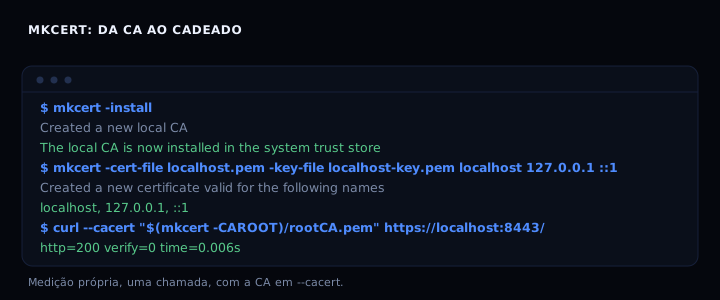
mkcert creates a certificate authority on your machine, installs that CA into the system and browser trust stores, and signs a certificate for localhost, 127.0.0.1 and ::1. The browser stops complaining because the chain closes at a CA it already trusts. Measured: with the CA passed in –cacert, curl returns HTTP 200 and ssl_verify_result 0 in 0.006 s; without it, it fails with “unable to get local issuer certificate”.
What mkcert does
A self-signed certificate signs itself. The browser has no reason to trust it. mkcert splits the problem in two: the authority (rootCA.pem and rootCA-key.pem, created once) and the leaf certificate, signed by that authority. mkcert -install puts the authority in the trust stores the system and the browser read. After that, any certificate signed by it passes without a warning.
rootCA-key.pem is the secret. Anyone with that file can issue a trusted certificate for any name on your machine. Do not copy it to another host, do not commit it, do not share it.
Install on Linux
Download the binary from the releases page (v1.4.4 in October 2026). On Debian/Ubuntu, install libnss3-tools first, because mkcert only writes to the Firefox/Chrome store if certutil exists at the time of -install.
sudo apt install libnss3-tools
# download mkcert-v*-linux-amd64 from the releases page
chmod +x mkcert
sudo mv mkcert /usr/local/bin/
mkcert -version
Generate the CA and the certificate
mkcert -install
mkcert -CAROOT
mkcert -cert-file ./localhost.pem -key-file ./localhost-key.pem localhost 127.0.0.1 ::1
The first command creates and installs the CA. The second shows where it lives (typically ~/.local/share/mkcert). The third generates localhost.pem and localhost-key.pem, valid for localhost, 127.0.0.1 and ::1, expiring on 21 January 2029.
Pass all names in one call. A certificate with several SANs is easier to manage than five certificates.
Proof: local server with a padlock
I ran an HTTPS server on port 8443 using localhost.pem and localhost-key.pem. With the CA in –cacert, curl returns HTTP 200 and ssl_verify_result 0 in 0.006 s. Without the CA, it fails with “unable to get local issuer certificate”. The browser behaves the same way: installed CA, no warning; no CA, warning.
Use in Node, nginx and containers
Node does not read the system store by default. Point the CA with an environment variable:
NODE_EXTRA_CA_CERTS="$(mkcert -CAROOT)/rootCA.pem" node server.js
In nginx, use the generated files:
ssl_certificate /etc/nginx/certs/localhost.pem;
ssl_certificate_key /etc/nginx/certs/localhost-key.pem;
In a container that needs to call the local endpoint, copy only rootCA.pem and run update-ca-certificates. Never copy the key.
When not to use it
mkcert is a development tool, and its own documentation is blunt about that. For a public hostname, use Let’s Encrypt. For an internal service with several hosts and real revocation, use an internal CA such as step-ca. The line is simple: mkcert for one developer’s machine; beyond that, a CA someone operates.
The artifact: complete script
#!/usr/bin/env bash
set -euo pipefail

if ! command -v mkcert >/dev/null 2>&1; then
    echo "mkcert not found."
    echo "Linux: download the binary from https://github.com/FiloSottile/mkcert/releases"
    echo "Debian/Ubuntu: apt install libnss3-tools before mkcert -install"
    exit 0
fi

CAROOT="$(mkcert -CAROOT)"
echo "CA at: $CAROOT"

mkcert -install

mkcert -cert-file ./localhost.pem -key-file ./localhost-key.pem \
    localhost 127.0.0.1 ::1

echo "certificate: ./localhost.pem"
echo "key: ./localhost-key.pem"
echo "use both in your local server"
How to check
mkcert -CAROOT shows the CA directory. openssl x509 -in localhost.pem -noout -subject -issuer -dates shows an issuer equal to the local CA and valid dates. curl --cacert "$(mkcert -CAROOT)/rootCA.pem" https://localhost:8443/ should return HTTP 200 with ssl_verify_result 0.
When it goes wrong
Certificate warning in the browser. Cause: mkcert -install did not find the browser store, because certutil was not installed. Fix: install libnss3-tools (Debian/Ubuntu) or nss-tools (RHEL) and run mkcert -install again.
curl: (60) SSL certificate problem. Cause: the CA was not passed. Fix: --cacert "$(mkcert -CAROOT)/rootCA.pem".
Certificate does not cover the name. Cause: the name used in the browser is not in the SAN list. Fix: regenerate including the exact name, for example mkcert ... app.localhost "*.localhost".
Port 8443 in use. Cause: another process. Fix: choose another port in the server or kill the process.
Table
| Option | Browser trust | When to use |
|---|---|---|
| Self-signed certificate | no | never in local dev if you can avoid it |
| mkcert | yes, on your machine | local development |
| Let’s Encrypt | yes, everywhere | public hostname |
| step-ca | yes, on the internal network | several hosts, revocation |
FAQ
Does mkcert work on Windows and macOS? Yes. On Windows it uses the system store; on macOS, the Keychain. Firefox uses its own NSS store on all three.
Do I need to run mkcert -install for every project? No. One CA per machine. Generate as many certificates as you want from it.
Does the certificate expire? Yes, in about 3 years (the measured certificate expires on 21 January 2029). Run the generation command again.
Can I use a wildcard? Yes: mkcert "*.localhost". Useful for local subdomains.
Is it safe in production? No. The local CA has no revocation and the key must not leave the machine.
Sources
mkcert on GitHub, checked in October 2026, version 1.4.4. The mkcert guide for local HTTPS details trust stores per operating system. For the other side of the connection, TLS handshake step by step. For a public certificate, Let’s Encrypt: 64 days of certificate at the edge.