29 Oct 2026 · linux, nginx, web · 5 min
How to serve a static site with nginx from scratch
A static site needs three things from the server: deliver the right file, compress text, and tell the browser how long it may keep each thing. The file below does all three in one nginx.conf, with no extra module and no panel. I tested it in an isolated container with nginx 1.31.6: nginx -t passed, an asset with an ETag came back as HTTP 304 on revalidation, and a 5 KB CSS left with Content-Encoding: gzip.
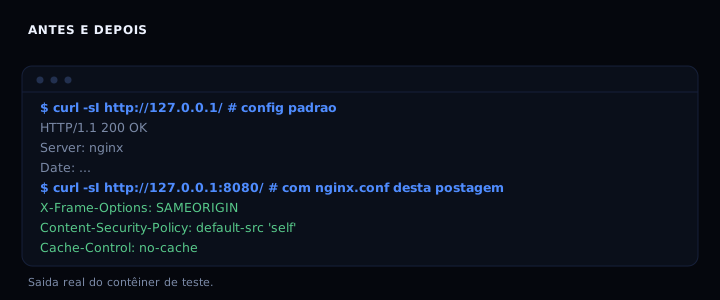
What each part solves
server_tokens off removes the nginx version from the response, which avoids handing the exact version to anyone running a scan. The security add_header directives close what the browser may do with the page: X-Content-Type-Options: nosniff stops a CSS file from being read as a script, X-Frame-Options: SAMEORIGIN stops the page from being embedded in an iframe on another domain, Referrer-Policy cuts path leakage to external sites, and the minimal Content-Security-Policy blocks script and style coming from outside.
gzip only acts on text. gzip_min_length 256 avoids spending CPU compressing tiny files, and gzip_vary on makes sure a cache in the middle does not hand gzip to a client that did not ask for it. Compressing images or video here makes no sense, since they are already compressed.
For caching, the rule is by file type. HTML changes on every deploy, so it gets Cache-Control: no-cache and always revalidates with an ETag. Assets with a hash in the name, such as style.a1b2.css, never change, so they get one year and immutable. The browser does not even ask again. Anyone using names without a hash needs a shorter TTL or must accept serving a stale version.
The log_format detalhado writes the response time ($request_time) next to the status. That is the field that helps most when a site is slow and you do not know whether it is network or disk. The log goes to its own file, which separates the site traffic from the rest of the host.
The complete nginx.conf
worker_processes auto;
error_log /var/log/nginx/error.log warn;
pid /tmp/nginx.pid;

events {
    worker_connections 256;
}

http {
    include /etc/nginx/mime.types;
    default_type application/octet-stream;

    log_format detalhado '$remote_addr - $remote_user [$time_local] '
                        '"$request" $status $body_bytes_sent '
                        '"$http_referer" "$http_user_agent" $request_time';
    access_log /var/log/nginx/access.log detalhado;

    sendfile on;
    tcp_nopush on;
    tcp_nodelay on;
    keepalive_timeout 65;
    server_tokens off;

    gzip on;
    gzip_vary on;
    gzip_min_length 256;
    gzip_proxied any;
    gzip_comp_level 5;
    gzip_types text/plain text/css text/javascript application/javascript
               application/json application/xml image/svg+xml;

    server {
        listen 8080;
        server_name _;
        root /usr/share/nginx/html;
        index index.html;

        add_header X-Content-Type-Options "nosniff" always;
        add_header X-Frame-Options "SAMEORIGIN" always;
        add_header Referrer-Policy "strict-origin-when-cross-origin" always;
        add_header Permissions-Policy "geolocation=(), microphone=(), camera=()" always;
        add_header Content-Security-Policy "default-src 'self'; style-src 'self'; script-src 'self'" always;

        location ~* \.(css|js|svg|png|jpg|jpeg|webp|woff2?)$ {
            expires 1y;
            add_header Cache-Control "public, max-age=31536000, immutable" always;
            add_header X-Content-Type-Options "nosniff" always;
            add_header X-Frame-Options "SAMEORIGIN" always;
            add_header Referrer-Policy "strict-origin-when-cross-origin" always;
            add_header Permissions-Policy "geolocation=(), microphone=(), camera=()" always;
            add_header Content-Security-Policy "default-src 'self'; style-src 'self'; script-src 'self'" always;
            try_files $uri =404;
        }

        location / {
            expires -1;
            add_header Cache-Control "no-cache" always;
            add_header X-Content-Type-Options "nosniff" always;
            add_header X-Frame-Options "SAMEORIGIN" always;
            add_header Referrer-Policy "strict-origin-when-cross-origin" always;
            add_header Permissions-Policy "geolocation=(), microphone=(), camera=()" always;
            add_header Content-Security-Policy "default-src 'self'; style-src 'self'; script-src 'self'" always;
            try_files $uri $uri/ =404;
        }

        error_page 404 /404.html;
    }
}
To run it, save as nginx.conf in a folder and start the official container:
mkdir -p site/assets
docker run --rm -p 8080:8080 \
  -v "$PWD/nginx.conf:/etc/nginx/nginx.conf:ro" \
  -v "$PWD/site:/usr/share/nginx/html:ro" \
  nginx:1.31-alpine
The nginxinc/nginx-unprivileged:alpine image listens on 8080 by default and runs without root, which fits the practices in running a container as non-root. If you prefer the official image, switch to nginx:1.31-alpine and change listen 80.
How to verify
curl -sI http://127.0.0.1:8080/
curl -sI http://127.0.0.1:8080/assets/style.css
curl -s -o /dev/null -w "%{http_code}\n" -H 'If-None-Match: "ETAG_HERE"' http://127.0.0.1:8080/assets/style.css
curl -sI -H 'Accept-Encoding: gzip' http://127.0.0.1:8080/assets/big.css | grep -i content-encoding
Expected output: the first shows Cache-Control: no-cache and the security headers. The second shows Cache-Control: public, max-age=31536000, immutable and an ETag. The third is HTTP 304. The fourth is Content-Encoding: gzip.
If it breaks
nginx: [emerg] bind() to 0.0.0.0:80 failed: the port is already in use or the official image listens on 80. Changelisten 8080tolisten 80or change the-pmapping.403 Forbiddenwhen fetching a file:rootpoints at a folder the nginx user cannot read. Check permissions withls -ldand use the unprivileged image, which already has the right owner.- Security headers missing from the HTML: in nginx,
add_headerin alocationcancels inheritance fromserver. That is why the headers repeat in each block. If you add a newlocation, copy the list or useadd_header_inherit mergeon nginx 1.29.3 or newer. - Gzip not active on small files:
gzip_min_length 256is intentional. Lower it to 20 if you want to compress everything, but the saving disappears and CPU goes up.
Cache by file type
| File | TTL | Reason |
|---|---|---|
index.html |
always revalidates | changes on every deploy |
style.a1b2.css, app.9f3e.js |
1 year, immutable | name changes when content changes |
| images and fonts without hash | 7 days | compromise between cache and freshness |
sitemap.xml, robots.txt |
1 hour | crawlers re-read often |
Anyone using names without a hash needs a short TTL or a build step that renames. The compose with a proxy solves the same problem when the site runs behind a container.
FAQ
Do I need HTTPS in this file? No. TLS terminates at the proxy or load balancer. Nginx here only serves the site. For a local development certificate, see HTTPS on localhost with mkcert.
Why not use try_files $uri $uri/ /index.html for an SPA?
Because this post is about a static site. For an SPA, change the line to try_files $uri $uri/ /index.html; and keep the HTML cache at no-cache, otherwise the browser keeps a stale shell.
Is sendfile on safe?
Yes on local disk. If root is on NFS or a network volume, turn it off with sendfile off, because the kernel may send stale bytes.
How do I know the cache is really working?
Run the asset curl twice and compare the ETag. The second time, with If-None-Match equal, the response should be 304 with no body. curl in practice shows how to read those headers.
Can I put this file in production as is?
Yes, but add rate limiting (limit_req) and, for a public site, a WAF in front. The file already leaks no version and already has a CSP, which covers the basics.
Sources
- Module ngx_http_headers_module, nginx.org, version 1.31.6, consulted on 29 October 2026.
- Module ngx_http_gzip_module, nginx.org, version 1.31.6, consulted on 29 October 2026.
- HTTP caching, MDN, consulted on 29 October 2026.