28 Oct 2026 · linux, memory, processos · 4 min
How do you measure a process's memory for real?
RSS counts resident pages, VSZ counts address space, and neither is what the cgroup charges. To get a process’s real cost, read PSS in /proc/PID/smaps_rollup and memory.current in its cgroup. Top and htop show RSS, which counts shared libraries once per process and ignores page cache.
The most common mistake when looking at a process is treating top’s RES as “memory used”. RES is RSS: pages of the process that are in RAM right now. It does not say who shares those pages, does not count the cache the kernel keeps for that process, and does not say whether the address space is only reserved or actually occupied.
What each number measures
| Metric | Where to read | What it counts | When to look |
|---|---|---|---|
| VmSize / VSZ | /proc/PID/status or statm | Mapped address space, including what was only reserved | Only to know the theoretical ceiling |
| VmRSS / RSS | /proc/PID/status or statm | Resident pages in RAM, shared ones counted in full for each process | Quick view in top |
| PSS | /proc/PID/smaps_rollup | RSS divided among the processes sharing the page | Attributable real memory |
| USS | sum of Private_* in smaps_rollup | Private pages of the process, no sharing | What you free by killing the process |
| memory.current | /sys/fs/cgroup/…/memory.current | RSS + cache + kernel memory of the whole cgroup | What the container budget measures |
What the cgroup charges
The cgroup is the unit the kernel uses to charge memory to a container or a service. memory.current includes the process RSS, the page cache attributed to that cgroup, and a little kernel memory. That is why a container with a 256 MB limit can be killed by the OOM killer even with 200 MB RSS: cache counts.
If the process runs on the host without its own cgroup, memory.current of the user cgroup mixes everything together and the reading loses meaning. Run the process isolated, in a container or in a systemd unit with MemoryMax, so the accounting closes.
Artifact: measure a process in 30 seconds
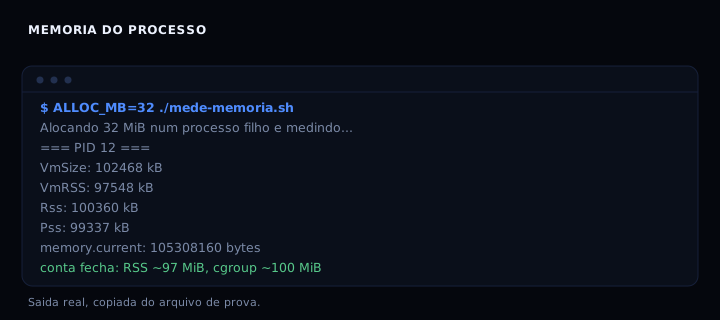
The script below measures a PID you pass, or with no argument creates a child that allocates 32 MiB and measures it. It reads /proc, smaps_rollup, and the process cgroup, and prints the five numbers side by side.
#!/usr/bin/env bash
set -euo pipefail

ALLOC_MB="${ALLOC_MB:-32}"
DUR="${DUR:-4}"
PAGINA="$(getconf PAGESIZE 2>/dev/null || echo 4096)"

medir() {
  local pid="$1"
  echo "=== PID $pid ==="
  if [ ! -d "/proc/$pid" ]; then
    echo "processo nao existe"; return 1
  fi
  echo "-- /proc/$pid/status --"
  grep -E '^(Name|VmSize|VmRSS|VmHWM|VmSwap|Threads):' "/proc/$pid/status" || true
  echo "-- /proc/$pid/statm (pages of $PAGINA bytes) --"
  cat "/proc/$pid/statm"
  echo "-- smaps_rollup --"
  grep -E '^(Rss|Pss|Shared_Clean|Private_Clean|Shared_Dirty|Private_Dirty|Anonymous|Swap|Locked):' "/proc/$pid/smaps_rollup" 2>/dev/null || echo "(sem smaps_rollup)"
  echo "-- cgroup --"
  local cg
  cg="$(sed -n 's/^0:://p' /proc/$pid/cgroup 2>/dev/null)"
  echo "cgroup path: ${cg:-?}"
  if [ -n "$cg" ] && [ -f "/sys/fs/cgroup${cg}/memory.current" ]; then
    echo "memory.current: $(cat /sys/fs/cgroup${cg}/memory.current) bytes"
    echo "memory.max:     $(cat /sys/fs/cgroup${cg}/memory.max 2>/dev/null || echo ?)"
    echo "memory.stat rss/cache:"
    grep -E '^(rss|cache|anon|kernel) ' "/sys/fs/cgroup${cg}/memory.stat" 2>/dev/null || true
  fi
  echo "-- ps --"
  ps -o pid,vsz,rss,%mem,comm -p "$pid" 2>/dev/null || true
}

if [ $# -ge 1 ] && [ -n "${1:-}" ]; then
  medir "$1"
  exit 0
fi

echo "Alocando ${ALLOC_MB} MiB num processo filho e medindo..."
(
  x=$(head -c $((ALLOC_MB*1024*1024)) /dev/zero | tr '\0' 'A')
  : "${x:0:1}"
  sleep "$DUR"
) &
child=$!
trap 'kill "$child" 2>/dev/null || true; wait "$child" 2>/dev/null || true' EXIT
sleep 1
medir "$child"
echo
echo "Legenda: VSZ = espaco de enderecos; RSS = paginas residentes; PSS divide compartilhado; cgroup memory.current inclui cache do processo."
Save as mede-memoria.sh and make it executable with chmod +x mede-memoria.sh.
How to verify
Run ALLOC_MB=32 ./mede-memoria.sh. The output should show VmRSS between 90 and 110 MiB (the bash holding the 32 MiB string has its own overhead) and memory.current between 95 and 120 MiB. If memory.current is larger than VmRSS, the difference is cache and kernel memory of the cgroup.
If it goes wrong
processo nao existe: the child ended before the reading. Raise DUR (DUR=8 ./mede-memoria.sh) or measure a long-lived PID.sem smaps_rollup: kernel without support (before 4.14) or /proc mounted with hidepid. Usepmap -x PIDor read /proc/PID/smaps.memory.currentmuch larger than VmRSS: the cgroup contains other processes or cache. Isolate the process in a container with--memoryor in a systemd unit.Permission deniedreading /proc/PID: process owned by another user. Run as the same user or as root.
Which one to use when
If you want to understand why the container limit is a cgroup, read What cgroups are. If the problem is finding who is eating memory on the host, How to see what is eating memory on Linux. To cap a container on purpose, How to limit memory, log, and restart of a container.
FAQ
Are RSS and “memory used” the same thing? No. RSS counts resident pages, including shared ones; it does not count cache per process; it does not say whether the space is reserved or used.
Why is VSZ so large? It is the address space reserved by mmap and malloc. It is not RAM.
PSS or USS to decide whether to kill a process? USS says what you free. PSS is better for comparing processes that share libraries.
Is top not enough? Top is good for finding the suspect. To charge a cost, use the cgroup.
How do you measure a whole container? Read memory.current of the container’s cgroup. That is the number the kernel uses to enforce the limit.
Sources
- proc(5), consulted on 28 Oct 2026.
- cgroups(7), consulted on 28 Oct 2026.
- Control Group v2, consulted on 28 Oct 2026.