13 Oct 2026 · security, linux, ssh · 5 min
Replacing the server password with an SSH key
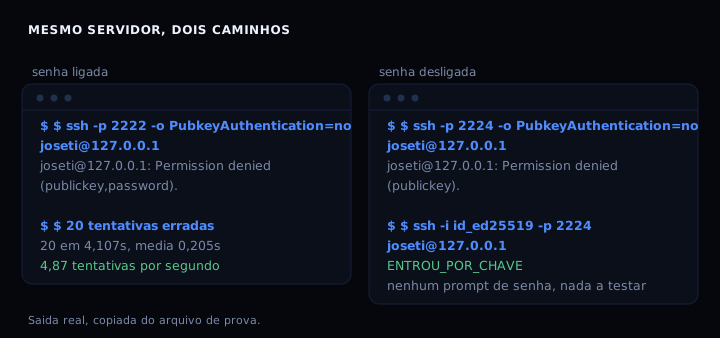
Twenty wrong passwords against a test sshd, all refused, four seconds. The average attempt took 0.205 seconds and the server never slowed down: 4.87 attempts per second, or one password every 30.8 days of continuous trying. Once I turned off PasswordAuthentication, the client stopped getting a password prompt altogether and refused immediately with Permission denied (publickey). The path disappeared from the conversation.
What actually changes
A password is the only authentication method an attacker can test without stealing anything from you. They run down a list of common ones (what the 8.8 million Danish records case made obvious) and keep going. A key cannot be tested: the server compares a signature, not a word someone can guess.
The detail most people skip is what the server announces before it refuses. With the password on, the client gets Permission denied (publickey,password), and that trailing word is an invitation. With the password off the list shrinks to Permission denied (publickey). The daemon stopped offering what the attacker wanted.
The artifact
Four modes in one script: generate the key, install it on a server, turn the password off after proving the key works, and a dry run that shows what would be written without touching anything. The order is what matters in that last mode. Proving the key before disabling the password avoids the classic way of locking yourself out of your own machine.
#!/usr/bin/env bash
# ssh-chave.sh: chave SSH no lugar da senha, sem deixar a maquina trancada.
#
# Quatro modos:
#   gerar              cria ~/.ssh/id_ed25519 se ainda nao existir
#   instalar u@host    copia a chave publica e confere que ela entra
#   travar   u@host    desliga senha, so depois de provar que a chave entra
#   simular            mostra o que travar faz, sem tocar em nada
set -uo pipefail

SSH_DIR="${HOME}/.ssh"
CHAVE="${SSH_DIR}/id_ed25519"
DROPIN_GERAL="/etc/ssh/sshd_config.d/20-desliga-senha.conf"
DROPIN_ALVO="/etc/ssh/sshd_config"

falar() { printf '%s\n' "$*"; }
passo() { printf '\n== %s\n' "$*"; }

dependencias() {
  local faltando=()
  command -v ssh-keygen >/dev/null 2>&1 || faltando+=("ssh-keygen")
  command -v ssh >/dev/null 2>&1 || faltando+=("ssh")
  command -v ssh-copy-id >/dev/null 2>&1 || faltando+=("ssh-copy-id")
  if [ "${#faltando[@]}" -gt 0 ]; then
    falar "faltando nesta maquina: ${faltando[*]}"
    falar "no Ubuntu e no Debian: sudo apt-get install -y openssh-client openssh-server"
    return 1
  fi
  return 0
}

gerar_chave() {
  passo "gerando a chave"
  mkdir -p "$SSH_DIR" && chmod 700 "$SSH_DIR"
  if [ -f "$CHAVE" ]; then
    falar "a chave $CHAVE ja existe, mantida como esta"
  else
    ssh-keygen -t ed25519 -a 100 -N '' -C "$(id -un)@$(hostname -s 2>/dev/null || echo local)" -f "$CHAVE"
    falar "chave criada em $CHAVE"
  fi
  chmod 600 "$CHAVE"
  chmod 644 "${CHAVE}.pub"
  falar "impressao digital da publica:"
  ssh-keygen -lf "${CHAVE}.pub"
  falar "guarde a linha acima. E' a unica prova de que a chave e' sua."
}

instalar_chave() {
  local alvo="${1:-}"
  [ -n "$alvo" ] || { falar "uso: $0 instalar usuario@host"; return 1; }
  [ -f "${CHAVE}.pub" ] || { falar "a chave publica nao existe ainda: rode $0 gerar"; return 1; }
  passo "instalando a chave publica em $alvo"
  ssh-copy-id -i "${CHAVE}.pub" "$alvo" || {
    falar "ssh-copy-id falhou. Se o servidor pedir senha e voce nao souber qual e', pare aqui."
    return 1
  }
  passo "conferindo que a chave entra sem digitar senha"
  if ssh -o BatchMode=yes -o ConnectTimeout=10 "$alvo" true 2>/dev/null; then
    falar "ok: a chave entra sozinha em $alvo"
  else
    falar "falhou: a chave nao entrou em $alvo. Nao siga para travar."
    return 1
  fi
  falar "no servidor, confira o que ele aceita:"
  falar "  ssh $alvo 'sudo sshd -T | grep -Ei \"^(passwordauthentication|pubkeyauthentication)\"'"
}

conteudo_regra() {
  cat <<'REGRA'
# gerado por ssh-chave.sh: senha fora, chave dentro.
# A primeira valoridade conta: em OpenSSH, para cada palavra-chave vale a
# primeira ocorrencia encontrada, e Includedir vem antes da leitura do arquivo.
PasswordAuthentication no
KbdInteractiveAuthentication no
PubkeyAuthentication yes
PermitRootLogin no
PermitEmptyPasswords no
MaxAuthTries 3
AllowTcpForwarding yes
AllowAgentForwarding no
X11Forwarding no
ClientAliveInterval 300
ClientAliveCountMax 2
REGRA
}

simular() {
  passo "simulacao: nada e' alterado aqui"
  local trabalho config antes
  trabalho="$(mktemp -d "${TMPDIR:-/tmp}/ssh-chave-demo-XXXXXX")"
  if [ -r "$DROPIN_ALVO" ]; then
    config="$trabalho/sshd_config"
    cp "$DROPIN_ALVO" "$config"
    antes="o sshd_config do sistema"
  else
    config="$trabalho/sshd_config"
    {
      falar "# exemplo minimo, so o que um sshd costuma trazer de serie"
      falar "Port 22"
      falar "PasswordAuthentication yes"
      falar "PermitRootLogin yes"
      falar "PubkeyAuthentication yes"
      falar "X11Forwarding yes"
    } > "$config"
    antes="um sshd_config de exemplo (esta maquina nao tem sshd)"
  fi
  falar "partindo de: $antes"
  falar ""
  falar "--- $config (depois) ---"
  falar "$(cat "$config")"
  falar ""
  falar "--- regra que entra em sshd_config.d/20-desliga-senha.conf ---"
  conteudo_regra
  falar ""
  if command -v sshd >/dev/null 2>&1; then
    falar "--- sshd -T le a configuracao efetiva ---"
    sshd -T -f "$config" 2>&1 | grep -Ei "^(passwordauthentication|kbdinteractiveauthentication|pubkeyauthentication|permitrootlogin)" || falar "(o teste acima devolveu nada: o arquivo de exemplo so serve para mostrar o formato)"
  else
    falar "sshd nao esta instalado aqui, entao a conferencia final fica para a sua maquina:"
    falar "  sudo sshd -t -f $config && sudo sshd -T | grep -Ei '^(passwordauthentication|pubkeyauthentication)'"
  fi
  falar ""
  falar "simulacao em $trabalho. Nada fora desse diretorio foi tocado."
}

travar() {
  local alvo="${1:-}"
  [ -n "$alvo" ] || { falar "uso: $0 travar usuario@host"; return 1; }
  [ -f "$CHAVE" ] || { falar "nao ha chave local ainda: rode $0 gerar"; return 1; }

  passo "prova final antes de desligar a senha"
  ssh -o BatchMode=yes -o ConnectTimeout=10 "$alvo" true 2>/dev/null || {
    falar "a chave nao entra em $alvo. Desligar a senha agora deixaria a maquina sem porta de entrada."
    falar "Rode: $0 instalar $alvo"
    return 1
  }
  falar "a chave entra. Agora a senha pode sair."

  passo "escrevendo a regra em $DROPIN_GERAL"
  conteudo_regra > "$DROPIN_GERAL" || {
    falar "sem permissao para escrever em $DROPIN_GERAL (precisa de sudo)"
    return 1
  }
  chmod 644 "$DROPIN_GERAL"

  passo "conferindo a configuracao antes de recarregar"
  ssh "$alvo" "sudo sshd -t" || {
    falar "sshd -t reprovou a configuracao. O daemon nao foi tocado."
    falar "veja do que ele esta reclamando: ssh $alvo 'sudo sshd -t -f $DROPIN_ALVO'"
    return 1
  }

  passo "recarregando o daemon sem derrubar a sessao"
  ssh "$alvo" 'sudo systemctl reload ssh || sudo systemctl reload sshd'

  passo "conferindo de novo, agora com a senha desligada"
  if ssh -o BatchMode=yes -o ConnectTimeout=10 "$alvo" true 2>/dev/null; then
    falar "ok: a chave continua entrando depois do reload"
  else
    falar "falhou. Reative a senha agora:"
    falar "  ssh $alvo 'sudo rm $DROPIN_GERAL && sudo systemctl reload ssh'"
    return 1
  fi
  falar "estado efetivo, lido pelo proprio daemon:"
  ssh "$alvo" "sudo sshd -T | grep -Ei '^(passwordauthentication|pubkeyauthentication|permitrootlogin)'"
}

case "${1:-}" in
  gerar)   gerar_chave ;;
  instalar) shift; dependencias || exit 1; instalar_chave "${1:-}" ;;
  travar)   shift; dependencias || exit 1; travar "${1:-}" ;;
  simular)  simular ;;
  *)
    falar "uso: $0 {gerar|instalar usuario@host|travar usuario@host|simular}"
    falar ""
    simular
    ;;
esac
The order that decides whether you get locked out
The script writes the rule to /etc/ssh/sshd_config.d/20-desliga-senha.conf and leaves sshd_config alone. That is not a style choice, it is a requirement. The sshd_config manual says that for each keyword the first obtained value is used, and I measured both orders with the same drop-in: when Include comes first, the no from the drop-in beats the yes in the main file and the password goes away. When Include comes after, yes wins, the password stays on, and nobody notices, because the file looks right.
That leads to the ssh utility I use most, sshd -T, which prints the effective configuration as the daemon read it, with keywords lowercased.
sudo sshd -T | grep -Ei '^(passwordauthentication|kbdinteractiveauthentication|pubkeyauthentication|permitrootlogin|maxauthtries)'
From my run, with the full rule in place, the daemon reported:
clientaliveinterval 300
permitrootlogin no
pubkeyauthentication yes
passwordauthentication no
kbdinteractiveauthentication no
permitemptypasswords no
allowtcpforwarding yes
allowagentforwarding no
maxauthtries 3
Turning off the password alone is not enough: KbdInteractiveAuthentication is the same path under another name, and with it on the client still sees keyboard-interactive in the refusal list. My test on port 2225 shows exactly that. I now disable both in the same rule.
How to verify
Run the script in dry run mode first, zero risk:
chmod +x ssh-chave.sh && ./ssh-chave.sh simular
Then, on your server, the test that counts is the client without a key. If the password really is off it never gets to ask:
ssh -o PubkeyAuthentication=no -o BatchMode=yes user@host true
Permission denied (publickey) is the sign it worked. If you get (publickey,password) or (publickey,keyboard-interactive), the password is still standing and the Include in your sshd_config is probably in the wrong place.
If it goes wrong
The first mistake is disabling the password without the key installed. The machine answers, the password vanishes, and your way in is the provider console. On a VPS that means opening the panel and typing the root password by hand. Before you disable, keep one session open and test in a second one: if the second gets in, you can disable from the first.
The second is Include at the end of the file. Some older installs never read sshd_config.d, and then the rule you wrote simply does not exist as far as the daemon is concerned. sshd -T | grep password answers empty or shows yes: that is the cheapest warning available.
The third is an authorized_keys with loose permissions. If the file is readable by others (chmod 644 on a machine with more than one user, or 777 by accident), StrictModes yes, which is the default, refuses the key with a terse line in the server log. chmod 700 ~/.ssh and chmod 600 ~/.ssh/authorized_keys fix it.
Key type cost, measured
| type | generation time | private key size | public key length |
|---|---|---|---|
| ed25519 | 0.005 s | 411 bytes | 69 characters |
| ecdsa 521 | 0.005 s | 736 bytes | 233 characters |
| rsa 4096 | 1.491 s | 3381 bytes | 717 characters |
A 4096-bit RSA key takes nearly a second and a half because it genuinely generates two large primes. Ed25519 and ECDSA-521 take five milliseconds. Pick ed25519. If you have to talk to a client from 2016 or older, RSA 4096 is still the least bad option.
Questions that always come up
I lost the key, can I get back in? With the password off, not through the normal path. The way out is the provider console plus the user password. That is why I keep the fingerprint of every key in a text file off the machine: it does not get you in, it proves the key on github is mine.
One key for everything or one per machine? One per machine. If a key leaks, only one machine falls, and generating takes five milliseconds.
Sources: sshd_config(5), OpenBSD manual and OpenSSH manual pages, OpenSSH 9.6p1, read on October 13, 2026.
My take is that keys stopped being the better option a while back and became the floor. What still makes sense after that is fail2ban at the edge and the certificate hygiene, which also expires fast. What you measure is what you fix.