17 Oct 2026 · security, linux, ssh · 5 min
Setting up fail2ban without locking yourself out
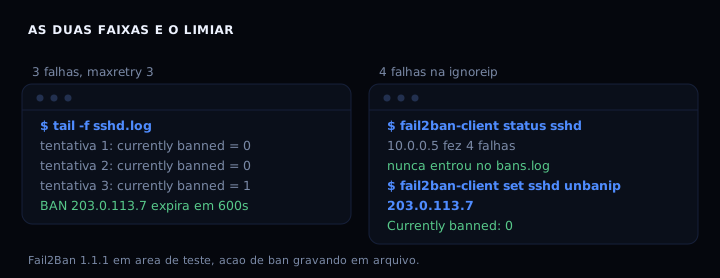
With maxretry 3, the fail2ban ban lands on the third failure from the same IP, not the first and not the second. An address on ignoreip can get it wrong four times and still stay outside, because the list is checked before the ban happens. Those two numbers decide whether the service protects you or locks you out, and the order of the options matters more than it looks.
What jail.local actually controls
The jail.conf that ships with the distribution is not meant to be edited. A package update overwrites it and you lose your settings without warning. Everything of yours goes in /etc/fail2ban/jail.local, which the distribution never touches.
Five options decide whether you end up locked out:
ignoreip is the safety net. An IP on that list is never banned, whatever it does. maxretry is the number of failures that triggers the ban. findtime is the window those failures have to fit in. bantime is how long the ban lasts. And backend decides how fail2ban notices the log changed.
The jail.local
[DEFAULT]
# Addresses that are never banned. Put yours here, plus the home
# network, before anything else. This is the line that stops a
# mistake of yours from cutting off your own access.
ignoreip = 127.0.0.1/8 ::1 10.0.0.0/8 172.16.0.0/12 192.168.0.0/16 YOUR_IP_HERE

# 3 failures in the window. With 2, a client that opens two connections
# at once (ssh multiplexing, git fetch) gets banned without erring.
maxretry = 3

# Those 3 failures have to fit in 10 minutes. Spreading attempts over
# hours avoids the ban without ever stopping the trying.
findtime = 10m

# Initial ban of 10 minutes.
bantime = 600

# Grows the ban on each repeat offence from the same IP instead of
# resetting to 10 minutes forever. The 1 week cap keeps it bounded.
bantime.increment = true
bantime.factor = 2
bantime.maxtime = 604800

# auto picks systemd when the system uses systemd and polling when it
# does not. Without it the service just refuses to start on machines
# without systemd, which still exist.
backend = auto

[sshd]
enabled  = true
port     = ssh
maxretry = 3
findtime = 10m
bantime  = 600

# fail2ban does not ban root over SSH by default. If you use root with a
# key and never a password, uncommenting the line below is the safer path.
ignoreregex =
Worth reading ignoreip twice: it takes an address, a CIDR mask or a hostname, separated by spaces. If your IP is dynamic, the better option here is ignorecommand, which queries a file of yours before each ban.
Where this meets your own access
fail2ban bans by IP, and the IP is the only thing it knows. Anyone logging in with an SSH key and no password already runs none of the risk a password does. Anyone still on a password has two good reasons to keep fail2ban: drop the attempt before it burns CPU, and cut the repetition.
Order matters. Key first and password off, fail2ban as the second layer. Inverted, the service becomes the single point of failure: one wrong setting costs you access, and the key was never there to save you.
How to verify
Before any restart, validate the config. The -t reads the file and applies nothing:
sudo fail2ban-client -t
The reply is OK: configuration test is successful. If something is wrong, the error names the option. That command alone avoids most of the scares, because it never touches the firewall.
Once applied, check who is banned right now:
fail2ban-client status sshd
You get Currently banned, Total banned and the IP list. If your own IP is in there, the ignoreip is wrong and the service is one step from cutting you off. Fix the line before you try to log back in.
If you are already locked out, the command that gets you back is short:
sudo fail2ban-client set sshd unbanip YOUR_IP
If it fails
-t passes but the service never starts. The config is fine and the problem is the backend. On a machine without systemd, auto can pick wrong. Switch to backend = polling and validate again.
You show up in the banned list. The ignoreip is missing your address, or your IP is dynamic and has changed. Find the current one with curl -s ifconfig.me and add it. Until your address is on the list, do not restart the service.
The jail never catches a failure. The filter is not reading the right log. On Debian sshd writes to /var/log/auth.log, on Fedora to /var/log/secure. Check with fail2ban-client -d and see which path the jail uses.
fail2ban against the alternatives
| option | protects | depends on | catch |
|---|---|---|---|
| fail2ban | SSH and other jails | service log | blind to web apps |
| two factor auth | the whole account | phone app | does not stop bots |
| moving the SSH port | the surface | nothing | security by obscurity |
| key with no password | SSH | no log | does not cover other services |
For a web port, fail2ban alone does not solve it: it reads the access log, and what actually breaks web apps is rate limiting in the app or the reverse proxy. For SSH it does solve it, which is why it stays on the list.
FAQ
Do I need my IP in ignoreip? Yes, if your IP is fixed. If it is dynamic, use ignorecommand pointing at a file you update, or a DynDNS name that resolves to your current address.
Is maxretry 3 too low? For passwords it is the balance point. At 2, a git fetch opening two connections can get banned without any error. At 5, a bot gets five free attempts.
What is bantime.increment? It grows the ban on each repeat offence from the same IP, using the history in the fail2ban database. It helps against someone who comes back, but the exact figure depends on your setup. Start by setting bantime.maxtime so it does not grow without a ceiling.
Is fail2ban safe alongside SSH passwords? It cuts the work an attacker does, but it does not remove the risk: the password is still guessable. Key plus password off closes the path for real.
Sources
- fail2ban,
config/jail.conf, theignoreip,maxretry,findtime,bantimeandbantime.incrementoptions, checked on 17 October 2026. - man.openbsd.org/sshd_config, the authentication options in the OpenSSH server.
- Fail2Ban 1.1.1, my own measurement in a test area with the polling backend, on 17 October 2026.