14 Oct 2026 · security, linux, ssh · 6 min
How to stop typing your key passphrase on every command
With a passphrase-protected key, every new ssh asks for the passphrase again. ssh-agent holds the already-decrypted key in memory for as long as the session lasts, and ssh uses that copy by itself. The trick in the script below is -t: the key does not sit in the agent forever, only for as long as you asked for.
What happens without it
I tested with a fresh passphrase-protected ed25519 key against a test server listening on 127.0.0.1:22222. With BatchMode=yes, which forbids the client from asking anything, the login fails with exit code 255, and the reason is the same both times: there is no loaded key for the client to offer.
With the agent in place, ssh-add -l lists the identity and the same command gets in without asking for anything.
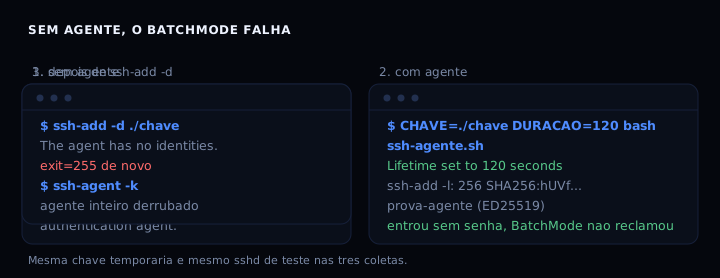
Notice that the successful login used -o BatchMode=yes. If the script runs where there is no passphrase to type, that is how automation discovers the agent solved the problem.
The script
Save it as ssh-agente.sh. It installs nothing, creates no service, and does not touch /etc/ssh: each run starts its own agent and it dies on its own when the lifetime expires.
#!/usr/bin/env bash
# ssh-agente.sh: sobe um ssh-agent com prazo, carrega a chave uma vez so
# e mostra o que conferir depois. Nao instala nada e nao cria servico.
#
#   CHAVE=/caminho/minha.chave DURACAO=3600 bash ssh-agente.sh github.com

set -uo pipefail

DURACAO="${DURACAO:-3600}"                # segundos que a chave fica carregada
CHAVE="${CHAVE:-$HOME/.ssh/id_ed25519}"   # chave que entra no agente
DESTINO="${1:-github.com}"                # host usado so para conferir a configuracao
BASE="${XDG_RUNTIME_DIR:-/tmp}"           # onde mora o socket do agente

echo "== ssh-agente.sh =="

# 0. o que existe nesta maquina
faltando=""
for prog in ssh-agent ssh-add ssh-keygen ssh; do
  command -v "$prog" >/dev/null 2>&1 || faltando="$faltando $prog"
done
if [ -n "$faltando" ]; then
  tem_cliente=0
  echo "aqui nao tem:$faltando  (em Debian e Ubuntu isso e o pacote openssh-client)"
else
  tem_cliente=1
  echo "cliente ssh encontrado, versao $(ssh -V 2>&1 | cut -d' ' -f1)"
fi

# 1. a chave precisa existir. Sem senha nao ha nada para o agente guardar.
if [ ! -f "$CHAVE" ]; then
  echo "chave $CHAVE ainda nao existe"
  if [ "$tem_cliente" = 1 ] && [ -t 0 ]; then
    mkdir -p "$(dirname "$CHAVE")" 2>/dev/null
    ssh-keygen -t ed25519 -a 100 -C "$(id -un)@$(hostname 2>/dev/null || echo exemplo)" -f "$CHAVE"
  else
    echo "gere na mao:  ssh-keygen -t ed25519 -a 100 -f $CHAVE"
  fi
fi

# 2. sobe o agente, se ainda nao houver um vivo neste caminho
# SSH_AGENT_DIR deixa o socket num lugar escolhido, para nao disputar
# /run/user/1001 com o desktop e para o script poder rodar em lote.
SOCK_DIR="${SSH_AGENT_DIR:-$BASE}"
SOCK="$SOCK_DIR/ssh-agente-$(id -u).sock"
mkdir -p "$SOCK_DIR" 2>/dev/null
export SSH_AUTH_SOCK="$SOCK"
if [ -S "$SOCK" ] && ssh-add -l >/dev/null 2>&1; then
  echo "agente ja responde em $SOCK"
elif [ "$tem_cliente" = 1 ]; then
  [ -e "$SOCK" ] && rm -f "$SOCK"     # socket deixado por uma sessao que morreu
  ssh-agent -a "$SOCK" -t "$DURACAO" >/dev/null
  echo "agente novo em $SOCK, expira sozinho em ${DURACAO}s"
fi

# 3. a senha e pedida uma vez, aqui. -t e o prazo da chave no agente.
if [ "$tem_cliente" = 1 ] && [ -f "$CHAVE" ]; then
  if ssh-add -t "$DURACAO" "$CHAVE"; then
    echo "chave carregada por ${DURACAO}s"
  else
    echo "a chave nao entrou: senha errada ou agente sem terminal para perguntar"
  fi
  echo "== ssh-add -l =="
  ssh-add -l
fi

# 4. o que o cliente vai dizer para o outro lado
echo "== ssh -G $DESTINO =="
if [ "$tem_cliente" = 1 ]; then
  ssh -G "$DESTINO" 2>/dev/null | grep -iE '^(identityagent|forwardagent|addkeystoagent|identityfile) ' \
    || echo "nenhuma linha de identidade: o cliente vai tentar a senha"
else
  echo "sem cliente ssh: esta conferencia fica para rodar na sua maquina"
fi

# 5. o bloco de configuracao que faz o agente ser encontrado em todo terminal
echo "== cole em ~/.ssh/config =="
cat <<CFG
Host *
  IdentityAgent $SOCK

# forwarding so onde a outra ponta precisa da sua chave.
# com yes no Host * voce entrega o agente a todo host que abre.
Host github.com
  ForwardAgent yes
CFG

# 6. como sair
echo "== para sair =="
echo "  ssh-add -d $CHAVE     tira so esta chave do agente"
echo "  ssh-agent -k          mata o agente inteiro"
Running it with a non-default key and a one-hour lifetime:
CHAVE=~/.ssh/id_ed25519_producao DURACAO=3600 bash ssh-agente.sh github.com
What the test produced, in order: Lifetime set to 120 seconds and one identity in ssh-add -l (256 SHA256:hUVf... prova-agente (ED25519)), then the login getting in without a passphrase. The server logged 3 successful key authentications across that whole test, all with the same key. Changing the lifetime later takes one line:
ssh-add -t 300 ~/.ssh/id_ed25519 # renova o prazo desta chave
How to verify
The command and the expected output, with a 120 second lifetime:
CHAVE=/path/to/key DURACAO=120 bash ssh-agente.sh github.com
ssh-add -l
Identity added: /path/to/key (test-key)
Lifetime set to 120 seconds
256 SHA256:hUVfzTcYsuKhYcXyhw+PEHp6exXQy8OztVCk+2bl+HA test-key (ED25519)
The second line is the one that matters: it tells you how long the key is loaded for. If ssh-add -l says The agent has no identities, the agent started but the key never made it in.
A stricter check that does not depend on typing anything:
ssh -o BatchMode=yes github.com 'echo got in'
If it prints got in, the agent is doing its job. If it complains about authentication, the key never got there.
When it goes wrong
Could not open a connection to your authentication agent. SSH_AUTH_SOCK points at a socket that no longer exists, often left behind by a dead session. Run SSH_AGENT_DIR=/tmp/ag bash ssh-agente.sh to start the agent on a clean path, or check echo $SSH_AUTH_SOCK.
It still asks for the passphrase with the agent running. The agent holds the key after it gets in; it cannot guess the passphrase of a key that has not been loaded yet. Run ssh-add /path/to/key once, beforehand.
It works in one terminal and not in another. Every new terminal needs SSH_AUTH_SOCK. That is exactly why the script prints the IdentityAgent block to paste into ~/.ssh/config: there it applies to every terminal instead of depending on your shell.
Agent forwarding: where to use it, where not to
ForwardAgent gives a remote server the power to ask for signatures with your keys. The ssh client warns in its documentation that anyone who can bypass file permissions on the remote side can use the forwarded agent as if it were theirs.
The risk is not the server stealing the key, it is the server being able to sign with it. That is why the block above enables forwarding only for the host that needs it, not for Host *. A safer route I prefer these days is a jump host with the ProxyJump option, which needs no agent at all:
ssh -J user@jump-host user@final-server
Comparison of the three ways
| approach | what it fixes | what stays open | cost |
|---|---|---|---|
| key without passphrase | nothing to type | decrypted key on disk | one less ssh-keygen |
| ssh-agent with lifetime | one passphrase per lifetime | decrypted key in memory | a process to clean up |
| ssh-agent without lifetime | one passphrase until you exit | key stays in the agent forever | the agent lingers on its own |
| forwarding | the far end signs with your key | signing power handed to the remote | one specific host only |
FAQ
Does the agent store the passphrase or the key? The key, decrypted, in the process memory. The passphrase is not kept anywhere after ssh-add. That is why the lifetime matters: while the key is in the agent, there is nothing to type.
Does the key vanish when I close the terminal? The agent is a separate process from the terminal. If your shell started it, the agent usually keeps running and the -t lifetime decides for how long. That is why the script prints how to shut everything down: ssh-agent -k.
Can I use the same key in two places at once? Yes. Each agent is independent, and each ssh process talks to whatever agent SSH_AUTH_SOCK points at. What you cannot do is have one agent pointed at two different places.
ssh-add -l shows the key but ssh still asks for the passphrase. That happens when the current terminal’s SSH_AUTH_SOCK points at a different agent, or when the loaded key is not the one the server accepts. Check with ssh -v and look at which identity file it tries.
Sources
- ssh-agent(1), OpenBSD manual page, checked on October 14, 2026. The
-a,-tand-koptions. - ssh-add(1), OpenBSD manual page, checked on October 14, 2026.
-t(lifetime per key) and-d(remove one key). - ssh(1), OpenBSD manual page, checked on October 14, 2026. The
-Asection and the agent forwarding warning.
If you have not replaced your server password with a key yet, start with the piece before this one. And if you want the passphrase itself to be something worth guessing, the cost of a weak hash is the measurement that convinced me.