18 Oct 2026 · linux, terminal, tools · 5 min
What changes in the terminal once fzf handles the search
Over 50,000 paths, searching for migrcaes_hndler returned zero lines from grep and all 500 from fzf. Same list, same machine, two characters out of place: grep wants the exact text, fzf matches the letters in the order they appear and ignores the rest. That is why fzf exists, and it changes your day in three places.
The trade is real and so is the price: filtering 50,000 lines took 84 ms with fzf against 2 ms with grep. On a shell history list, nobody feels that difference.
The script
The fzf-terminal.sh below installs fzf through the package manager, writes the three integrations to one file for bash and another for zsh, and checks the syntax of both with bash -n and zsh -n. Without fzf, git or network it does not hang: it writes what it can, says what was missing, and exits 0.
#!/usr/bin/env bash
# fzf-terminal.sh - instala o fzf e liga as tres integracoes que mudam o dia a dia:
# historico, arquivos e troca de branch.
#
# Uso:
#   ./fzf-terminal.sh                 instala o fzf e escreve a configuracao
#   ./fzf-terminal.sh --sem-instalar  so escreve a configuracao e roda a prova
#   ./fzf-terminal.sh --provar        so roda as tres buscas e mostra o resultado
#
# Sem fzf, sem git ou sem rede o script nao trava: ele escreve o que da para
# escrever, confere a sintaxe e diz o que faltou. Sai com codigo 0 nos caminhos.
set -u

MODO="${1:-instalar}"
CFG_BASH="$HOME/.fzf-terminal.bash"
CFG_ZSH="$HOME/.fzf-terminal.zsh"
DEMO="$HOME/.fzf-demo"

log() { printf '%s\n' "$*"; }
tem_cmd() { command -v "$1" >/dev/null 2>&1; }

instalar_pacotes() {
    local g="$1" pacotes="$2" sudo_cmd=""
    if [ "$(id -u)" -ne 0 ]; then
        if ! tem_cmd sudo; then return 1; fi
        sudo_cmd="sudo"
    fi
    case "$g" in
        apt-get)
            $sudo_cmd apt-get update -qq >/dev/null 2>&1
            # shellcheck disable=SC2086
            $sudo_cmd apt-get install -y --no-install-recommends $pacotes >/dev/null 2>&1 ;;
        dnf)     # shellcheck disable=SC2086
                $sudo_cmd dnf install -y $pacotes >/dev/null 2>&1 ;;
        pacman)  # shellcheck disable=SC2086
                $sudo_cmd pacman -S --noconfirm --needed $pacotes >/dev/null 2>&1 ;;
        apk)     # shellcheck disable=SC2086
                $sudo_cmd apk add --no-cache $pacotes >/dev/null 2>&1 ;;
        *) return 1 ;;
    esac
}

gerenciador() {
    local g
    for g in apt-get dnf pacman apk; do
        if tem_cmd "$g"; then printf '%s' "$g"; return 0; fi
    done
    return 1
}

instalar() {
    if tem_cmd fzf; then
        log "fzf: ja instalado ($(fzf --version))"
        return 0
    fi
    if ! g=$(gerenciador); then
        log "fzf: sem gerenciador de pacotes conhecido, pulei a instalacao"
        return 1
    fi
    log "fzf ausente: instalando com $g"
    # git entra junto porque a integracao de branch depende dele.
    if instalar_pacotes "$g" "fzf git"; then
        log "fzf e git instalados"
    fi
    if tem_cmd fzf; then
        log "fzf: $(fzf --version)"
        return 0
    fi
    log "fzf: nao instalado (sem root ou sem rede); o resto do script continua"
    return 1
}

# As tres integracoes. Tudo em funcao, para o mesmo arquivo servir em bash e zsh.
# --filter e o modo nao interativo do fzf: sem ele, sem terminal, nada aparece.
escrever_cfg() {
    {
        printf '# ~/.fzf-terminal.bash e ~/.fzf-terminal.zsh, gerados por fzf-terminal.sh\n'
        printf '# Va para o rc com: source ~/.fzf-terminal.$(basename "$SHELL")\n\n'

        printf '# 1. historico: busca por subtexto e devolve o comando na linha\n'
        printf 'fhist() {\n'
        printf '  local escolha\n'
        printf '  escolha=$(fc -lnr -1000 2>/dev/null | fzf --scheme=history --reverse --prompt="hist> ")\n'
        printf '  [ -z "$escolha" ] && return 0\n'
        printf '  # print -z so existe no zsh; no bash o comando volta pela READLINE_LINE\n'
        printf '  if [ -n "${ZSH_VERSION:-}" ]; then\n'
        printf '    print -z -- "$escolha"\n'
        printf '  fi\n'
        printf '  READLINE_LINE="$escolha"; READLINE_POINT=${#READLINE_LINE}\n'
        printf '}\n\n'

        printf '# 2. arquivos: fuzzy sobre find e abre no editor\n'
        printf 'ff() {\n'
        printf '  local arquivo\n'
        printf '  arquivo=$(find "${1:-.}" -type f -not -path "*/.git/*" 2>/dev/null | fzf --reverse --prompt="arquivo> ")\n'
        printf '  [ -z "$arquivo" ] && return 0\n'
        printf '  "${EDITOR:-vi}" "$arquivo"\n'
        printf '}\n\n'

        printf '# 3. branch: troca de branch a partir da lista\n'
        printf 'fb() {\n'
        printf '  local branch\n'
        printf '  command -v git >/dev/null 2>&1 || { echo "git nao instalado"; return 1; }\n'
        printf '  branch=$(git branch --format="%%(refname:short)" 2>/dev/null | fzf --reverse --prompt="branch> ")\n'
        printf '  [ -z "$branch" ] && return 0\n'
        printf '  git switch "$branch"\n'
        printf '}\n\n'

        printf '# Ctrl-R no historico\n'
        printf 'if [ -n "${ZSH_VERSION:-}" ]; then\n'
        printf '  zle -N fhist\n'
        printf '  bindkey "^R" fhist\n'
        printf 'else\n'
        printf '  bind -x "\\C-r": fhist 2>/dev/null\n'
        printf 'fi\n'
    } > "$CFG_BASH.tmp"

    {
        cat "$CFG_BASH.tmp"
        printf '\n# Ctrl-T abre o seletor de arquivos, que so o zsh faz com fzf\n'
        printf 'fzf-arquivo-widget() { ff; zle reset-prompt }\n'
        printf 'zle -N fzf-arquivo-widget\n'
        printf 'bindkey "^T" fzf-arquivo-widget\n'
    } > "$CFG_ZSH.tmp"

    mv "$CFG_BASH.tmp" "$CFG_BASH"
    mv "$CFG_ZSH.tmp" "$CFG_ZSH"
    chmod 600 "$CFG_BASH" "$CFG_ZSH"
    log "configuracao escrita: $CFG_BASH e $CFG_ZSH"
}

# Confere a sintaxe de verdade: bash -n e zsh -n leem o arquivo sem executar nada.
conferir_sintaxe() {
    local problema=0
    if tem_cmd bash; then
        if bash -n "$CFG_BASH" 2>/dev/null; then
            log "sintaxe do arquivo bash: ok"
        else
            log "sintaxe do arquivo bash: ERRO"
            problema=1
        fi
    fi
    if tem_cmd zsh; then
        if zsh -n "$CFG_ZSH" 2>/dev/null; then
            log "sintaxe do arquivo zsh: ok"
        else
            log "sintaxe do arquivo zsh: ERRO"
            problema=1
        fi
    fi
    return "$problema"
}

# Cenario de mentira: arquivos, historico e um repositorio com branches.
# Nada disso depende do que existe na maquina de quem roda.
montar_cenario() {
    local i
    mkdir -p "$DEMO"
    i=0
    while [ "$i" -lt 60 ]; do
        mkdir -p "$DEMO/modulo$((i % 6))"
        printf 'linha %d do arquivo de teste\n' "$i" > "$DEMO/modulo$((i % 6))/arquivo$i.txt"
        i=$((i + 1))
    done
    printf '%s\n' \
        'git status' \
        'systemctl restart nginx' \
        'tar xzf backup.tar.gz' \
        'docker ps -a' \
        'grep -rn timeout /etc' \
        'python manage.py migrate' \
        'systemctl status postgresql' \
        'tar czf arquivos.tar.gz notas' \
        'docker compose up -d' > "$DEMO/historico.txt"

    if ! tem_cmd git; then
        log "cenario: git ausente, o repositorio de teste nao foi criado"
        return 1
    fi
    mkdir -p "$DEMO/repo"
    (
        cd "$DEMO/repo" || exit 1
        git init -q 2>/dev/null
        git config user.email [email protected]
        git config user.name teste
        printf 'conteudo\n' > leia-me.txt
        git add leia-me.txt
        git commit -q -m "primeiro commit" 2>/dev/null
        for b in correcao-taxa nova-tela-manutencao correcao-critica; do
            git branch "$b" 2>/dev/null
        done
    )
    log "cenario montado: 60 arquivos, 9 comandos no historico, 4 branches"
    return 0
}

# As tres buscas no modo --filter, que e o mesmo motor do modo interativo sem
# a parte de desenhar a tela. E o que permite a prova rodar sem terminal.
provar() {
    if ! tem_cmd fzf; then
        log "prova: fzf ausente, nao ha o que filtrar"
        return 1
    fi
    log "fzf: $(fzf --version)"
    montar_cenario || true

    log ""
    log "== 1. historico: busca por 'systemclt', com o 's' fora do lugar =="
    log "grep achou $(grep -c 'systemclt' "$DEMO/historico.txt" 2>/dev/null) linha(s)"
    log "fzf achou:"
    fzf --scheme=history --filter='systemclt' < "$DEMO/historico.txt" | sed 's/^/  /'

    log ""
    log "== 2. arquivos: busca por 'aqui54', sem ponto e sem o v =="
    log "fzf achou:"
    find "$DEMO" -type f 2>/dev/null | fzf --filter='aqui54' | sed "s|$DEMO/||; s/^/  /"

    log ""
    if tem_cmd git && [ -d "$DEMO/repo/.git" ]; then
        log "== 3. branches: busca por 'corr' =="
        local achada
        achada=$( (cd "$DEMO/repo" && git branch --format='%(refname:short)' 2>/dev/null) | fzf --filter='corr' | head -n1 )
        log "fzf achou:"
        (cd "$DEMO/repo" && git branch --format='%(refname:short)' 2>/dev/null) | fzf --filter='corr' | sed 's/^/  /'
        log "primeira da lista, que e a que o fzf entregaria: ${achada:-nenhuma}"
    else
        log "== 3. branches: sem git, pulei a prova =="
    fi
    return 0
}

case "$MODO" in
    --provar)
        provar || true
        log "fim"
        exit 0
        ;;
    --sem-instalar)
        log "modo --sem-instalar: nada foi instalado"
        if tem_cmd fzf; then log "fzf presente: $(fzf --version)"; else log "fzf ausente"; fi
        if tem_cmd git; then log "git presente: $(git --version | cut -d' ' -f3)"; else log "git ausente"; fi
        ;;
    *)
        instalar || true
        ;;
esac

escrever_cfg
conferir_sintaxe || log "a configuracao precisa de revisao antes de ser usada"
provar || true

log "fim: acrescente source ~/.fzf-terminal.bash no seu rc e abra um terminal novo"
exit 0
After running it, add source ~/.fzf-terminal.bash to your ~/.bashrc (or the .zsh version in ~/.zshrc) and open a new terminal. Ctrl-R starts calling fhist, and the ff and fb functions become available.
Why grep does not cut it here
grep looks for substrings. If you do not remember how long the path is, whether the separator is - or _, whether the number has two digits, the search comes back empty and you cannot tell whether you mistyped the term or the file does not exist. fzf matches the letters in the order they appear, without requiring them to sit next to each other.
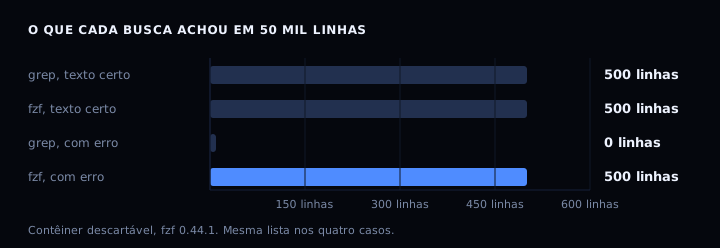
With the correct text, both find the same 500 lines. With two characters swapped, grep finds 0 and fzf finds all 500. It was the same list in all four cases: 50,000 paths, 500 of them containing migracoes_handler.
The price shows up in time. Filtering those 50,000 lines took 2 ms with grep -c and 84 ms with fzf --filter, median of five runs after one warm-up. On a shell history you will not notice that second number. Scanning a terabyte of logs line by line, you will.
fzf matches letters, not meaning. If you are searching by meaning rather than by name, the route is different, as the semantic search with sqlite-vec post shows.
How to verify
Run ./fzf-terminal.sh. Here is the output of a run in an ubuntu 24.04 container:
fzf ausente: instalando com apt-get
fzf e git instalados
fzf: 0.44.1 (debian)
configuracao escrita: /root/.fzf-terminal.bash e /root/.fzf-terminal.zsh
sintaxe do arquivo bash: ok
fzf: 0.44.1 (debian)
cenario montado: 60 arquivos, 9 comandos no historico, 4 branches

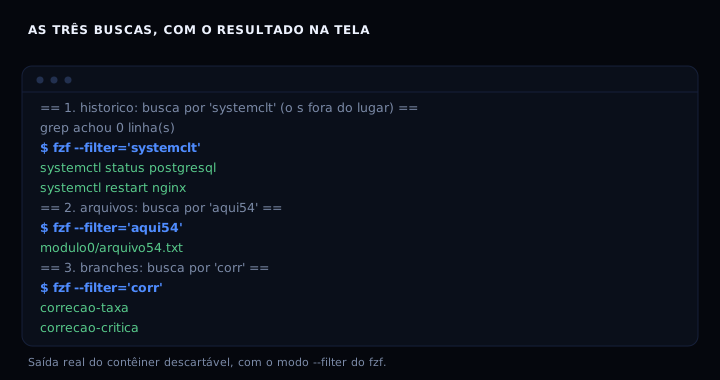
== 1. historico: busca por 'systemclt', com o 's' fora do lugar ==
grep achou 0 linha(s)
fzf achou:
  systemctl status postgresql
  systemctl restart nginx

== 2. arquivos: busca por 'aqui54', sem ponto e sem o v ==
fzf achou:
  modulo0/arquivo54.txt

== 3. branches: busca por 'corr' ==
fzf achou:
  correcao-taxa
  correcao-critica
primeira da lista, que e a que o fzf entregaria: correcao-taxa
fim: acrescente source ~/.fzf-terminal.bash no seu rc e abra um terminal novo
grep achou 0 linha(s) followed by the two systemctl lines is the proof that the difference is real and not my typing.
If it goes wrong
Failed to open /dev/tty when you call a function. That happens when you call ff or fb from a script, from cron or from a container, where there is no terminal for fzf to draw on. Use fzf --filter in those places: it prints the result and exits. The function is built for the prompt.
Ctrl-R does nothing after the source. In bash, bind -x only applies to an interactive shell; sourcing the file from a script binds nothing. Run the source in a terminal and open another tab to check.
The branch search returns nothing. The function uses git branch --format, which needs git 2.13 or newer. On older git, use git branch | cut -c3- instead.
fzf against the alternatives
| option | what it does | speed over 50k lines | cost |
|---|---|---|---|
| grep | exact substring | 2 ms | already in the distro |
| fzf –filter | fuzzy, non-interactive | 84 ms | 5 MB binary |
| skim | fuzzy, faster, written in Rust | not measured here | needs nightly |
| bash completion | completes what already exists | does not apply | already in the distro |
skim promises to be faster but needs the Rust toolchain to build. fzf is a single binary, and its git stays active: version 0.74.4 shipped on 12 September 2026.
FAQ
Does fzf work without an interactive shell? The search does, with --filter. That is how the proof in this post runs inside a container with no terminal. What needs a terminal is the interface, with the list drawn at the bottom and the cursor on it.
Do I need fzf to find a file by name? No. find | grep works, and ff just saves you from typing the path. Where fzf really wins is history, where you do not remember the exact command.
How do I make history cover more commands? The fc -lnr -1000 in fhist reads the last thousand lines. Change it to fc -lnr -5000 if your history is larger, and raise the shell’s HISTSIZE to match.
Does it work in fish? Not directly. fzf ships its own fish integration, fzf --fish | source, and the history function has to be rewritten because fish’s fc is a different thing. The rest of the reasoning holds.
Sources
- junegunn/fzf, repository and documentation, MIT license, read on 18 October 2026.
- fzf(1), Ubuntu man page, with the
--scheme,--filterand--tiebreakoptions. - fzf 0.74.4, released 12 September 2026.
Measurements in a disposable ubuntu 24.04 container capped at 0.5 CPU and 256 MB of RAM, with fzf 0.44.1 from the distro package: a 50,000-path list generated with awk, median of five runs after one warm-up. Method details and the full counts are in the rootless container post, measured the same way.