15 Oct 2026 · security, linux, containers · 5 min
How to actually run a container as non-root
A container with no user setting runs with 14 kernel capabilities and writes to /etc without complaining. Switch only user to 1000 and the effective capabilities fall to zero, and the write to /etc starts failing. That is the whole test in one terminal window, and it is what the compose.yaml in this post builds.
What each lock does
user changes who owns the process. cap_drop: ALL takes away the capabilities that would be left over. read_only turns the image into a filesystem that refuses writes. no-new-privileges stops anything inside the process from turning into root while it runs.
The kernel manual explains the part that matters: root is an ordinary user with an extra package of capabilities bolted on. Capabilities are exactly that package. Removing them removes root.
The Docker security guide has said this for years: by default the engine keeps a short allowlist of capabilities and drops the rest. The hardening below invents nothing, it just closes the list all the way down.
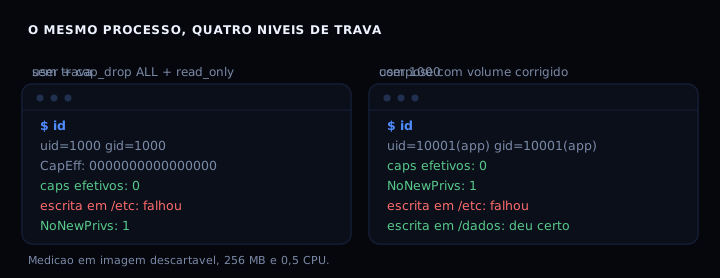
The thing to look at there: capabilities fall from 14 to zero in the second column already, without any help from cap_drop. And the last column shows the detail that takes down more services in production than any of the security settings.
The artifact
This is the whole compose.yaml, commented line by line. It needs a four-line Dockerfile next to it, which creates the unprivileged user and the /dados directory already owned by the right account.
services:
  app:
    build: .
    image: exemplo-endurecido:1

    # 1. uid and gid of the process. The image must have that user.
    user: "10001:10001"

    # 2. no kernel capability left over.
    cap_drop:
      - ALL

    # 3. read-only filesystem: /etc, /usr and the rest are closed.
    read_only: true

    # 4. nobody becomes root during the run.
    security_opt:
      - no-new-privileges:true

    # writes that are allowed, kept in memory and gone with the container
    tmpfs:
      - /tmp:rw,size=16m,mode=1777
      - /run:rw,size=4m

    # named volume. Its owner has to match the user above.
    volumes:
      - dados:/dados

    restart: unless-stopped
    logging:
      driver: json-file
      options:
        max-size: "10m"
        max-file: "3"

volumes:
  dados:
And the Dockerfile it expects:
FROM debian:stable-slim

# unprivileged user plus a data directory with the right owner
RUN groupadd -g 10001 app \
 && useradd -u 10001 -g 10001 -M -s /usr/sbin/nologin app \
 && mkdir -p /dados && chown 10001:10001 /dados

USER 10001:10001
WORKDIR /app
CMD ["sleep", "infinity"]
Look at the chown on the third line. It fixes the most common breakage, and that breakage has nothing to do with security.
A volume only matters if you test restoring it. The rsync backup you can actually restore post shows that test, and it takes a few minutes.
How to verify
This is the verifica-contexto.sh that runs inside the container. It installs nothing and writes nothing outside the directories it tests. It is also what produced the figure.
#!/bin/sh
# verifica-contexto.sh: shows who the process is, from inside the container.
# Copy it into the container and run: sh verifica-contexto.sh
# Installs nothing and writes nothing outside the tested directories.

id
grep -E '^(CapEff|NoNewPrivs)' /proc/self/status

# counts the set bits in CapEff: a normal root starts with 14
c=$(awk '/^CapEff/{print $2}' /proc/self/status)
n=0
for i in $(seq 0 63); do
  n=$((n + ((0x$c >> i) & 1)))
done
echo "effective caps: $n"

# write test in each directory: does the image accept it or is it closed?
for dir in /etc /var/lib /tmp /dados; do
  [ -d "$dir" ] || continue
  if touch "$dir/sonda.txt" 2>/dev/null; then
    echo "write in $dir: worked"
  else
    echo "write in $dir: failed"
  fi
done
Bring the service up and ask the process who it is:
docker compose up -d
docker compose exec app sh /app/verifica-contexto.sh
What you should see is uid 10001, CapEff: 0000000000000000, NoNewPrivs: 1, failure on /etc and /var/lib, and success on /tmp and /dados. If CapEff shows a single bit that is not zero, some lock never reached the container.
To see the before, just delete one line from the compose. Without user, the same script comes back with uid 0, 14 capabilities and the /etc write reported as fine.
Now the unsettling part. Mount the same volume without --user and the root process writes to /dados without a word. Run it again as 1000 and the same volume gives you Permission denied, because the directory still belongs to root. A named volume has no idea which uid your service will use.
When it goes wrong
apt-get update dies with E: List directory /var/lib/apt/lists/partial is missing. Acquire (13: Permission denied). Cause: read_only closed the path apt uses. Fix: install packages in the Dockerfile, never in a running container.
The process restarts without saying why. Cause: tmpfs out of space, or a volume it cannot write to. Fix: raise the tmpfs size and check the owner with ls -ld /dados.
The image refuses to start with no-new-privileges. Cause: shadow passwords or setcap, which need elevation. Fix: use a fixed USER in the Dockerfile instead, which solves the same problem.
Table
| Lock | What it removes | Cost |
|---|---|---|
user |
root becomes an ordinary user | 0 ms, capabilities drop to zero |
cap_drop: ALL |
the remaining capabilities | 0 ms |
read_only |
writes to the image | 0 ms, breaks apt at runtime |
no-new-privileges |
elevation during the run | 0 ms |
| tmpfs on /tmp | writes that die with the container | RAM |
That tmpfs really does come out of RAM, and it disappears when the container dies. The memory audit post puts a number on what an unbounded process costs.
FAQ
Do I need --privileged for anything network related? Only if the program touches interfaces, routes or low ports. For almost everything, a normal network and cap_add: NET_BIND_SERVICE are enough.
How do I find the right uid for my image? Run docker run --rm imagem cat /etc/passwd and look for the account the service already uses. Reusing an account that exists in the image saves you the useradd in the Dockerfile.
Does cap_drop: ALL break TLS? No. TLS uses an ordinary socket, not a kernel capability.
Does the same thing work on Kubernetes? Same logic, with securityContext in the manifest instead of compose. The readOnlyRootFilesystem and runAsNonRoot fields say exactly the same thing.
Why does cap_drop look redundant next to user? It looks that way, and in practice it is the safety net. If user ever gets left out by mistake, cap_drop still holds.
Sources
Docker Engine security, the Compose services reference and capabilities(7) from the Linux manual. For the same idea outside a container, replacing a server password with an SSH key shows what changes when the identity stops being root.