25 Oct 2026 · ferramenta, git · 4 min
Lazygit: can you use git in the terminal without memorising commands?
Git has dozens of commands, and the interactive rebase flow asks you to edit a TODO file by hand. Lazygit puts everything in a terminal UI: hunk staging, partial commits, rebase and conflict resolution. The script below reproduces those four operations with plain git, so you can see what lazygit is doing underneath. See also fzf in the terminal and a terminal that looks clean.
What lazygit does not invent
Lazygit does not create a parallel git. It calls the same commands you would: git add -p, git rebase, git add to mark resolved, git rebase --continue. The gain is ergonomics: one key to stage a hunk, another to amend, another for interactive rebase with a menu instead of a text file. People who already know the git flow gain speed; people who do not learn the flow by watching what lazygit runs.
Installation is a single binary (Go), no runtime. On Debian and Ubuntu there is a package in the community repository, but it tends to lag; the direct binary from GitHub is the simplest path. The project is MIT licensed and has more than 80 thousand stars. The UI also shows a side-by-side diff and lets you discard hunks with one key, which cuts mistakes during quick reviews.
The artifact
```bash
!/usr/bin/env bashset -euo pipefail
if ! command -v git >/dev/null 2>&1; then echo “git não encontrado neste ambiente; instale o git para rodar este roteiro” exit 0 fi
W=$(mktemp -d) cd “$W”
echo “=== 1. repositório base ===” git init -q -b main git config user.email “[email protected]” git config user.name “demo” printf ‘linha 1\nlinha 2\nlinha 3\nlinha 4\n’ > arquivo.txt git add arquivo.txt git commit -q -m “base” echo “commit base criado”
echo “=== 2. stage parcial (git add -p) ===” printf ‘linha 1\nlinha 2 modificada\nlinha 3\nlinha 4 modificada\n’ > arquivo.txt printf ‘s\ny\nn\n’ | git add -p arquivo.txt >/dev/null 2>&1 || true echo “— index (o que vai no commit) —” git diff –cached echo “— worktree (o que fica fora) —” git diff git commit -q -m “commit parcial” git checkout – arquivo.txt
echo “=== 3. rebase com conflito ===” git checkout -q -b feature printf ‘feature\n’ > arquivo.txt git commit -q -am “feature change”
git checkout -q main printf ‘main change\n’ > arquivo.txt git commit -q -am “main change”
git checkout -q feature set +e git rebase main >/dev/null 2>&1 rc=$? set -e echo “rebase parou com código $rc (esperado: conflito)” echo “— status —” git status –short
echo “=== 4. resolução ===” printf ‘merged result\n’ > arquivo.txt git add arquivo.txt GIT_EDITOR=true git rebase –continue >/dev/null 2>&1 || true echo “— histórico final —” git log –oneline echo “— arquivo final —” cat arquivo.txt
echo “=== pronto ===”```
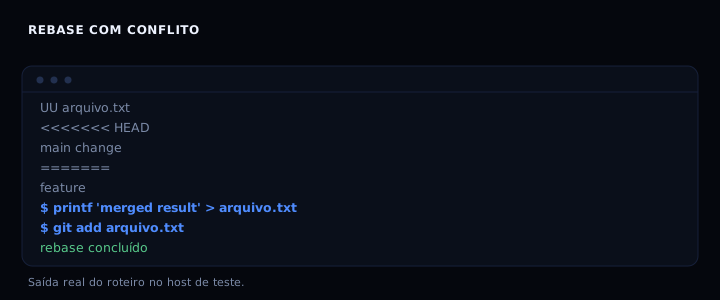
The script has four parts. The first creates a minimal repository. The second changes two lines and stages only one, using git add -p with the answer s (split) followed by y and n. The third creates two divergent commits and runs a rebase that stops on a conflict. The fourth resolves the conflict, marks it with git add and continues with GIT_EDITOR=true to avoid opening an editor.
How to verify
Run bash lazygit.sh. Expected output includes UU arquivo.txt, the <<<<<<<, ======= and >>>>>>> markers, and ends with merged result. If git is not installed, the script prints a message and exits with code 0.
If it goes wrong
git: command not found: install git. The script detects the absence and exits cleanly, but does not run the demo.- The rebase finishes without a conflict: the two commits did not diverge on the same line. The scenario depends on that; make both changes touch the same line.
git add -pdoes not split the hunk: git only splits when there are unchanged lines between the changes. Separate the edits with neutral lines, or useeto edit the patch by hand.
Comparison
| Tool | Advantage | Cost |
|---|---|---|
| lazygit | Fast UI for staging, rebase and stash | One more binary to install and update |
Interactive git (add -p, rebase -i) |
Already installed, no dependency | Long commands and a TODO file to edit |
| GUI client (SourceTree, Fork) | Visual history and diff | Heavy, and many are paid or closed |
FAQ
Does lazygit replace git? No. It is a layer on top of git. Commits, branches and reflogs are the same; you can switch between lazygit and the command line in the same repository.
Does it work on a server with no GUI? Yes, it runs entirely in the terminal. That is one reason to use it over SSH.
How do you undo an action in lazygit? Lazygit has undo with z for most operations, including commits and rebases. That is one of its strong points compared to plain git.
Is it worth it if you already know git? Yes, for repetitive operations such as partial staging and interactive rebase. For rare commands, the command line stays more direct.
And in large repositories? It works, but rendering the commit graph can get slow in projects with tens of thousands of commits. Adjust the log limit in lazygit’s settings. Lazygit also lists worktrees and lets you switch between them without leaving the UI. That saves context switching time.
Sources
- jesseduffield/lazygit, accessed 25 Oct 2026
- git-add, accessed 25 Oct 2026
- git-rebase, accessed 25 Oct 2026