26 Oct 2026 · linux, diagnostico · 4 min
How to use journalctl to find the error
journalctl filters the systemd journal by unit, priority, time window and boot. Three filters in sequence turn a failure buried in thousands of lines into 3 lines. Nothing to install: the journal is already there.
systemd stores stdout, stderr and messages from every unit in an indexed binary journal, and journalctl is the tool that reads that index. The error did not vanish because the log rotated too soon; it vanished because nobody filtered. The sequence below cuts thousands of lines down to a handful, and each filter is cumulative, so you can drop one if it cuts too much.
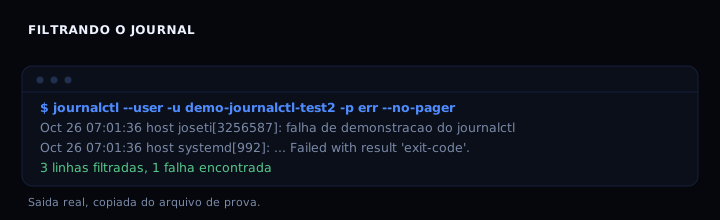
The sequence I use
Start with the unit, because that is the filter that cuts the most. If the service is called demo-journalctl-test2.service, the command is journalctl --user -u demo-journalctl-test2 --no-pager. --no-pager keeps less from truncating the output. If the service is a system one, drop --user and run with sudo or be in a group that can read the system journal.
Then refine by priority. The syslog priorities, 0 to 7, are emerg, alert, crit, err, warning, notice, info and debug. To find an error, -p err is enough; for a wider hunt, -p warning includes err. journalctl colors by level when output goes to a terminal: red for err and above, yellow for warning.
Next, the time window. --since "10 minutes ago" and --until "5 minutes ago" bound the incident. Absolute dates work too, in the form 2026-10-26 07:00:00. Knowing the approximate time saves minutes of reading.
Finally, the boot. journalctl -b 0 shows the current boot, -b -1 the previous one, and --list-boots lists the known boots. A service that fails only after a restart shows up in the right boot, not the current one. Combine it with -u and you isolate the problem.
To search for specific text in the log, use -g with a regular expression: journalctl -u my-service -g "timeout|refused|exit-code". It is faster than piping the output to grep, and it respects the previous filters.
The artifact
#!/usr/bin/env bash
# journalctl-filters.sh - runs the filter sequence on a service.
# Usage: ./journalctl-filters.sh [unit] [priority] [window]
set -euo pipefail

UNIT="${1:-demo-journalctl-test2.service}"
PRIORITY="${2:-err}"
WINDOW="${3:-10 minutes ago}"

if command -v journalctl >/dev/null 2>&1; then
    echo "== by unit =="
    journalctl --user -u "$UNIT" --no-pager -o short | tail -n 20
    echo "== by priority =="
    journalctl --user -p "$PRIORITY" -n 5 --no-pager
    echo "== by window =="
    journalctl --user --since "$WINDOW" -u "$UNIT" --no-pager -o short
    echo "== current boot =="
    journalctl --user -b 0 -u "$UNIT" --no-pager -o short | tail -n 5
    echo "== text in log =="
    journalctl --user -u "$UNIT" --no-pager -g "fail|FAILURE|exit-code" | tail -n 5
else
    # demo mode: the same reasoning over a sample log
    LOG=/tmp/journal-demo.log
    printf '%s\n' \
        "Oct 26 07:01:36 host systemd[992]: Started demo-journalctl-test2.service - demo failure." \
        "Oct 26 07:01:36 host joseti[3256587]: failure demo for journalctl" \
        "Oct 26 07:01:36 host systemd[992]: demo-journalctl-test2.service: Main process exited, code=exited, status=1/FAILURE" \
        "Oct 26 07:01:36 host systemd[992]: demo-journalctl-test2.service: Failed with result 'exit-code'." > "$LOG"
    echo "== by unit =="
    grep "$UNIT" "$LOG"
    echo "== by priority (err) =="
    grep -i "fail\|FAILURE\|exit-code" "$LOG"
    echo "== by window (last 3) =="
    tail -n 3 "$LOG"
    echo "== text in log =="
    grep -E "fail|FAILURE|exit-code" "$LOG"
fi
The individual commands, to paste one at a time:
journalctl --user -u demo-journalctl-test2 --no-pager
journalctl --user -p err -n 5 --no-pager
journalctl --user --since "10 minutes ago" -u demo-journalctl-test2 --no-pager
journalctl --user -b 0 -u demo-journalctl-test2 --no-pager
journalctl --user -u demo-journalctl-test2 --no-pager -g "fail|FAILURE"
How to verify
Run the priority filter and check the expected output:
$ journalctl --user -p err -n 3 --no-pager
Oct 26 07:01:22 host sudo[3256262]: joseti : a password is required ; PWD=/home/joseti/sites ; USER=root ; COMMAND=/usr/bin/true
Oct 26 07:01:36 host joseti[3256587]: failure demo for journalctl
Oct 26 07:01:38 host joseti[3256639]: direct logger test
That is 3 lines. If more appear, the priority filter was not applied; if fewer appear, the window or the unit cut too much.
If it goes wrong
-- Logs begin at ...and no lines: the unit has a different name. Check withsystemctl statusorsystemctl --user --failed. The.servicesuffix can be omitted in-u, but the base name cannot.Permission deniedorNo journal files were found: the user cannot read the system journal. Join thesystemd-journaloradmgroup, or usesudo journalctl. For the user’s own journal, use--user.- The journal disappears after a reboot: storage is volatile. Edit
/etc/systemd/journald.conf, setStorage=persistent, and restartsystemd-journald. After that the journal survives a reboot. - The output is cut in the middle: the pager paginated. Use
--no-pageror setSYSTEMD_PAGER=empty. To copy to a file, redirect with> output.txt.
Priorities at a glance
| Level | Number | When to use |
|---|---|---|
| emerg | 0 | system unusable |
| alert | 1 | immediate action |
| crit | 2 | critical failure |
| err | 3 | service error |
| warning | 4 | warning |
| notice | 5 | normal but relevant |
| info | 6 | informational |
| debug | 7 | debugging |
Start at err. If nothing shows up, drop to warning and then info. Move up to crit only when the service is down for good.
FAQ
Does journalctl replace /var/log?
On systemd systems, yes for most services. Some programs still write to /var/log directly. The two coexist; journalctl does not read text files.
How do I watch the log live?
Use journalctl -f, the equivalent of tail -f. Combine with -u to follow one service: journalctl -f -u my-service.
Why does my logger message not show up?
logger sends to syslog, which journald captures. If the priority is low, filter with -p debug or remove the filter. User messages show up in the user journal with --user.
Can I export the journal for analysis?
Yes. journalctl -o json or journalctl -o export produce machine-readable formats. For a range, combine with --since and --until and redirect to a file.
Does -g accept full regex?
It accepts extended regular expressions, including alternation with |. Special characters need quotes. Put -g after the other filters, because text search is the slowest.
See also Cron done right: environment, logs and what silently fails for the case where the log disappears because cron did not redirect output. Running containers as non-root shows how to keep the service lean so the log does not become noise.