01 Nov 2026 · ia, self-hosted, docker, interface · 4 min
Open WebUI: your own interface for your models
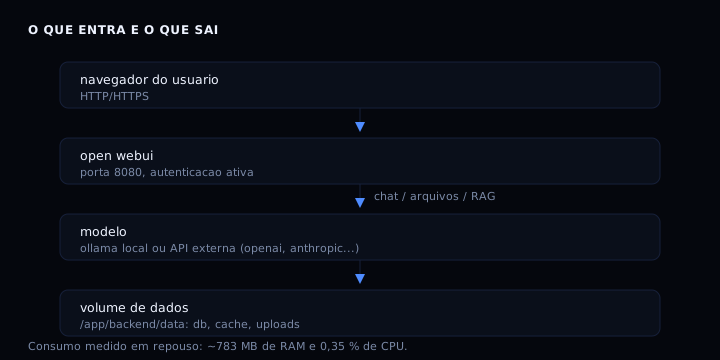
Open WebUI is a web interface that runs on your own machine and talks to local models (Ollama) or to any OpenAI-compatible API. Instead of depending on an external service, you start a container, point it at the model and get chat, history, files and search in one place. The project is open source, with over 150 thousand stars on GitHub, and runs fully offline when paired with Ollama.
What you get
Chat with persistent history, document upload with content search (RAG), multiple users with permissions, tool and model integration, and an OpenAI-compatible API for your own scripts. All of it in a single container.
What runs, how heavy, how much
The :main image ships embeddings, document extraction and speech recognition. :slim is 88 % smaller (197 MB to download) and uses about 300 MiB of RAM at idle, delegating embeddings and voice to external services. Pick :slim if the machine is small and you do not need local RAG.
In my own test, the :main image took about 60 seconds to respond on first boot and used 783 MiB of RAM at idle with 0.35 % CPU. Operating cost is zero beyond the machine you already have; license cost is zero, the code is open (license “Other” on GitHub, check the terms in the repository).
How to run it
services:
  open-webui:
    image: ghcr.io/open-webui/open-webui:main
    container_name: open-webui
    ports:
      - "3000:8080"
    volumes:
      - open-webui-data:/app/backend/data
    environment:
      - WEBUI_AUTH=True
      - WEBUI_SECRET_KEY=${WEBUI_SECRET_KEY}
    restart: unless-stopped
    mem_limit: 2g
    cpus: 1.0
    healthcheck:
      test: ["CMD", "curl", "-f", "http://localhost:8080/health"]
      interval: 30s
      timeout: 10s
      retries: 5

volumes:
  open-webui-data:
Save as compose.yaml, create a .env file with WEBUI_SECRET_KEY (a long random string) and run docker compose up -d. The interface appears at http://localhost:3000. On first access, the account you create becomes the administrator.
To use a local model, install Ollama on the machine and point Open WebUI at http://host.docker.internal:11434. To use an external API, add the key under Settings, Connections.
How to verify
docker compose ps
curl -s http://localhost:3000/health
docker stats --no-stream open-webui
Expected output: container with status healthy, health returning {"status":true} and memory usage near 780 MiB for the :main image (or 300 MiB for :slim).
If it goes wrong
- Port 3000 in use: change the left side of the mapping to another port, for example
3001:8080. - Healthcheck fails: the image may be downloading the embedding model on first boot; wait up to 2 minutes.
- No login screen: check that
WEBUI_AUTH=Trueis in the environment; withFalse, anyone can access. - High RAM usage: use the
:slimimage or raisemem_limit. - Data lost on recreate: confirm the volume
open-webui-dataexists withdocker volume ls; without a volume, the database lives inside the container.
Upsides and limits
| Aspect | Open WebUI | Typical alternative |
|---|---|---|
| Hosting | self-hosted, offline | SaaS with account |
| Models | local Ollama or external API | only the vendor’s model |
| Data | stays in your volume | stays on the vendor’s server |
| Cost | zero license | monthly fee |
| Memory | ~780 MiB (:main) or ~300 MiB (:slim) | not applicable |
FAQ
Do I need a GPU? Not to run the interface. The GPU only matters for the model it calls; Open WebUI itself runs on CPU.
Can I use it without Ollama? Yes. Point it at any OpenAI-compatible API: OpenAI, Anthropic via proxy, vLLM, LM Studio, OpenRouter. The interface does not depend on a local model.
How to update?
docker compose pull && docker compose up -d. The volume preserves data. Back up the volume before larger version jumps.
Does RAG work offline?
With the :main image, yes, because embeddings run inside the container. With :slim, you need an external embedding service.
Is it safe to expose on the internet?
Keep WEBUI_AUTH=True, use a strong password in WEBUI_SECRET_KEY and put it behind a reverse proxy with TLS. By default, serve only on the local network or through a tunnel.
To structure a compose file from scratch with healthcheck and .env variables, see docker compose from scratch. To limit container memory and restarts, see how to limit memory, logs and restarts of a container. To avoid leaking secrets in .env, see environment variables and .env files.
Sources: Open WebUI Docs, open-webui/open-webui on GitHub. Tested on 01 Nov 2026: boot in ~60 s, 783 MiB RAM at idle, health ok.