01 Nov 2026 · linux, processos, rede, diagnostico · 6 min
How to find processes, ports and connections on Linux
To find what is running, who is listening on which port and which process holds a file, use three tools: ps, ss and lsof. They read the same source, the kernel’s /proc directory, and answer different questions. ps talks about processes, ss about sockets, lsof about open files. Together they cover almost every ‘who is doing what’ diagnosis on a Linux machine.
ps: what is running
ps is a snapshot. It does not refresh the screen like top; it prints once and exits. That makes it predictable for scripts and for pasting into a ticket.
ps aux                 # all processes of all users
ps -ef                 # SysV format, includes PPID and start time
ps -e --forest         # process tree with indentation
ps -o pid,ppid,user,%cpu,%mem,stat,cmd -p 1234   # only process 1234
To find a process by name, prefer pgrep:
pgrep -a nginx         # PID and command line
ps aux | grep '[n]ginx'   # the brackets keep grep itself out of the list
Columns worth reading: PID, PPID, USER, STAT, %CPU, %MEM, TIME and CMD. STAT tells the state: R running, S sleeping, D waiting on I/O (uninterruptible), Z zombie (dead process whose parent never reaped it) and T stopped. A persistent D usually means stuck disk or NFS, not CPU.
To kill safely, use the PID ps showed and check first: kill -TERM <pid>, wait, then kill -KILL <pid> only if it did not exit. Killing by name with killall or pkill is convenient but risky when more than one process shares a similar name.
ss: who is listening on which port
ss replaced netstat and reads straight from the kernel. The most used recipe is ss -tlnp: TCP, listening only, numeric, with process.
ss -tlnp               # TCP listening, with PID and name
ss -ulnp               # UDP listening
ss -tunap              # everything: listening and established connections
ss -tn state established '( dport = :443 or sport = :443 )'
Four columns matter: State (LISTEN, ESTAB, TIME-WAIT), Local Address:Port, Peer Address:Port and Process. If the Process column is empty, run with sudo or check the net_admin capability of your user.
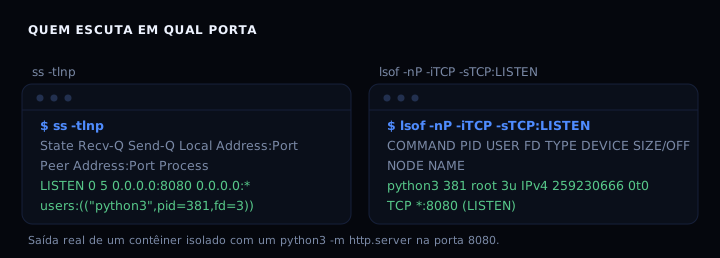
In a test container with a python3 -m http.server on port 8080, ss -tlnp shows 0.0.0.0:8080 with users:(('python3',pid=381,fd=3)). The fd 3 is the socket descriptor. The same information shows up in lsof, which lets you cross-check the two views.
ss -s prints a summary of kernel counters: how many connections in each state. Useful for spotting a pile of TIME-WAIT or half-open connections.
lsof: who holds the file or the port
lsof lists open files. On Linux, sockets, pipes and terminals are files too, so lsof covers the network. lsof -nP -iTCP -sTCP:LISTEN lists who is listening, with the same information as ss plus the executable path.
lsof -nP -iTCP -sTCP:LISTEN        # who listens on TCP
lsof -nP -i :8080                  # who uses port 8080 (TCP or UDP)
lsof -p 381                        # everything process 381 opened
lsof /var/log/app.log              # who has this file open
lsof +D /tmp                       # descend into /tmp
lsof +L1                           # deleted files still open
The deleted-file case is the most valuable: a log rotated with mv or rm keeps occupying space while the process holds it open. lsof +L1 shows those ghosts. The fix is to restart the service or truncate the descriptor via /proc/<pid>/fd/<n>.
lsof -b skips calls that may block (stat on a stuck NFS), useful when the machine is slow and plain lsof hangs.
The three together
Question: “who is on port 8080?”
ss -tlnp | grep ':8080'
lsof -nP -i :8080
Question: “what is this process doing?”
ps -p <pid> -o pid,user,lstart,cmd
lsof -p <pid> | head -30
Question: “why did the disk fill up?”
lsof +L1
lsof / | grep deleted
The answer is almost always a deleted file still open, or a process writing to a path nobody watches. To dig deeper into space usage, see disk full: how to find what is taking the space.
How to verify
Run ss -tlnp on a machine with at least one service listening. The expected output has a line with LISTEN, an address like 0.0.0.0:22 or [::]:80, and the Process column filled in. If the Process column is empty, the command ran without enough privilege.
To confirm the cross-check, run lsof -nP -iTCP -sTCP:LISTEN and verify that the PID and process name match what ss showed.
If it goes wrong
ss: command not found: the iproute2 package is missing. On Debian or Ubuntu,apt install iproute2. On Alpine,apk add iproute2.lsof: command not found: install withapt install lsoforapk add lsof. Some minimal images do not ship it.- ss shows no process: run with sudo or check whether the user has the net_admin capability. Without it, the kernel hides the PID.
- lsof is slow: use
lsof -bto skip blocking stat calls, or restrict with-p <pid>or-i <port>. - ps shows a process that no longer exists: the snapshot was taken before it exited; run again.
ps, ss or lsof
| Tool | Answers | Reads | When to use |
|---|---|---|---|
| ps | who is running, with CPU and memory | /proc//stat | process inventory, scripts |
| ss | who listens or is connected | /proc/net/tcp | ports, connections, TCP states |
| lsof | who holds a file, socket or port | /proc//fd | locked file, busy port, ghost disk usage |
None replaces the others. ps knows nothing about ports, ss knows nothing about files, lsof shows no CPU. The trio covers the diagnosis.
FAQ
ss or netstat, which one today? Use ss. netstat comes from the net-tools package, which is in maintenance mode and does not track recent kernel changes. ss is the default on current distributions.
Why does ss not show the process name? Not enough privilege. Run with sudo or add the net_admin capability to the user. In a container, check whether the capability was granted.
lsof prints too much, how to filter?
Combine selectors: lsof -p <pid> for one process, lsof -u <user> for one user, lsof -i TCP:443 for one port. Selectors of the same kind are ORed; use -a to AND across kinds.
How to tell if a process is a zombie?
ps aux | grep 'Z' in the STAT column, or ps -o pid,stat,cmd -p <pid>. A zombie uses no CPU or memory but holds a PID. The parent must call wait() or be restarted.
The artifact below runs without ps, ss or lsof. Why?
Because all three read /proc. The script reads the same files they read, which proves the information lives in the kernel, not in the tool. In production, use ps, ss and lsof; the script is for understanding and for minimal environments.
Artifact
#!/usr/bin/env bash
# Recipes for finding processes, ports and open files.
# Works by reading /proc directly: that is what ps, ss and lsof do underneath.
# Run as root to see processes of other users.

set -euo pipefail

# demo: open a test port with perl (no real service needed)
perl -MIO::Socket::INET -e 'my $s=IO::Socket::INET->new(LocalPort=>8765,Listen=>5,Reuse=>1) or die $!; sleep 300;' >/dev/null 2>&1 &
DEMO_PID=$!
sleep 1

echo "=== 1. processes: who is running ==="
for d in /proc/[0-9]*; do
    pid=${d##*/}
    [ -r "$d/stat" ] || continue
    name=$(awk '{print $2}' "$d/stat" 2>/dev/null | tr -d '()') || continue
    cmd=$(tr '\0' ' ' < "$d/cmdline" 2>/dev/null | sed 's/ *$//')
    [ -z "$cmd" ] && cmd="[$name]"
    printf '%6s  %-16s %s\n' "$pid" "$name" "$cmd"
done | sort -n | head -12

echo
echo "=== 2. listening ports (equivalent to ss -tlnp) ==="
decode_hex() {
    local hex=$1
    local iphex=${hex%:*} porthex=${hex#*:}
    local a=$((16#${iphex:6:2})) b=$((16#${iphex:4:2})) c=$((16#${iphex:2:2})) d=$((16#${iphex:0:2}))
    local port=$((16#$porthex))
    printf '%s.%s.%s.%s:%s' "$a" "$b" "$c" "$d" "$port"
}
inode_to_pid() {
    local target=$1
    for fd in /proc/[0-9]*/fd/*; do
        [ -L "$fd" ] || continue
        if [ "$(readlink "$fd" 2>/dev/null)" = "socket:[$target]" ]; then
            local pid=${fd#/proc/}; pid=${pid%%/*}
            echo "$pid"
            return
        fi
    done
}
awk 'NR>1 && $4=="0A" {print $2, $10}' /proc/net/tcp | while read -r endhex inode; do
    pid=$(inode_to_pid "$inode")
    printf '%-22s pid=%s\n' "$(decode_hex "$endhex")" "${pid:-?}"
done

echo
echo "=== 3. open files of a PID (equivalent to lsof -p) ==="
TARGET_PID=${1:-1}
echo "Target PID: $TARGET_PID"
if [ -d "/proc/$TARGET_PID/fd" ]; then
    for fd in /proc/$TARGET_PID/fd/*; do
        [ -e "$fd" ] || continue
        num=${fd##*/}
        target=$(readlink "$fd" 2>/dev/null || echo "?")
        printf '  fd %-4s -> %s\n' "$num" "$target"
    done
else
    echo "  (process $TARGET_PID does not exist)"
fi

# clean up the demo
kill "$DEMO_PID" 2>/dev/null || true
wait "$DEMO_PID" 2>/dev/null || true
To watch processes, memory and I/O in real time, see how to see what is using memory on Linux.
Sources: ps(1), ss(8), lsof(8). Tested in a debian:stable-slim container on 01 Nov 2026.