31 Oct 2026 · linux, tools, terminal · 4 min
bat and eza: readable ls and cat in the terminal
Two commands everyone uses every day, ls and cat, have versions that show more with less noise. bat is a cat that colors syntax and numbers lines. eza is an ls that shows symbolic permissions, readable size and git status on the same line.
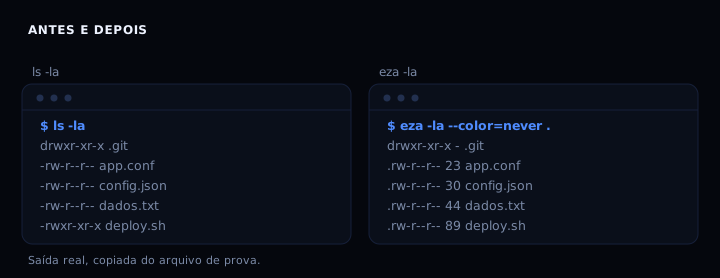
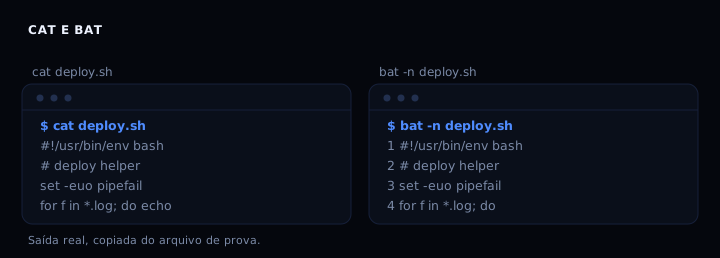
I measured both in a directory of seven files with a git repository next to them. ls -la printed 10 lines. eza -la printed 9, with size in bytes and date on each. bat -n numbered the four lines of the script. The gain is not speed, it is readability.
What bat fixes
The problem with cat on code is not color, it is reference. You read a 40-line file, find the bug on line 23, and when writing the commit you count again. bat -n solves that for free, without opening an editor.
Besides the number, bat shows git changes when the file is in a repository. In the test directory, the modified dados.txt showed a mark on the new line. And it colors syntax for dozens of languages, with no configuration.
What eza fixes
ls -la prints permissions in letters, owner, group, size in bytes and date, but everything glued together. eza aligns the columns and switches the size to a readable format. With --git, it adds a column with the file status in the repository: -- for unmodified, -M for modified.
In the test, dados.txt showed -M and the others --. That is the information you would get by running git status separately.
When it is not worth it
On a remote server, where you only want to check if a file exists, ls and cat are enough and exist in every image. bat and eza are extra binaries, and they do not exist in a minimal container. ripgrep follows the same logic: a better tool, but an extra dependency.
If the terminal is slow or the output is large, bat pages by default. Use --paging=never in scripts.
The artifact: commented aliases
The file below is meant to be copied into ~/.bashrc or ~/.zshrc. Each alias has a comment with its effect. If bat or eza is missing, the script warns and does not break.
#!/usr/bin/env bash
# aliases for bat and eza
# paste at the end of ~/.bashrc or ~/.zshrc and run: source ~/.bashrc

if command -v bat >/dev/null 2>&1; then
  # cat with syntax and no paging (good in scripts)
  alias cat='bat --paging=never --style=plain'
  # cat with line numbers, to cite in a commit
  alias catn='bat --paging=never -n'
  # diff of the file against git HEAD
  alias catd='bat --paging=never --diff'
else
  echo 'bat not found: cat aliases disabled'
fi

if command -v eza >/dev/null 2>&1; then
  # basic listing with icons
  alias ls='eza --icons'
  # long listing with git status
  alias ll='eza -la --git --icons'
  # two-level tree
  alias lt='eza --tree --level=2 --icons'
else
  echo 'eza not found: ls aliases disabled'
fi

# demo, only runs if both tools exist
tmp=$(mktemp -d)
printf '#!/usr/bin/env bash\necho hi\n' > "$tmp/demo.sh"
if command -v bat >/dev/null 2>&1; then
  echo '--- bat -n ---'
  bat -n --color=never --paging=never "$tmp/demo.sh"
fi
if command -v eza >/dev/null 2>&1; then
  echo '--- eza -la --git ---'
  eza -la --git --color=never "$tmp"
fi
rm -rf "$tmp"

echo 'aliases loaded'
How to verify
bat --version
eza --version
bash aliases-bat-eza.sh
The last line prints “aliases loaded”. If bat or eza is missing, the script warns and continues.
If it breaks
bat: command not found: install from the distro package manager or download the static binary from GitHub. On Debian,apt install batinstalls it asbatcat; create the linkln -s /usr/bin/batcat /usr/local/bin/bat.- eza shows no color: set
TERM=xtermor use--color=always. In a pipe, eza turns color off by default. eza -la --gitprints nothing: pass the directory explicitly,eza -la --git .. Without the dot, some versions do not list.- bat pages and hangs in a script: add
--paging=never.
Links that help
The same logic of swapping a tool for a more readable version shows up in ripgrep instead of grep, fzf for history, files and branch and lazygit without memorizing commands. For the terminal itself, a terminal that looks clean and works.
FAQ
Is bat slower than cat? On a small file the difference is imperceptible. On a large file, bat does more work and takes longer. Use cat in pipelines.
Does eza replace ls in scripts? No. In scripts, use ls or find, because eza output changes between versions. Aliases are for interactive use.
Why does bat not color in a pipe? Because it detects that the output is not a terminal. Use --color=always to force it.
Do eza icons need a special font? Yes, a Nerd Font. Without it, squares show up. Use --icons=never or drop --icons.
Is it worth installing both? If you spend your day in the terminal, yes. If you use a terminal once a week, no.
Sources: sharkdp/bat (v0.26.1), eza-community/eza (v0.23.5). My own measurement in an isolated directory of seven files, 31 Oct 2026.