31 Oct 2026 · linux, security, permissões · 5 min
Linux permissions: chmod, chown, sudo and what not to do
Permission in Linux is a three-column table: owner, group and others. Each column has three bits, read, write and execute. That is the whole story, and it fits in three octal digits. The rest is convention.
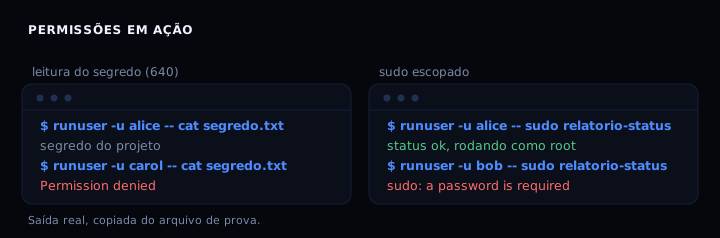
I measured this in a disposable container with three users. A file with mode 640, owner root and group project: alice and bob read it, carol gets Permission denied. A directory with mode 2770: a file created by bob inherits the project group and alice reads it without complaint. Scoped sudo: alice runs a command as root, bob gets “a password is required”.
What the three digits say
Mode 640 is three digits, not a magic number. The 6 is the owner, the 4 is the group, the 0 is everyone else. Each digit is the sum of 4 (read), 2 (write) and 1 (execute). An owner with 6 has read and write. A group with 4 has read. Others with 0 have nothing.
| mode | owner | group | others | typical use |
|---|---|---|---|---|
| 644 | rw | r | r | public file |
| 640 | rw | r | - | project secret |
| 600 | rw | - | - | private key |
| 755 | rwx | rx | rx | executable script |
| 2770 | rwx | rwx+s | - | shared folder |
| 1777 | rwx | rwx | rwx+t | temporary directory |
The leading digit, when present, is special bits. The 2 is setgid: new files in the folder inherit the group. The 1 is sticky: only the owner deletes their own file. The 4 is setuid, which does not work on scripts on most systems and, on a binary, makes the program run as the owner.
chown changes owner and group
chown changes who owns. chown alice file changes the owner. chown :project file changes only the group. chown alice:project file changes both at once. It is the command people forget exists, and then try to fix with chmod 777.
The group matters as much as the owner. A 640 file with the wrong group is closed to the people who should read it and open to the people who should not.
Shared folder with setgid
The pattern that works for a team folder:
mkdir -p /srv/project
chown root:project /srv/project
chmod 2770 /srv/project
The 2770 is 2 (setgid) plus 770 (owner and group do everything, others nothing). With setgid, every file created there is born with the project group, even if bob created it. Without it, bob creates a file with group bob and alice cannot read it.
That is exactly what the measurement showed: bob created bob.txt and the file was born with group project, and alice read it with no error.
Scoped sudo, not free sudo
Free sudo is alice ALL=(ALL) NOPASSWD: ALL. It is the same as handing out the root password. Scoped sudo lists the exact command:
alice ALL=(root) NOPASSWD: /usr/local/bin/report-status
Alice can run only that binary as root. sudo bash fails. sudo cat /etc/shadow fails. And the file in /etc/sudoers.d must have mode 440, otherwise sudo ignores it with a warning.
The artifact
The script below creates the group, the two users, the shared folder and the scoped sudo. It runs as root and installs nothing.
#!/usr/bin/env bash
set -euo pipefail

GROUP=project
FOLDER=/srv/project
CMD=/usr/local/bin/report-status

groupadd -f "$GROUP"
id alice >/dev/null 2>&1 || useradd -m -s /bin/bash -G "$GROUP" alice
id bob >/dev/null 2>&1 || useradd -m -s /bin/bash -G "$GROUP" bob
usermod -aG "$GROUP" alice
usermod -aG "$GROUP" bob

mkdir -p "$FOLDER"
chown root:"$GROUP" "$FOLDER"
chmod 2770 "$FOLDER"

printf 'project secret\n' > "$FOLDER/secret.txt"
chown root:"$GROUP" "$FOLDER/secret.txt"
chmod 640 "$FOLDER/secret.txt"

cat > "$CMD" <<'EOF'
#!/usr/bin/env bash
echo "status ok, running as $(id -un)"
EOF
chmod 755 "$CMD"

mkdir -p /etc/sudoers.d
cat > /etc/sudoers.d/90-project <<'EOF'
alice ALL=(root) NOPASSWD: /usr/local/bin/report-status
EOF
chmod 440 /etc/sudoers.d/90-project

if command -v visudo >/dev/null 2>&1; then
  visudo -cf /etc/sudoers.d/90-project
fi

echo "ready: group $GROUP, folder $FOLDER (2770), secret (640), scoped sudo for alice"
How to verify
bash setup-permissions.sh
runuser -u alice -- cat /srv/project/secret.txt
runuser -u carol -- cat /srv/project/secret.txt
runuser -u alice -- sudo /usr/local/bin/report-status
runuser -u bob -- sudo /usr/local/bin/report-status
The first read prints the secret. The second prints Permission denied. The third prints “status ok, running as root”. The fourth asks for a password.
If it breaks
- Permission denied for someone who should read: the user is not in the group, or joined before the change. Groups are read at login. Use
newgrp projector open a new shell. - sudo asks for a password even with NOPASSWD: the file in
/etc/sudoers.dis not mode 440, or has a syntax error. Validate withvisudo -cf /etc/sudoers.d/90-project. - A new file in the folder does not inherit the group: the setgid bit is missing. Check with
stat -c %a /srv/project; it must start with 2. - chown on a symbolic link follows the target by default. Use
chown -hwhen you want to change the link itself.
Links that help
The same user and group logic shows up when hardening SSH, using an SSH key instead of a password, storing secrets in files with mode 600 in env and secrets in a file, and running a container without root in how to run a container as non-root.
FAQ
Why not use 777 and be done with it? Because 777 lets any local user read and overwrite. On a shared server that is write access for everyone.
Does chmod +x on a text file make sense? No. The x bit on a text file does not turn it into a program. Use it only on scripts and binaries.
Is sudo with a password worse than sudo without one? Not necessarily. NOPASSWD on a scoped command is fine for automation. NOPASSWD on ALL is the problem.
How do I see permissions in octal? stat -c %a file. In symbolic form, ls -l and eza -l.
What is umask? The mask the shell applies when creating a file. Umask 022 results in 644 for a file. Umask 077 results in 600.
Sources: chmod(1), chown(1), sudoers(5). My own measurement in a disposable container, 31 Oct 2026.