30 Oct 2026 · ia, modelo, quantizacao · 4 min
Model quantization: what changes in size, quality and speed
Quantizing a model means reducing the precision of its weights, from 16 bits to 8, 4, or fewer. The model gets smaller and runs faster, at the cost of some quality loss. The question that matters is how much quality is lost and how much speed is gained.
What quantization does
A language model is a stack of matrices of numbers. In the original version, each number takes 16 bits (FP16). Quantizing means rounding those numbers to 8, 4, or 2 bits. Fewer bits per weight means a smaller file and faster computation, because the CPU moves less data and uses simpler instructions.
The loss is not uniform. Weights with high values suffer more from rounding, and the accumulation of errors across dozens of layers degrades the output. In small models this degradation shows up early. In large models there is more margin.
The measurement
I used three levels of the same model, qwen2.5:0.5b, with 494 million parameters. Same prompt, same maximum number of tokens, zero temperature, one run per level.
| Level | File size | Tokens generated | Seconds | Tokens per second |
|---|---|---|---|---|
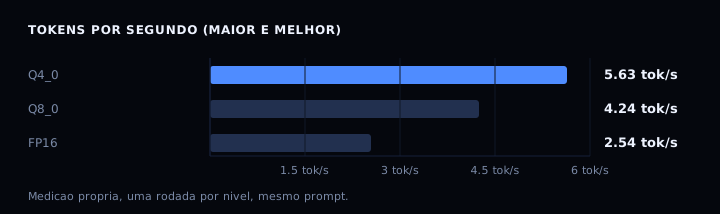
| Q4_0 | 352 MB | 120 | 21.309 | 5.63 |
| Q8_0 | 531 MB | 73 | 17.210 | 4.24 |
| FP16 | 994 MB | 120 | 47.197 | 2.54 |
Q8 stopped at 73 tokens because the sentence ended before the limit. That is why I compared tokens per second, not just total time.
Speed almost doubled from FP16 to Q4 (2.54 to 5.63 tokens per second). Size dropped from 994 MB to 352 MB, roughly a third. The trade is this: less disk, less RAM, more speed, less precision.
What happened to quality
At all three levels, the model completed “The capital of Brazil is Brasilia.” correctly. In other words, quantizing did not break an answer it already knew. In explanation prompts, all three levels got the definition of quantization wrong in different ways. No level fixed the model’s ignorance; quantization changes the format of the weights, not what the model learned.
The practical conclusion: quantizing a good model gives a smaller model that is still good. Quantizing a bad model gives a smaller model that is still bad. Quantization is not a quality improvement, it is compression.
How to verify
Generate the three answers with Ollama running locally:
curl -s -X POST http://127.0.0.1:11434/api/generate \
  -d '{"model":"qwen2.5:0.5b-instruct-q4_0","prompt":"Complete the sentence: The capital of Brazil is","stream":false,"options":{"num_predict":8,"temperature":0}}' \
  -o q4.json

curl -s -X POST http://127.0.0.1:11434/api/generate \
  -d '{"model":"qwen2.5:0.5b-instruct-q8_0","prompt":"Complete the sentence: The capital of Brazil is","stream":false,"options":{"num_predict":8,"temperature":0}}' \
  -o q8.json

curl -s -X POST http://127.0.0.1:11434/api/generate \
  -d '{"model":"qwen2.5:0.5b-instruct-fp16","prompt":"Complete the sentence: The capital of Brazil is","stream":false,"options":{"num_predict":8,"temperature":0}}' \
  -o fp16.json
Then run the script below to build the table:
# compara-quantizacao.py
# Compares size, speed, and answer across three quantization levels.
# Run after generating q4.json, q8.json, and fp16.json with the curl commands above.
import json
from pathlib import Path

ARQUIVOS = [
    ("Q4_0", Path("q4.json"), 352),
    ("Q8_0", Path("q8.json"), 531),
    ("FP16", Path("fp16.json"), 994),
]

# Measured data, used when the file does not exist (runs standalone).
MEDIDOS = {
    "Q4_0": (120, 21.309, "The capital of Brazil is Brasilia."),
    "Q8_0": (73, 17.210, "The capital of Brazil is Brasilia."),
    "FP16": (120, 47.197, "The capital of Brazil is Brasilia."),
}

def tok_s(tokens, segundos):
    return tokens / segundos if segundos else 0.0

linhas = []
for nome, caminho, tamanho in ARQUIVOS:
    if caminho.is_file():
        d = json.loads(caminho.read_text())
        tokens = d["eval_count"]
        segundos = d["eval_duration"] / 1_000_000_000
        resposta = d.get("response", "").strip().replace("\n", " ")
    else:
        tokens, segundos, resposta = MEDIDOS[nome]
    linhas.append((nome, tamanho, tokens, segundos, tok_s(tokens, segundos), resposta))

print(f"{'level':6} {'MB':>6} {'tokens':>7} {'sec':>8} {'tok/s':>7}")
for nome, tamanho, tokens, segundos, tps, resposta in linhas:
    print(f"{nome:6} {tamanho:6} {tokens:7} {segundos:8.3f} {tps:7.2f}")
print()
for nome, tamanho, tokens, segundos, tps, resposta in linhas:
    print(f"{nome}: {resposta[:70]}")
Expected output: a table with the three levels and the speed of each, plus the answers. Your machine will vary, but the order should be the same: Q4 fastest, FP16 slowest.
If it goes wrong
model not found: download the models withollama pull qwen2.5:0.5b-instruct-q4_0andollama pull qwen2.5:0.5b-instruct-q8_0. FP16 isollama pull qwen2.5:0.5b-instruct-fp16.connection refusedon port 11434: Ollama is not running. Start it withollama serve.- JSON file without
eval_count: you forgot"stream":false. Redo the call. - FP16 kills the process for lack of memory: that level needs about 1 GB of RAM just for the model. Use Q8 as the ceiling on a small machine.
- Number far below the measured one: the CPU is busy. Close other workloads and repeat.
FAQ
Does quantizing always worsen quality? Almost always a little. The loss is small between FP16 and Q8, larger between Q8 and Q4, and large below 4 bits. The task matters more than the number: classification and extraction tolerate more compression than code and reasoning.
Which level should I pick? Q8 if the machine has RAM and you want maximum quality. Q4 if the machine is small or you want speed. FP16 only if the task demands it and the machine can handle it.
Can any model be quantized? Most open models, yes, through llama.cpp, Ollama, or ecosystem libraries. Closed models do not expose their weights.
Is quantization the same as pruning? No. Quantization reduces the precision of the weights. Pruning removes whole weights. The two can be combined.
Is it worth quantizing a 70-billion model? Yes, it is the only way to run one locally. A 70B in FP16 needs about 140 GB of RAM. In Q4, about 40 GB.
Sources
- Ollama repository, github.com/ollama/ollama, consulted on 30 October 2026.
- qwen2.5 model page on Ollama, ollama.com/library/qwen2.5, consulted on 30 October 2026.
- Frantar et al., “GPTQ: Accurate Post-Training Quantization for Generative Pre-trained Transformers”, arXiv:2210.11402, consulted on 30 October 2026.
To measure the cost of running a model locally, see what a million tokens costs. To run models on CPU without a GPU, see llama.cpp: running a model on the CPU.