19 Oct 2026 · mcp, ia, agentes · 6 min
Ready made MCP servers to plug into your agent
I pointed a file server MCP at a process of mine and it answered with a list of 14 tools. The memory server answered with 9. Neither install touched the system: npx fetched the packages into a cache and ran them as a child process speaking JSON-RPC over stdin.
The part worth stating plainly: an MCP server is a program. It is not a daemon, not a service, it has no port. The agent writes one line of JSON to its stdin, the process writes one line of JSON back to stdout. Everything else is an SDK, and the SDK is optional.
the two servers I would keep
The modelcontextprotocol/servers repo holds the reference implementations maintained by the group that defines the protocol. Its README warns they are examples to learn from, not production components. Two are genuinely usable now.
The file server is the useful one. It takes the directories it may touch as command line arguments and stays inside them. It exposes read_text_file, write_file, edit_file, search_files, directory_tree, get_file_info, move_file and more, 14 in total. Write tools carry destructive hints, which lets the client ask for confirmation.
The memory server keeps what the agent learns in a graph of entities, relations, and observations, stored in a JSONL file. It has 9 tools: create_entities, create_relations, add_observations, search_nodes, open_nodes, read_graph, and three that delete. Its point is persistence across conversations.
the config, commented
Two servers in one config. What differs is the command and what goes in env.
{
  "mcpServers": {
    "files": {
      "command": "npx",
      "args": [
        "-y",
        "@modelcontextprotocol/[email protected]",
        "/path/the/agent/may/read"
      ]
    },
    "memory": {
      "command": "npx",
      "args": ["-y", "@modelcontextprotocol/[email protected]"],
      "env": {
        "MEMORY_FILE_PATH": "/home/you/.local/share/agent/memory.jsonl"
      }
    }
  }
}
The @2.0.0 on the package name is not decoration. Leave it off and you get the newest version on every install, so an upstream release breaks your agent and you changed nothing.
The MEMORY_FILE_PATH matters more than it looks. Without it the server writes to ~/.npm/_npx/<hash>/node_modules/.../dist/memory.jsonl, inside the npm cache. That works until the cache is cleared or the hash changes, and then the whole graph is gone. It happened on my first run: the file was four directories deep inside the cache.
the artifact
A bash script that speaks the protocol directly, so you can see what the agent sees before wiring up the agent. No SDK, no Python, no client.
#!/usr/bin/env bash
# mcp-call.sh - talks to an MCP server over stdio, with no SDK and no agent.
#
# The protocol is JSON-RPC 2.0, one line per message, on the process's stdin and
# stdout. That is all of it. No Python and no client needed.
#
# Usage:
#   ./mcp-call.sh                     print the protocol
#   ./mcp-call.sh -- <command>...              list the tools
#   ./mcp-call.sh --tool NAME [--args JSON] -- <command>...   call one
#
# The "--" separates the server command from the options. Without it you cannot
# tell "npx -y package /path" from a tool named "-y", and any heuristic gets it
# wrong. That is why the tool name arrives in --tool rather than in a fixed slot.
#
# The detail that saves an hour of debugging: the server exits when stdin
# closes. Without the sleep after the last line, it reads the three messages and
# dies before answering the third. The pipe has to stay open.

set -uo pipefail

PROTOCOL='2025-06-18'
WAIT="${MCP_WAIT:-20}"
TOOL=""
ARGS='{}'

print_protocol() {
    cat <<'END'
An MCP server is a process speaking JSON-RPC 2.0, one line per message.

  {"jsonrpc":"2.0","id":1,"method":"initialize","params":{...}}
  {"jsonrpc":"2.0","method":"notifications/initialized"}
  {"jsonrpc":"2.0","id":2,"method":"tools/list"}

Call a tool:
  {"jsonrpc":"2.0","id":2,"method":"tools/call",
   "params":{"name":"list_directory","arguments":{"path":"/tmp"}}}

Required order: initialize, notifications/initialized, then tools/list or
tools/call. The server exits when stdin closes.
END
}

case "${1:-}" in
    ""|"-h"|"--help") print_protocol; exit 0 ;;
esac

# Options come before the "--".
while [ $# -gt 0 ]; do
    case "$1" in
        --tool)   TOOL="${2:-}"; shift 2 ;;
        --args)   ARGS="${2:-{\}}"; shift 2 ;;
        --)       shift; break ;;
        *)        break ;;
    esac
done

if [ $# -eq 0 ]; then
    echo "missing the server command after the --" >&2
    exit 2
fi

INIT="{\"jsonrpc\":\"2.0\",\"id\":1,\"method\":\"initialize\",\"params\":{\"protocolVersion\":\"$PROTOCOL\",\"capabilities\":{},\"clientInfo\":{\"name\":\"mcp-call\",\"version\":\"0\"}}}"
READY='{"jsonrpc":"2.0","method":"notifications/initialized"}'

if [ -n "$TOOL" ]; then
    REQUEST="{\"jsonrpc\":\"2.0\",\"id\":2,\"method\":\"tools/call\",\"params\":{\"name\":\"$TOOL\",\"arguments\":$ARGS}}"
else
    REQUEST='{"jsonrpc":"2.0","id":2,"method":"tools/list"}'
fi

# The { ...; sleep; } keeps stdin open after the last line.
OUTPUT="$({ printf '%s\n%s\n%s\n' "$INIT" "$READY" "$REQUEST"; sleep "$WAIT"; } \
  | timeout 120 "$@" 2>/dev/null)"

if [ -z "$TOOL" ]; then
    if printf '%s' "$OUTPUT" | grep -q '"result":{"tools"'; then
        printf '%s\n' "$OUTPUT" | grep '"result":{"tools"' \
          | jq -r '.result.tools[] | "  " + .name' | sort
        printf 'total tools: '
        printf '%s\n' "$OUTPUT" | grep '"result":{"tools"' | jq -r '.result.tools | length' | head -1
    else
        echo "no tools/list response. The server command failed or"
        echo "needs a different node version. Test the command on its own first."
    fi
else
    printf '%s\n' "$OUTPUT" | grep '"id":2' | jq -r '.result.content[]?.text // .error.message'
fi
what I measured
I ran both servers through the script on node v22.23.3, on 19 October 2026.
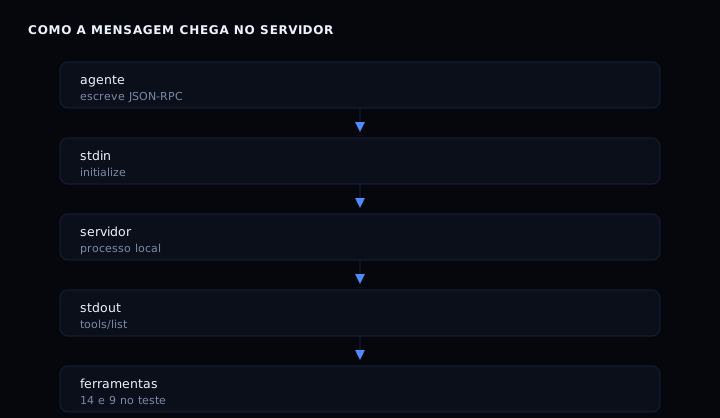
The file server returned its 14 tools, list_directory and write_file among them. My test call to list_directory came back with [FILE] init.jsonl, the only file in the directory I had passed. The memory server returned 9 tools, and create_entities wrote an entity that read_graph then read back in full.
Package sizes: 94,972 bytes unpacked for the file server and 57,615 for the memory server, 16 MB on disk each with dependencies. Both MIT licensed. The file server asked for node 24 or newer and ran on node 22 with a warning rather than failing.
how to verify
chmod +x mcp-call.sh
./mcp-call.sh -- npx -y @modelcontextprotocol/[email protected]
The output lists the 9 tools and ends with the total. To call one:
./mcp-call.sh --tool read_graph --args '{}' -- npx -y @modelcontextprotocol/[email protected]
jq sits in the middle of that path: it is what reads the response. Without it you see the raw JSON line, which is useful too.
when it goes wrong
The server answers initialize and dies. The most common case, and it is stdin closing. A pipe that ends right after the last message kills the process before it replies, because the server reads to end of file and exits. The script holds the pipe open with a sleep after the last line.
You see an EBADENGINE warning. The file server package asks for node 24 or newer and I tested on node 22. It worked, but on a locked down machine it might not. The fix is upgrading node.
The tool list comes back empty. Almost always a missing jq, or the server failing before the handshake. Run the command on its own and see whether the server identifies itself.
picking between them
| Server | Tools | Keeps state in | Good for |
|---|---|---|---|
| filesystem 2.0.0 | 14 | nothing, only reads and writes | file access bounded to a directory |
| memory 2.0.0 | 9 | JSONL, via MEMORY_FILE_PATH |
remembering across conversations |
| fetch 2.0.0 | 1 | nothing | fetching a URL and converting to markdown |
| sequentialthinking | varies | nothing | step by step reasoning, more token use |
The first two cover what most agents need. An agent with a shell already has filesystem access, making the file server more of a boundary than a new capability, as discussed in the post on running a container as non-root. For file-based state you want to query, semantic search with sqlite-vec solves it in a way that is easier to audit.
questions that always come up
Do I have to install anything? No, if you use npx. The package is fetched into a cache and run as a child process. Installing globally works too, and then you lose track of which version is running.
Does an MCP server open a port? Not with the stdio transport, which is what both servers here use. Remote servers do listen on a socket, and then you have authentication and TLS in the middle.
Can I write my own? Yes, and it is less work than it sounds: the agent needs one line of JSON with a method and parameters. The reference servers show the envelope.
Can I run more than one at a time? Yes. Model Context Protocol treats each server as an independent block, and the client decides when to call which.
Pin a version or use latest? Pin it. Both packages shipped releases on the same day in the week I wrote this, and a tool renamed between versions breaks the agent with no warning.
sources
Server list and the note about them being reference implementations: github.com/modelcontextprotocol/servers, checked on 19 October 2026. Version, license, and tools: server-filesystem 2.0.0 and server-memory 2.0.0. The concepts of tool, resource, and prompt are in Understanding MCP servers, from the protocol team.