19 Oct 2026 · linux, memoria, diagnostico · 6 min
How to see what is using memory on Linux
Add up the RSS of every process on a 5.9 GB machine and you get 4.8 GB. Add up the PSS of the same processes and you get 3.8 GB. Neither number is a lie: it is the same usage counted two ways, and the 959 MB gap is the same library page loaded by several processes at once.
That is why the sum never matches what free reports as used, and why the process list looks bigger than the physical RAM. The script below computes all three numbers at once so the gap shows up with a name attached to it.
What each number means
RSS is the resident set of a process: everything it touched that the kernel has not dropped back. The catch is that a shared page is counted in full for every process holding it. Ten Node processes sharing one libc book that library ten times.
PSS, proportional set size, divides each shared page among the processes sharing it. Ten processes on one libc count that library once, split ten ways. It is the only number that lets you compare processes fairly.
Page cache is a separate thing. The kernel spends spare memory on recently read files and hands it back on demand. In /proc/meminfo that shows up under Cached and SReclaimable, and it belongs to no process at all.
The number that says whether the machine is tight is MemAvailable, which already subtracts reclaimable cache. That is the figure your alerting should watch, not the RSS sum.
The artifact
A bash script that installs nothing, needs no root, and reads /proc directly. It groups by process name, which fixes the common case of a server with twelve workers showing up as twelve separate rows.
#!/usr/bin/env bash
# memoria.sh - shows what is eating your RAM without mixing up the three numbers.
#
# Why it exists: the sum of RSS across all processes never matches what free
# calls "used", and it usually looks like you are out of memory. Two numbers
# are missing from that reasoning: shared pages (the same libc counted in every
# process that loaded it) and page cache, which the kernel gives back on its own
# under pressure. This keeps the two apart.
#
# Usage:
#   ./memoria.sh            top 12 processes
#   ./memoria.sh 25         top 25
#
# Needs no root and installs nothing: it reads /proc directly.

set -uo pipefail

TOP="${1:-12}"

# --- 1. The kernel's own numbers, read from /proc/meminfo ----------------
# MemAvailable decides whether the machine is tight. Cache is reclaimable, so
# it is not a problem.
declare -A MEM=()
while read -r chave valor _; do
    case "$chave" in
        MemTotal:|MemAvailable:|Buffers:|Cached:|SReclaimable:|SwapTotal:|SwapFree:)
            MEM["${chave%:}]"]="${valor:-0}" ;;
    esac
done < /proc/meminfo

mb() { awk -v k="${1:-0}" 'BEGIN{printf "%d", k/1024}'; }

echo "memoria.sh - $(uname -sr), top ${TOP} by PSS"
echo
printf '  total       %6s MB\n' "$(mb "${MEM[MemTotal]:-0}")"
printf '  available   %6s MB\n' "$(mb "${MEM[MemAvailable]:-0}")"
printf '  cache       %6s MB  (buffers + cached + reclaimable)\n' \
    "$(mb $(( ${MEM[Buffers]:-0} + ${MEM[Cached]:-0} + ${MEM[SReclaimable]:-0} )))"
if [ "${MEM[SwapTotal]:-0}" -gt 0 ]; then
    printf '  swap        %6s MB  of %6s MB\n' \
        "$(mb $(( ${MEM[SwapTotal]:-0} - ${MEM[SwapFree]:-0} )) )" \
        "$(mb "${MEM[SwapTotal]:-0}")"
fi
echo

# --- 2. Every process, measured once --------------------------------------
# PSS (proportional set size) is the only honest number for comparing
# processes: each shared page is split among whoever shares it. RSS counts
# the whole page for each process and inflates the total.
# smaps_rollup exists since kernel 4.14; without it the script falls back to
# VmRSS and says so at the end.
if [ -r /proc/self/smaps_rollup ]; then TEM_SMAPS=1; else TEM_SMAPS=0; fi

BRUTO="$(mktemp 2>/dev/null || echo "./.memoria-bruto.$$")"
trap 'rm -f "$BRUTO"' EXIT
for dir in /proc/[0-9]*; do
    [ -r "$dir/status" ] || continue
    nome="$(awk '/^Name:/{print $2; exit}' "$dir/status" 2>/dev/null)"
    [ -n "$nome" ] || nome="?"

    rss=0; pss=0; priv=0; swap=0
    if [ "$TEM_SMAPS" -eq 1 ] && [ -r "$dir/smaps_rollup" ]; then
        rss="$(awk '/^Rss:/{print $2; exit}' "$dir/smaps_rollup" 2>/dev/null)"
        pss="$(awk '/^Pss:/{print $2; exit}' "$dir/smaps_rollup" 2>/dev/null)"
        priv="$(awk '/^Private_Dirty:/{print $2; exit}' "$dir/smaps_rollup" 2>/dev/null)"
        swap="$(awk '/^Swap:/{print $2; exit}' "$dir/smaps_rollup" 2>/dev/null)"
    fi
    if [ "${rss:-0}" -eq 0 ] && [ "${pss:-0}" -eq 0 ]; then
        rss="$(awk '/^VmRSS:/{print $2; exit}' "$dir/status" 2>/dev/null)"
        swap="$(awk '/^VmSwap:/{print $2; exit}' "$dir/status" 2>/dev/null)"
        if [ "$TEM_SMAPS" -eq 1 ] && [ -r "$dir/smaps_rollup" ]; then
            pss="$(awk '/^Pss:/{print $2; exit}' "$dir/smaps_rollup" 2>/dev/null)"
        else
            pss="$rss"
        fi
    fi
    [ "${rss:-0}" -gt 0 ] || continue
    printf '%s\t%s\t%s\t%s\t%s\n' "${pss:-$rss}" "$rss" "${priv:-0}" "${swap:-0}" "$nome" >> "$BRUTO"
done

# --- 3. Top by PSS, grouping processes that share a name -------------------
# nginx worker 12 and nginx worker 13 show up summed, which is how the service
# actually consumes memory.
awk -F'\t' -v top="$TOP" '
    { pss[$5]+=$1; rss[$5]+=$2; priv[$5]+=$3; swp[$5]+=$4; n[$5]++ }
    END { for (k in pss) printf "%012d\t%s\t%d\t%d\t%d\t%d\t%d\n", pss[k], k, pss[k]/1024, rss[k]/1024, priv[k]/1024, swp[k]/1024, n[k] }
' "$BRUTO" | sort -rn | head -n "$TOP" | awk -F'\t' '
    BEGIN { printf "%-16s %7s %7s %8s %6s %4s\n", "process", "PSS", "RSS", "private", "swap", "n" }
    { printf "%-16s %6dM %6dM %7dM %5dM %4d\n", $2, $3, $4, $5, $6, $7 }
'

# --- 4. The numbers that reconcile ----------------------------------------
# Sum of RSS minus sum of PSS is the same memory counted two or more times.
# That is what makes the list look bigger than the machine's RAM.
echo
awk -F'\t' '{ pss+=$1; rss+=$2; priv+=$3 } END {
    printf "  sum of PSS, all       %6d MB\n", pss/1024
    printf "  sum of RSS, all       %6d MB\n", rss/1024
    printf "  double counting       %6d MB  (shared pages)\n", (rss-pss)/1024
    printf "  private only          %6d MB  (this is what dies in the OOM killer)\n", priv/1024
}' "$BRUTO"

if [ "$TEM_SMAPS" -eq 0 ]; then
    echo "  warning: kernel without smaps_rollup, PSS fell back to RSS (needs 4.14+)"
fi
The measurement
I ran the script in a throwaway container with three python3 processes holding 96 MB, 48 MB, and 16 MB, under a 512 MB limit. The hand-calculated total was 160 MB.
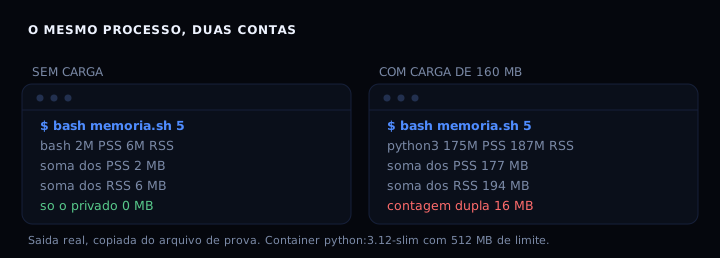
The three processes collapsed into a single python3 row with 175 MB of PSS and 187 MB of RSS. Summing RSS across everything gave 194 MB, PSS gave 177 MB, and the 16 MB difference is shared pages counted twice. The cgroup’s memory.current read at the same moment reported 175 MB, within 2 MB of the PSS. Measuring those same 160 MB by RSS alone gives a figure 21% higher than what was actually reserved.
How to verify
chmod +x memoria.sh
./memoria.sh
The output has four parts: the kernel’s numbers (total, available, cache, swap), the process table sorted by PSS, and the reconciliation at the bottom. On kernel 4.14 or newer you see the PSS and private columns populated. To see more rows:
./memoria.sh 30 | head -8
Check that the PSS sum matches the usage you know is there. If it comes out short, some process is unreadable to your user and the bottom-line numbers only cover what your user can see.
When it goes wrong
The private column shows zeros. Private_Dirty is only accounted when the process’s smaps_rollup file is readable, which needs an unrestricted kernel.core_pattern and the process belonging to you. For another user’s process the script falls back to VmRSS and the column stays at zero.
The swap total reads zero. A machine with zram shows a SwapTotal smaller than RAM, because compressed swap takes less room. Zero only happens when the kernel was built without support or the field does not exist.
The script prints its list but PSS equals RSS. /proc/self/smaps_rollup is missing, which only exists from 4.14 onward. The script warns about this at the end of the output; in that case compare by the private column, which still comes from /proc/[pid]/status.
when RSS is the right number
PSS does not always win. To decide whether a process is leaking, what matters is Private_Dirty, the dirty anonymous memory owned exclusively by it: 172 MB of the 177 MB in the test. High RSS with low PSS is shared library code, a sign of health. High RSS with high and growing private is a leak.
If you work with per-container limits, there is another reference: the cgroup memory.current is the number the kernel charges, and it includes cache. For the rest of the accounting, zram changes what swap means.
| Tool | What it shows | Install | Good for |
|---|---|---|---|
free |
total, available, cache | already there | telling whether the machine is tight |
ps aux --sort=-rss |
RSS per process | already there | finding the big process, knowing the sum inflates |
smem |
PSS per process | needs installing | comparing processes without double counting |
memoria.sh |
PSS, RSS, private, and the gap | installs nothing | seeing all three numbers and the double count together |
Questions that always come up
Why does the RSS sum exceed physical RAM? Shared pages are counted in full for each process. With ten Node processes, the same libc is counted ten times.
Is PSS available everywhere? No. Only kernel 4.14 or newer has /proc/[pid]/smaps_rollup. Before that, the honest number simply did not exist.
Is high cache a problem? Not when it is Cached or SReclaimable, which the kernel hands back under pressure. Cache that grows while I/O queues up is a slow disk, not a memory shortage.
How do I know when to worry? MemAvailable under 10% of total, holding for more than a few minutes, with Private_Dirty climbing. A one-off dip in MemAvailable with no swap in use is the kernel dropping cache, and that is routine.
Does it work in a container? It runs, with one caveat: /proc inside the container shows that container’s processes, so the sum covers the group rather than the machine. Run it on the machine for the machine-wide total.
Sources
The behaviour of /proc/[pid]/smaps_rollup and the meaning of Pss, Private_Dirty, and Swap are in the proc(5) manual, checked on 19 October 2026, and in the kernel’s documentation on the proc filesystem, version 7.3.0. MCP servers, the subject of the post about a JSONL knowledge graph, have the same file-based state problem.