16 Oct 2026 · docker, containers, producao · 6 min
How to limit memory, logs and restarts of a container
A container with no memory cap takes the whole service down with it, and a log without rotation fills the disk until the server stops answering. The fix is four keys in the compose file: mem_limit, pids_limit, logging and restart: on-failure:3. Running all four limits on purpose in an isolated environment, the process blew past 120 MB under a 128 MB cap and exited with code 137, the restart stopped on the third attempt, and 4.2 MB of log ended up as 1 MB.
What each limit holds back
mem_limit is the memory ceiling for the container. Go past it and the cgroup OOM killer sends SIGKILL, which Docker records as exit 137. The difference between 137 and 143 is the signal itself: both mean killed.
pids_limit caps processes and threads, not memory. It catches the service stuck in a loop spawning children forever, the one that brings a box down with hundreds of processes sharing one name.
logging with max-size and max-file truncates the log once it passes the size. Without it the json-file driver only grows, and it is the most common way a disk fills up unnoticed.
restart: on-failure:3 lets the container come back after a failure, but only three times in a row. Without the number, always keeps respawning all night, burning CPU on a service that was never going to work.
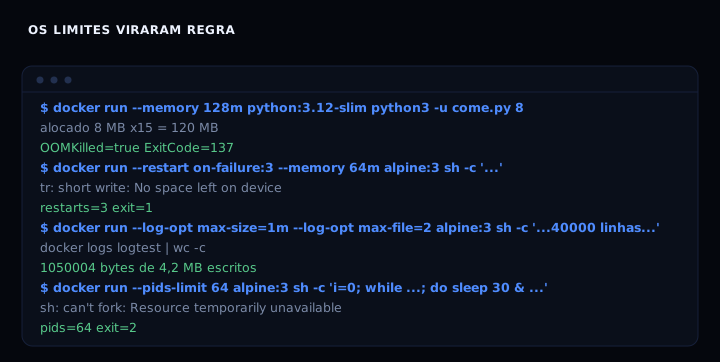
The number that matters most is 120 MB. The process asked for 120 MB and died under a 128 MB ceiling without ever reaching it. Anyone writing mem_limit: 128m needs headroom, because the container itself burns memory on the runtime before the application starts.
Docker’s resource constraints documentation explains the part that surprises people: the daemon protects itself from being killed, which leaves the container as the victim. The OOM killer usually takes the process that exceeded its own limit, not the engine.
The artifact
The compose file below is the whole thing, commented line by line. It starts a test container and applies all four limits.
services:
  app:
    image: python:3.12-slim
    command: ["sleep", "infinity"]

    # memory ceiling. the kernel kills whatever goes past it
    mem_limit: 128m

    # cap on processes and threads. stops a service spawning children forever
    pids_limit: 64

    # half a core at most, so the container does not take the machine
    cpus: 0.5

    # log that stops growing: 1 MB per file, 3 files
    logging:
      driver: json-file
      options:
        max-size: "1m"
        max-file: "3"

    # comes back after a failure, but stops on the third try in a row
    restart: on-failure:3

    # scratch space that dies with the container
    tmpfs:
      - /tmp:rw,size=16m,mode=1777
If you have hardened a service before, the rest of the pattern is familiar. The post on rootless containers covers what sits next to it: user, cap_drop and read_only, on the same line of defense.
How to verify
Before starting anything, the script below checks whether your compose file has all four limits. It only reads the file, does not need Docker, and runs anywhere bash does. Save it as verifica-limites.sh and run bash verifica-limites.sh compose.yaml.
#!/usr/bin/env bash
# verifica-limites.sh: confere se o compose tem os quatro limites.
# uso: bash verifica-limites.sh compose.yaml
# Nao instala nada e nao mexe em container nenhum, so le o arquivo.

arquivo="${1:-compose.yaml}"

if [ ! -f "$arquivo" ]; then
  echo "arquivo nao encontrado: $arquivo" >&2
  exit 1
fi

conteudo=$(tr '\n' ' ' < "$arquivo")
faltando=0

conferir() {
  if printf '%s' "$conteudo" | grep -q "$1"; then
    echo "ok    $2"
  else
    echo "FALTA $2"
    faltando=$((faltando + 1))
  fi
}

conferir 'mem_limit:' 'teto de memoria (mem_limit)'
conferir 'pids_limit:' 'teto de processos (pids_limit)'
conferir 'max-size:' 'rotacao de log (max-size)'
conferir 'max-file:' 'quantidade de arquivos de log (max-file)'

# restart precisa ter numero: 'always' e 'on-failure' sem :N nao param
if printf '%s' "$conteudo" | grep -qE 'restart:[[:space:]]*(on-failure|unless-stopped):[0-9]'; then
  echo "ok    reinicio com numero de tentativas"
elif printf '%s' "$conteudo" | grep -q 'restart:'; then
  echo "FALTA restart sem numero: um servico quebrado entra em laco"
  faltando=$((faltando + 1))
else
  echo "FALTA politica de reinicio (restart:)"
  faltando=$((faltando + 1))
fi

if [ "$faltando" -gt 0 ]; then
  echo "$faltando limite(s) faltando em $arquivo"
  exit 1
fi

echo "os quatro limites estao em $arquivo"
It prints ok per line and exits 1 if anything is missing. Against the full file from this post, the last line is os quatro limites estao em compose.yaml.
To see what Docker actually applied instead of trusting the file:
docker compose up -d

docker inspect $(docker compose ps -q) \
  --format 'mem={{.HostConfig.Memory}} pids={{.HostConfig.PidsLimit}}'
Expected output is mem=134217728 pids=64. The big number is the same ceiling in bytes: 128 MB becomes 134217728.
The test worth running is blowing the limit on purpose. Inside an isolated container, this script allocates 8 MB per round and prints the running total:
blocos = []
for i in range(1000):
    blocos.append(bytearray(8 * 1024 * 1024))
    print(f"alocado 8 MB x{i + 1} = {(i + 1) * 8} MB", flush=True)
print("SOBREVIVEU")
Run it as docker run --memory 128m python:3.12-slim python3 -u come.py and the last line is alocado 8 MB x15 = 120 MB, the process dies right there, and docker inspect reports OOMKilled=true ExitCode=137. That 120 MB is the headroom I mentioned: if you have watched a process die before it reached the cap, you stop setting the limit to the application’s exact number.
If it goes wrong
The service restarts endlessly and burns CPU overnight. Cause: restart: always with no number, or on-failure without the :3. Fix: switch to on-failure:3 and check RestartCount after the failure.
The container dies with 137 and nobody knows why. Cause: the memory cap is too tight once the runtime is counted. Fix: raise mem_limit, or measure real usage before picking the number.
The disk fills up even with logging configured. Cause: max-file only counts alongside max-size, and any driver other than json-file ignores both. Fix: check docker inspect --format '{{.HostConfig.LogConfig.Type}}' and stick with the default driver.
Table
| Limit | What it holds back | What happens at the ceiling |
|---|---|---|
mem_limit: 128m |
a process that grows without a ceiling | OOM killer strikes, exit 137 |
pids_limit: 64 |
a loop spawning processes forever | can't fork, exit 2 |
max-size + max-file |
a log that fills the disk | file rotates, disk stops growing |
restart: on-failure:3 |
a service dying in a loop | stops on the third try |
A memory cap does not protect the disk, and a log cap does not protect memory. Different defenses for different failures. The memory audit post shows the outside view of a process that grows with no limit.
FAQ
Why did the process die at 120 MB when the cap is 128 MB? The container uses memory beyond the application, through the runtime and the page cache. The cap counts all of it, so the process dies before reaching the limit number.
mem_limit or deploy.resources.limits in compose? Both work in current Compose. mem_limit is the per-service shortcut: shorter and easier to read in a small file.
Can a container use swap? Yes, but memory-swap equal to mem_limit turns swap off in practice. If you want page cache as headroom, set memory-swap above the memory limit.
Does the pids limit take down a normal service? No. A normal container uses a few dozen processes. If 64 is too few, the service is opening far too many, and the limit just found a bug.
Sources
Docker resource constraints, checked on 16 October 2026, and the Compose services reference, same date. For the cgroup underneath mem_limit, cgroups(7) from the Linux manual. Outside the container, the same discipline of capping growth on disk shows up in the rsync backup post.