21 Oct 2026 · linux, automacao · 4 min
Cron done right: environment, logs and what silently fails
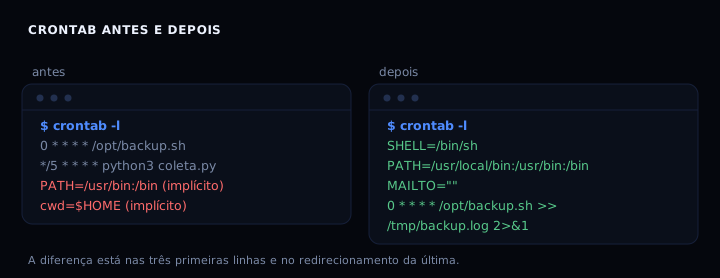
Cron runs with PATH=/usr/bin:/bin, SHELL=/bin/sh, from the user’s $HOME, and without loading .bashrc. That is why a script that works in the terminal fails silently under cron. The fix fits in three lines at the top of the crontab: declare PATH and SHELL, turn off email with MAILTO=”“, and redirect output to a log. The wrapper below adds a file lock so one run cannot start on top of another.
The environment cron does not inherit
Cron is not a shell. It does not read .bashrc, .profile, or /etc/profile. The variables it sets are few: SHELL=/bin/sh, HOME and LOGNAME from /etc/passwd, and PATH=/usr/bin:/bin on Debian and Ubuntu (on root, /usr/sbin:/usr/bin). The working directory is $HOME. That is what I reproduced: with PATH=/usr/bin:/bin, date and flock exist, but anything in /usr/local/bin or ~/.local/bin does not exist for cron. A relative cd also fails, because the starting directory is not the script’s directory.
Measured: with PATH=/usr/bin:/bin, date and flock were found, and the cd to a missing directory failed. The minimal PATH explains half of the “works in the terminal, not in cron” cases.
The crontab
SHELL=/bin/sh
PATH=/usr/local/bin:/usr/bin:/bin
MAILTO=""

0 * * * * /opt/my-job.sh >> /tmp/my-job.log 2>&1
MAILTO=”” turns off email. Without it, any output from the command becomes email to the crontab owner; with no MTA installed, the output goes to syslog and you never see it. The redirect >> ... 2>&1 writes stdout and stderr to the same file, in append mode, so history is not lost.
The wrapper with a lock
#!/usr/bin/env bash
set -euo pipefail

LOG="${LOG:-/tmp/my-job.log}"
LOCK="${LOCK:-/tmp/my-job.lock}"

mkdir -p "$(dirname "$LOG")" "$(dirname "$LOCK")"

exec 9>"$LOCK"
if ! flock -n 9; then
    printf '%s another instance running, exiting
' "$(date -Is)" >> "$LOG"
    exit 0
fi

{
    printf '===== %s start =====
' "$(date -Is)"
    # work goes here
    printf 'ok
'
    printf '===== %s end =====
' "$(date -Is)"
} >> "$LOG" 2>&1

printf 'my-job: ok, log at %s
' "$LOG"
flock -n tries the lock without waiting. If another instance is running, it exits 0 and records it in the log. File descriptor 9 stays open until the script ends, so the lock releases itself. Do not use a pidfile with echo $$: it lies when the process dies without cleaning up.
How to check
Install the crontab with crontab file and inspect it with crontab -l. Run the wrapper by hand: bash /opt/my-job.sh should print my-job: ok, log at .... Watch the log with tail -f /tmp/my-job.log. To confirm cron fired, look in syslog: grep CRON /var/log/syslog (Debian/Ubuntu) or journalctl -u cron.
When it goes wrong
Command not found. Cause: minimal PATH. Fix: declare PATH=/usr/local/bin:/usr/bin:/bin at the top of the crontab, or use an absolute path in the command.
File not found. Cause: the working directory is $HOME and the script used a relative path. Fix: absolute paths everywhere, or cd /opt && ./my-job.sh as the cron command.
Output that never appears. Cause: the default MAILTO tries to send email; with no MTA, output goes to syslog and is lost. Fix: MAILTO=”” plus the redirect >> log 2>&1.
Two instances at once. Cause: the job takes longer than the interval. Fix: flock -n in the wrapper, exiting 0 when it cannot get the lock.
Table
| Symptom | Likely cause | Fix |
|---|---|---|
| “command not found” in the log | minimal PATH | PATH=… in the crontab |
| “No such file” | cwd is $HOME | absolute path |
| error email or silence | default MAILTO | MAILTO=”” + redirect |
| duplicate job | interval shorter than runtime | flock -n |
FAQ
Does cron load .bashrc? No. It reads no profile file. If you need an environment variable, declare it in the crontab or in the wrapper.
Can I use % in the command? % becomes a newline in cron. Escape it with \%.
How do I run every 5 minutes? */5 * * * *. For a fixed time, 0 3 * * * runs at 3am.
Cron or systemd timer? For a machine that powers off, a systemd timer with Persistent=true recovers a missed run. For a server that stays up, cron is enough.
How do I disable a job without deleting it? Comment the line with #. Crontab accepts comments.
Sources
crontab(5) and cron(8), checked in October 2026. The cron environment variables guide summarises the defaults per distribution. For backup routines, restorable rsync backup. To avoid locking yourself out while automating, fail2ban without locking yourself out.