02 Nov 2026 · ferramenta, git · 4 min
Read git diffs with delta
The standard git diff shows lines with + and - in plain text. Delta is a pager that reads that diff and returns the same content with syntax highlighting, line numbers and, if you want, two columns. It does not replace git: it is just the program git calls to show the diff. See also lazygit and bat for reading files.
Install
# Debian/Ubuntu (community package may lag)
sudo apt install git-delta

# or direct binary
curl -LO https://github.com/dandavison/delta/releases/download/0.20.1/delta-0.20.1-x86_64-unknown-linux-musl.tar.gz
tar -xzf delta-0.20.1-x86_64-unknown-linux-musl.tar.gz
sudo install delta-0.20.1-x86_64-unknown-linux-musl/delta /usr/local/bin/delta
delta --version
The current version is 0.20.1 (published 2026-10-04). It is a single binary with no runtime. The project is open source under the MIT license and has more than 20 thousand stars on GitHub.
The gitconfig
[core]
    pager = delta

[interactive]
    diffFilter = delta --color-only

[delta]
    navigate = true
    side-by-side = true
    line-numbers = true
    syntax-theme = Monokai Extended

[merge]
    conflictstyle = diff3
pager = delta makes git call delta instead of less. diffFilter applies delta to git add -p as well. navigate = true lets you jump between files with n and N. side-by-side = true opens two columns. line-numbers shows the line number on both sides. conflictstyle = diff3 shows the common base in merge conflicts.
Three real uses
git diffopens the formatted diff, with highlighting per language and line numbers.git log -puses the same pager, so history becomes readable too.git diff -- file.pyrestricts to one file; navigate jumps between hunks.
Shortcuts inside delta
With navigate = true, use n for the next file and N for the previous one. Inside the diff, the arrows scroll line by line and space scrolls a page. q quits the pager. These shortcuts come from less, so anyone who already uses less learns nothing new.
When not to use delta
Delta is a pager, not a diff generator. If the output goes to a file or to another program, use git --no-pager diff or git diff > changes.patch. In CI scripts, prefer the plain diff, which is stable and does not depend on a terminal. Delta shines for quick reviews in the terminal; for automation it only gets in the way.
How to verify
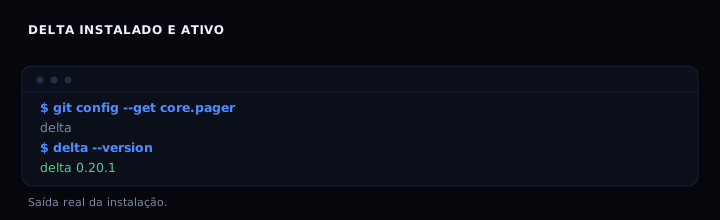
git config --get core.pager
delta --version
git diff | delta --no-gitconfig | head
The first line should print delta. The second, delta 0.20.1. The third shows the diff with formatting, without depending on the gitconfig.
If it goes wrong
- No color: the terminal does not announce 24-bit support. Run
export COLORTERM=truecoloror switchsyntax-themeto a 256-color theme. - Broken columns: narrow terminal. Turn off
side-by-side = trueor widen the window. - Git ignores delta:
core.pagerwas not saved or thePAGERvariable overrides it. Check withgit config --show-origin --get core.pager. - Strange characters in a pipe: use
delta --no-gitconfigto isolate the problem.
Comparison
| Tool | Syntax highlighting | Line numbers | Side by side | Install |
|---|---|---|---|---|
| git diff | no | no | no | already there |
| delta | yes | yes | yes | single binary |
| diff-so-fancy | partial | no | no | npm or Perl |
FAQ
Does delta change the diff? No. It only presents the same diff with formatting. The content does not change.
Does it work with other version control systems? Yes. It reads unified diff from stdin, so any tool that produces that format works. That includes diffs generated by svn, mercurial or custom scripts.
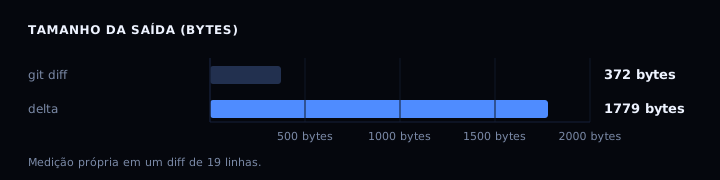
Does the pager make the terminal slower? Barely. A 19-line diff (372 bytes) became 24 lines (1779 bytes) with delta’s formatting. The execution time difference was below what you can measure by hand.
Can I turn delta off for one command?
Yes. Use git --no-pager diff or GIT_PAGER=cat git diff.
Can I use delta with merge conflicts?
Yes. With conflictstyle = diff3, delta shows the common base and both sides of the conflict with highlighting.
Does delta work in a Windows terminal? Yes, through WSL or Git Bash. A native Windows binary is also available on the releases page.
Can I change the color theme?
Yes. syntax-theme accepts bat theme names; run delta --list-syntax-themes to see the installed options.
Sources
#!/usr/bin/env bash
# delta: demonstrates the gitconfig and checks the installation.
set -u

if ! command -v git >/dev/null 2>&1; then
    echo "git not found; install git to run this script"
    exit 0
fi

W=$(mktemp -d)
cd "$W"
git init -q -b main
git config user.email "[email protected]"
git config user.name "demo"

printf 'def soma(a, b):\n    return a + b\n' > calc.py
git add calc.py
git commit -q -m base

printf 'def soma(a, b):\n    """Soma dois inteiros."""\n    return a + b\n\ndef divide(a, b):\n    return a / b\n' > calc.py

echo "=== suggested gitconfig ==="
cat <<'EOF'
[core]
    pager = delta
[delta]
    navigate = true
    side-by-side = true
    line-numbers = true
EOF

echo "=== plain diff ==="
git --no-pager diff

if command -v delta >/dev/null 2>&1; then
    echo "=== with delta ==="
    git --no-pager diff | delta --no-gitconfig
    echo "delta installed: $(delta --version)"
else
    echo "delta not installed; follow the install section"
fi

rm -rf "$W"
echo "done"