23 Oct 2026 · docker, compose, infrastructure · 5 min
How to spin up an app, database and reverse proxy with docker compose from scratch
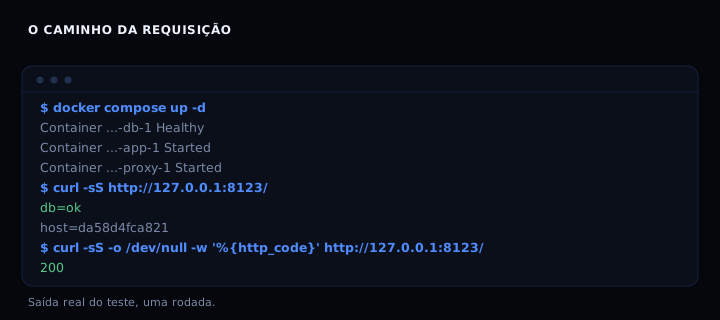
A stack with an app, a database and a reverse proxy comes up from a single compose.yaml plus a .env. The app starts only after the database passes its healthcheck, the proxy starts only after the app, and the database keeps its data in a named volume. I booted it from scratch on a test stack: the database went healthy in about 27 seconds, the app answered db=ok and the proxy returned HTTP 200 on the configured port.
What each service does
db is Postgres. It reads credentials from .env, creates the database on first boot and exposes a healthcheck using pg_isready. Without that healthcheck, the app would try to connect before the database accepted connections and fail on the first boot.
app is a minimal HTTP server in Python. It tries to open a TCP connection to the database on port 5432 and answers db=ok or db=fail. Testing the connection instead of running a query keeps the example short while still proving the path: proxy, app, internal network, database.
proxy is Nginx. It is the only service with a published port (${APP_PORT}:80) and forwards everything to app:8000. The app and the database publish no port, so they are not reachable from outside the compose network.
The whole compose.yaml
services:
  db:
    image: postgres:16-alpine
    environment:
      POSTGRES_USER: ${POSTGRES_USER}
      POSTGRES_PASSWORD: ${POSTGRES_PASSWORD}
      POSTGRES_DB: ${POSTGRES_DB}
    volumes:
      - db-dados:/var/lib/postgresql/data
    healthcheck:
      test: ["CMD-SHELL", "pg_isready -U ${POSTGRES_USER} -d ${POSTGRES_DB}"]
      interval: 5s
      timeout: 3s
      retries: 5
    restart: unless-stopped

  app:
    image: python:3.12-slim
    working_dir: /app
    volumes:
      - ./app.py:/app/app.py:ro
    environment:
      DB_HOST: db
      DB_PORT: "5432"
    command: ["python", "app.py"]
    depends_on:
      db:
        condition: service_healthy
    restart: unless-stopped

  proxy:
    image: nginx:alpine
    ports:
      - "${APP_PORT}:80"
    volumes:
      - ./nginx.conf:/etc/nginx/conf.d/default.conf:ro
    depends_on:
      - app
    restart: unless-stopped

volumes:
  db-dados:
The depends_on with condition: service_healthy is the part most examples skip. Without it, compose starts all three at once and the app dies on the first request because the database is not accepting connections yet.
The .env
POSTGRES_USER=app
POSTGRES_PASSWORD=change-this-password
POSTGRES_DB=appdb
APP_PORT=8080
Change the password before using it. .env does not go into git: add it to .gitignore and keep a .env.example with fake values in the repository. Compose reads .env automatically when it sits in the same directory.
app.py
import http.server, socket, os

def db_ok():
    try:
        with socket.create_connection(
            (os.getenv("DB_HOST", "db"), int(os.getenv("DB_PORT", "5432"))),
            timeout=2,
        ):
            return True
    except OSError:
        return False

class H(http.server.BaseHTTPRequestHandler):
    def do_GET(self):
        ok = db_ok()
        body = ("db=%s\n" % ("ok" if ok else "fail")).encode()
        self.send_response(200 if ok else 503)
        self.send_header("Content-Type", "text/plain; charset=utf-8")
        self.send_header("Content-Length", str(len(body)))
        self.end_headers()
        self.wfile.write(body)
    def log_message(self, *a):
        pass

if __name__ == "__main__":
    http.server.HTTPServer(("0.0.0.0", 8000), H).serve_forever()
The python:3.12-slim image does not contain the code: it enters through a read-only volume (:ro). The image stays generic and the code is versioned together with the compose file.
nginx.conf
server {
    listen 80;
    location / {
        proxy_pass http://app:8000;
        proxy_set_header Host $host;
    }
}
The name app resolves because compose creates an internal network and registers each service by name. Outside that network, app does not exist.
How to verify
Bring the stack up and check the request path:
docker compose up -d
docker compose ps
curl -sS http://127.0.0.1:8080/
Expected output: the database with status healthy, the app and the proxy as Up, and curl printing db=ok with HTTP 200. If the database is not healthy yet, the app will not have started, because depends_on holds the order.
To check whether a compose file has the fields that matter without bringing anything up:
#!/usr/bin/env bash
# verifica-compose.sh: checks a compose file's fields without starting a container.
# usage: bash verifica-compose.sh compose.yaml  (no argument uses the embedded example)
arquivo="${1:-}"
if [ -n "$arquivo" ] && [ -f "$arquivo" ]; then
  origem="$arquivo"
else
  origem=$(mktemp)
  cat > "$origem" <<'YAML'
services:
  db:
    image: postgres:16-alpine
    healthcheck:
      test: ["CMD-SHELL", "pg_isready"]
  app:
    depends_on:
      db:
        condition: service_healthy
  proxy:
    volumes:
      - ./nginx.conf:/etc/nginx/conf.d/default.conf:ro
YAML
fi

conteudo=$(tr '\n' ' ' < "$origem")
faltando=0
conferir() {
  if printf '%s' "$conteudo" | grep -q "$1"; then
    echo "ok    $2"
  else
    echo "FALTA $2"
    faltando=$((faltando + 1))
  fi
}
conferir 'postgres:16-alpine' "database image"
conferir 'healthcheck:' "database healthcheck"
conferir 'condition: service_healthy' "app waits for healthy db"
conferir 'proxy_pass\|nginx.conf' "proxy pointing at app"
if [ "$faltando" -eq 0 ]; then
  echo "compose complete"
  exit 0
else
  echo "incomplete compose: $faltando field(s)"
  exit 1
fi
If it breaks
port is already allocated when bringing the proxy up. Another service already uses port 8080. Change APP_PORT in .env to a free one, for example 8081, and bring it up again. Compose recreates only the proxy.
The app does not start or keeps restarting. The database is not healthy yet, or the app image cannot find app.py. Check docker compose logs app and verify that the volume ./app.py:/app/app.py:ro points at the right file.
db=ok never shows and curl returns 503. The app cannot reach the database. Check that DB_HOST is db (the service name, not localhost) and that both are on the compose default network.
Comparison
| Piece | What it solves | Common alternative |
|---|---|---|
| healthcheck on db | Boot order | sleep in the entrypoint script |
| named volume | Data survives down |
bind mount to a host folder |
| proxy in compose | Single entry point | publish the app port directly |
.env |
Secret out of compose | variables in the host shell |
Publishing the app port directly works, but it exposes the service without headers, compression or routing. The proxy centralises that.
FAQ
Do I need Docker Compose or is the docker compose plugin enough? The docker compose command (with a space) is the current plugin, installed with Docker Engine. The old docker-compose (with a hyphen) is discontinued. Always use the plugin.
Does the db-dados volume disappear when I run docker compose down? No. down removes containers and the network, but keeps named volumes. To delete the data, use docker compose down -v.
Can I use another database image? Yes. Swap the image and adjust the healthcheck: for MySQL use mysqladmin ping, for Redis use redis-cli ping. The rest of the compose stays the same.
Why does the app test TCP instead of running a query? To keep the example short and free of driver dependencies. In production, the app healthcheck should verify what actually matters, for example a /health route that queries the database.
Does the proxy need a build? No. The nginx:alpine image is ready to use and the configuration enters through a read-only volume. No Dockerfile, no build, no cache to invalidate.
Sources
- Docker Compose specification (accessed 23 Oct 2026)
- Docker Compose healthcheck (accessed 23 Oct 2026)
- Postgres image on Docker Hub (accessed 23 Oct 2026)
- Nginx image on Docker Hub (accessed 23 Oct 2026)
See also limiting memory, logs and restarts of a container and running containers as non-root.