25 Oct 2026 · linux, seguranca · 4 min
How do you store a secret in an environment variable without leaking it?
A secret in code or in a log is already a lost secret. A .env file solves storage, but only if the file mode and the .gitignore rule are right. The script below creates the file with mode 600, generates the .gitignore and tests whether the value shows up in a log. See also cron done right for how cron inherits (or not) environment variables, and containers without root for running the service without privilege.
What leaks and why
Three paths usually leak a secret: the .env file enters git because nobody added the ignore rule; the application log prints the whole variable during debugging; and the secret sits in a shell variable exported by a script running as root and read by another user. The first is the most common and the cheapest to prevent.
The Twelve-Factor rule helps frame it: configuration varies between deploys, code does not. A secret is configuration, so it does not belong in the repository. A .env outside git with mode 600 covers the single-host case. For several hosts or frequent rotation, a secret manager (Vault, SOPS, the provider’s vault) starts to earn its cost.
The artifact
```bash
!/usr/bin/env bashset -euo pipefail
DEMO=$(mktemp -d) cd “$DEMO”
1. arquivo de segredos com permissão restritaumask 077 cat > .env <<’ENV’ APP_SECRET=sk_live_9f8e7d6c5b4a3210 DB_PASSWORD=hunter2-nao-use-isso ENV chmod 600 .env
echo “=== permissão do .env ===” stat -c ‘%a %U:%G %n’ .env
2. .gitignore precisa cobrir .envif [ ! -f .gitignore ] || ! grep -qxF ‘.env’ .gitignore; then printf ‘%s\n’ ‘.env’ ‘.env.*’ ‘!.env.example’ >> .gitignore fi echo “=== .gitignore ===” cat .gitignore
3. leitura mascarada: nunca imprime o segredo inteiromask() { local v=”$1” if [ “${#v}” -le 4 ]; then printf ‘****’ else printf ‘%s…%s’ “${v:0:2}” “${v: -2}” fi }
set -a
shellcheck disable=SC1091. ./.env set +a
echo “=== variáveis carregadas (mascaradas) ===” printf ‘APP_SECRET=%s\n’ “$(mask “$APP_SECRET”)” printf ‘DB_PASSWORD=%s\n’ “$(mask “$DB_PASSWORD”)”
4. teste de vazamento em log: o log nunca pode conter o valor brutoLOG=”$DEMO/run.log” { printf ‘inicio %s\n’ “$(date -Is)” printf ‘APP_SECRET=%s\n’ “$(mask “$APP_SECRET”)” printf ‘fim\n’ } > “$LOG”
echo “=== teste de vazamento ===” if grep -Fq “$APP_SECRET” “$LOG” || grep -Fq “$DB_PASSWORD” “$LOG”; then echo “FALHA: segredo encontrado no log” exit 1 else echo “ok: nenhum segredo bruto no log” fi
5. exemplo de unit systemd (não executa aqui; é o que o leitor cola)echo “=== unit de exemplo (EnvironmentFile) ===” cat <<’UNIT’ [Service] EnvironmentFile=/etc/meu-app/.env ExecStart=/usr/local/bin/meu-app UNIT
echo “=== pronto ===”```
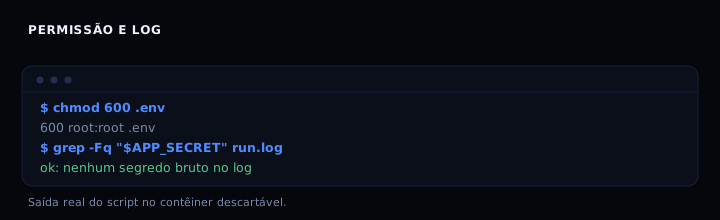
The script sets umask 077 before creating .env, so the file is born with mode 600 even if the shell umask is relaxed. Reading is masked: the mask function shows only the first two and last two characters. The final test searches for the raw value in the log and fails if it finds it.
How to verify
Run bash env.sh. Expected output includes the line 600 in the stat output and ok: nenhum segredo bruto no log. In a real repository, also confirm with git status --porcelain --ignored, which should list !! .env.
If it goes wrong
.envshows ingit status: the ignore rule was added after the file was already tracked. Usegit rm --cached .envand commit; the rule only applies to files not yet tracked.Permission deniedreading .env: the process runs as another user. Change the file owner withchownto the service user, keeping mode 600, or use systemd’s vault withLoadCredential.- Secret in the log even with mask: some other spot prints
os.environwhole, or the framework logs the request with headers. Search forprint(env)and for logging middleware.
.env, shell or vault
| Approach | When to use | Limit |
|---|---|---|
| .env file with mode 600 | One host, one service, stable secret | Manual rotation, no audit |
| Variable in shell or crontab | Single ephemeral command | Stays in history and in ps |
| Secret manager | Several hosts or automatic rotation | One more dependency to operate |
FAQ
Can I commit a .env.example? Yes, as long as it contains only variable names and example values without a secret. The script adds !.env.example for that.
Does systemd read .env directly? Yes, with EnvironmentFile=/etc/meu-app/.env. The example line in the script shows the unit. systemd ignores lines starting with # and requires KEY=VALUE without export.
Is chmod 600 enough? For a host with a single service user, yes. If several users need to read, use a dedicated group with mode 640 and a service group, not 644.
How to rotate without stopping the service? Update .env and reload the service (systemctl reload or the app’s mechanism). If the app reads the file only at boot, a restart is needed. Keep the .env outside the deployment artifact so a rollback does not restore an old secret.
Is it worth encrypting .env in git? For a small team, no. If you need to version a secret, use SOPS or git-crypt, not the plain file. Rotate through your deploy pipeline, not by hand.
Sources
- systemd.exec (EnvironmentFile), accessed 25 Oct 2026
- gitignore, accessed 25 Oct 2026
- Twelve-Factor App, config, accessed 25 Oct 2026
- OWASP Secrets Management, accessed 25 Oct 2026