23 Oct 2026 · tools, json, terminal · 5 min
How to query JSON in the terminal with jq
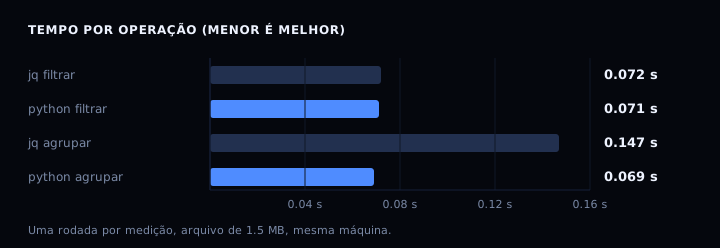
jq is a command line filter for JSON: it reads from input, applies an expression and prints the result. With a file of four services, extracting names, filtering by status, sorting by memory, summing and converting to CSV are five one-liners. Measured on 20,000 records: filtering takes 0.072 s with jq against 0.071 s with Python; grouping takes 0.147 s against 0.069 s.
What jq does
jq is neither a JSON editor nor a database. It takes a JSON document, applies an expression and prints the result as JSON, text or CSV. The simplest expression is ., which prints the whole document formatted. From there, you chain filters with |, like a shell.
The default output is formatted JSON. For raw text, use the -r (raw) flag. For CSV, use @csv inside the expression. That combination is what makes jq useful in scripts: one line replaces dozens of Python lines.
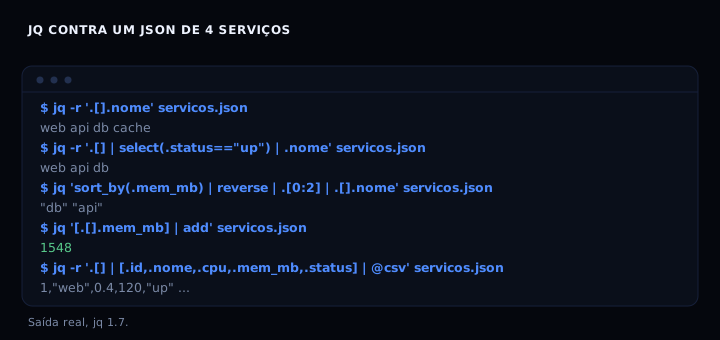
The five filters that cover 90% of usage
Extract a field from each element:
jq -r '.[].nome' servicos.json
Filter by condition:
jq -r '.[] | select(.status == "up") | .nome' servicos.json
Sort and take the first:
jq 'sort_by(.mem_mb) | reverse | .[0:2] | .[].nome' servicos.json
Aggregate:
jq '[.[].mem_mb] | add' servicos.json
Convert to CSV:
jq -r '.[] | [.id, .nome, .cpu, .mem_mb, .status] | @csv' servicos.json
The point that trips up beginners: .[] iterates the array, but select must come after the |, because it filters element by element. sort_by and reverse operate on the whole array, so they come before .[0:2].
The artifact: a script that runs all five
The consultar-json.sh below runs the five queries against any JSON file in the example format. If jq is not installed, it warns and exits 0, so it does not break a pipeline. With no file argument, it uses the embedded example.
#!/usr/bin/env bash
# consultar-json.sh: the five jq queries that cover most usage.
# usage: bash consultar-json.sh [file.json]
# no file uses the embedded example. exits 0 even without jq installed.

if ! command -v jq >/dev/null 2>&1; then
  echo "jq not found: install with 'apt install jq' or 'brew install jq'"
  exit 0
fi

if [ -n "${1:-}" ] && [ -f "$1" ]; then
  arquivo="$1"
else
  arquivo=$(mktemp)
  cat > "$arquivo" <<'JSON'
[
  {"id": 1, "nome": "web", "cpu": 0.4, "mem_mb": 120, "status": "up"},
  {"id": 2, "nome": "api", "cpu": 1.2, "mem_mb": 340, "status": "up"},
  {"id": 3, "nome": "db", "cpu": 0.1, "mem_mb": 1024, "status": "up"},
  {"id": 4, "nome": "cache", "cpu": 0.0, "mem_mb": 64, "status": "down"}
]
JSON
fi

echo "== names =="
jq -r '.[].nome' "$arquivo"

echo "== active services =="
jq -r '.[] | select(.status == "up") | .nome' "$arquivo"

echo "== two largest by memory =="
jq 'sort_by(.mem_mb) | reverse | .[0:2] | .[].nome' "$arquivo"

echo "== total memory =="
jq '[.[].mem_mb] | add' "$arquivo"

echo "== csv =="
jq -r '.[] | [.id, .nome, .cpu, .mem_mb, .status] | @csv' "$arquivo"
How to verify
Install jq and run the script against the example:
apt install jq        # debian/ubuntu
brew install jq       # macos
bash consultar-json.sh
Expected output: four names in the first section, three active in the second, db and api in the third, 1548 in the fourth and four CSV lines in the last. If jq is not installed, the script prints the install instruction and exits 0, without breaking a pipeline.
To validate an expression’s syntax without running it over large data, use --null-input:
jq -n '1 + 2'
If it breaks
parse error: Invalid numeric literal. The input JSON has a syntax error, usually a trailing comma or single quotes. Validate first with jq empty file.json: on error it points at the line.
Cannot index string with string "nome". The expression assumed an array but the document is an object. Check the structure with jq 'type' file.json and adjust the filter: .items[].nome instead of . [].nome.
jq: command not found in CI. The container’s base image has no jq. Install it in the Dockerfile with apt-get install -y jq, or use the stedolan/jq image to process files in a pipeline. Do not call jq in a python:slim container without installing it first.
Output with quotes when you wanted text. You missed the -r flag. Without it, strings come out quoted, which breaks pipes to other commands.
Comparison
| Tool | Strength | Weakness |
|---|---|---|
jq |
One line per query, formatted output | Its own syntax to learn |
| Python + json | Known to anyone who codes | Verbose for simple filters |
grep/sed |
Fast on simple text | Breaks on nested JSON or values with commas |
fx/jless |
Interactive interface | Needs a TTY, useless in scripts |
grep works while the JSON is simple and on one line. The moment a nested field or a value with a comma appears, it lies. jq is the safe bet in scripts.
FAQ
Does jq modify the original file? No. It reads from input and writes to output. To overwrite, redirect: jq '.[] | .nome = "x"' file.json > tmp && mv tmp file.json. Never use > file.json in the same command, because the shell truncates the file before jq reads it.
Can I use jq on JSON Lines (one object per line)? Yes. Use -s to slurp (reads everything into an array) or process line by line without -s. For NDJSON, jq -c '.' emits one object per line, useful to feed other commands.
What is the difference between jq and yq? jq is for JSON. yq applies the same idea to YAML, XML and TOML. The syntax is similar but not identical. If your data is JSON, use jq.
Is jq fast enough for large files? For files up to a few megabytes, yes. Above that, consider jaq (Rust implementation, faster) or gojq. For gigabytes, use a database or a streaming tool.
How do I debug a long expression? Break it into steps: run jq '.[]' first, then jq '.[] | select(...)', then add | .field. jq prints the result of each step if you stop at the |.
Sources
- jq manual (accessed 23 Oct 2026)
- jq on GitHub (accessed 23 Oct 2026)
- jq tutorial (accessed 23 Oct 2026)
See also curl in practice: testing apis, reading headers and timing requests and ready made mcp servers to plug into your agent.