16 Oct 2026 · ia, llama.cpp, cpu · 5 min
Running a language model on CPU with llama.cpp
A 630 million parameter model runs at 50.95 tokens per second on a 4 core CPU, with no GPU anywhere, using 952.6 MiB of memory at peak. llama.cpp is what makes it possible: a 17 MB binary that reads a GGUF file and speaks the OpenAI API if you want it to. What nobody mentions is that quantizing harder does not always mean running faster.
Why llama.cpp runs on a small machine
The ggml project rewrote the Transformer to work on a CPU, without the operations that only make sense on a graphics card. The result is a file format, GGUF, with the weights converted into a layout the CPU can load directly, no GPU library in the way. I downloaded the official tarball and the llama-cli, llama-bench and llama-server binaries all came with it.
The llama.cpp license is MIT, permissive: commercial use, modification and distribution, with the only requirement of keeping the copyright notice. The Qwen2.5-0.5B-Instruct model I used is apache-2.0. Two open licenses, no license cost to run any of it.
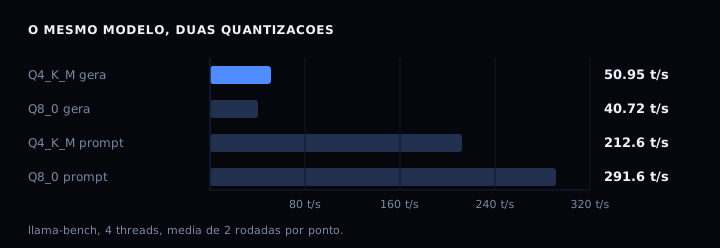
That chart is the finding here. Q8_0, 176 MiB larger on disk, read the prompt 37% faster: 291.60 against 212.60 tokens per second. And it generated 20% slower: 40.72 against 50.95. If you quantize harder expecting a speedup across the board, you pay with the part that matters.
The artifact
The script below measures the model sitting in the directory: version, file size, benchmark, a test generation and peak memory. It installs nothing. If the binary or the model is missing, it prints the exact command to fetch it instead of failing halfway.
#!/usr/bin/env bash
# roda-llama.sh: mede o llama.cpp no modelo GGUF que esta na pasta.
# uso: bash roda-llama.sh [MODELO_GGUF]
# Nao instala nada no sistema: tudo cai na pasta atual.

VERSAO="b11688"
PASTA="llama-${VERSAO}"
MODELO="${1:-qwen2.5-0.5b-instruct-q4_k_m.gguf}"
URL_BINARIO="https://github.com/ggml-org/llama.cpp/releases/download/${VERSAO}/llama-${VERSAO}-bin-ubuntu-x64.tar.gz"
URL_MODELO="https://huggingface.co/Qwen/Qwen2.5-0.5B-Instruct-GGUF/resolve/main/${MODELO}"

# 1. o binario de CPU. o tarball tem 17 MB e traz llama-cli, llama-bench e llama-server
if [ ! -d "$PASTA" ]; then
  echo "=== falta o binario ==="
  echo "para pegar, rode:"
  echo "  curl -fL -o llama.tar.gz ${URL_BINARIO} && tar xzf llama.tar.gz"
  echo "nada foi medido ainda."
  exit 0
fi

# 2. o modelo quantizado. GGUF e o formato que o llama.cpp le direto
if [ ! -f "$MODELO" ]; then
  echo "=== falta o modelo ==="
  echo "para pegar, rode:"
  echo "  curl -fL -o ${MODELO} ${URL_MODELO}"
  echo "nada foi medido ainda."
  exit 0
fi

export LD_LIBRARY_PATH="$PWD/$PASTA"
BIN="$PWD/$PASTA"

echo "=== versao ==="
"$BIN/llama-cli" --version 2>&1 | head -2

# 3. tamanho do modelo em disco
TAM=$(wc -c < "$MODELO")
echo "modelo: ${MODELO}"
echo "tamanho: $((TAM / 1048576)) MiB"

# 4. benchmark: leitura de prompt (pp) e geracao (tg), 4 threads, media de 2 rodadas
echo "=== benchmark: 4 threads, pp128 e tg64 ==="
"$BIN/llama-bench" -m "$MODELO" -t 4 -p 128 -n 64 -r 2 2>&1 | grep -E '^\|.*(pp128|tg64)'

# 5. uma geracao de verdade, temperatura zero para o texto sair sempre igual
echo "=== teste de geracao ==="
"$BIN/llama-cli" -m "$MODELO" -t 4 -n 48 --temp 0 \
  -p "Explique em uma frase o que e um container." 2>&1 | tail -6

# 6. pico de memoria do processo, quando o /usr/bin/time existe na maquina
echo "=== pico de memoria ==="
if [ -x /usr/bin/time ]; then
  /usr/bin/time -v "$BIN/llama-cli" -m "$MODELO" -t 4 -n 24 --temp 0 \
    -p "O que e Docker?" 2>&1 | grep -E 'Maximum resident|Elapsed'
else
  echo "/usr/bin/time nao existe nesta maquina, pulando a medicao de memoria"
fi
Save it as roda-llama.sh. For the two downloads, before you run it:
curl -fL -o llama.tar.gz https://github.com/ggml-org/llama.cpp/releases/download/b11688/llama-b11688-bin-ubuntu-x64.tar.gz
tar xzf llama.tar.gz

curl -fL -o qwen2.5-0.5b-instruct-q4_k_m.gguf https://huggingface.co/Qwen/Qwen2.5-0.5B-Instruct-GGUF/resolve/main/qwen2.5-0.5b-instruct-q4_k_m.gguf
The first line pulls 17 MB, the last one 468 MiB. After that the script measures.
How to verify
Here is the output I measured, running the script in a clean directory:
version: 0.7.0-dev (build 11688, commit 3dbcb7fca)
modelo: qwen2.5-0.5b-instruct-q4_k_m.gguf
tamanho: 468 MiB
| qwen2 1B Q4_K - Medium | 462.96 MiB | 630.17 M | CPU | 4 | pp128 | 238.90 ± 2.28 |
| qwen2 1B Q4_K - Medium | 462.96 MiB | 630.17 M | CPU | 4 |  tg64 |  52.69 ± 0.67 |
[ Prompt: 206.2 t/s | Generation: 50.7 t/s ]
Maximum resident set size (kbytes): 975692
The standard deviation printed after each number is why I do not sell 50.95 as truth. I ran the same model three times in one day: generation landed between 49 and 53 tokens per second, prompt between 212 and 239. Your number moves with machine load, and that is normal.
If you want the API instead of the terminal, the same binary starts an OpenAI compatible server. That is what I used to ask “say hi in one word”, which answered “Hello!” in 231 milliseconds, 40 tokens total:
export LD_LIBRARY_PATH="$PWD/llama-b11688"
./llama-b11688/llama-server -m modelo.gguf -t 4 --port 8099 -ngl 0

curl -s http://localhost:8099/health
The -ngl 0 turns off GPU layers. Without it, llama.cpp will use a GPU if it finds one.
If it goes wrong
The binary says error while loading shared libraries. Cause: the .so files from the tarball itself are not on the path. Fix: export LD_LIBRARY_PATH=$PWD/llama-b11688, which is what the script does.
Generation repeats the same sentence until it hits the limit. Cause: the model is too small for the task. A 0.5 billion parameter model gets the sense of the question wrong and makes it embarrassing. Fix: go up to 1.5 or 7 billion and measure again, or drop the temperature to zero and accept the short answer.
The server starts and anyone on the network can call it. Cause: without --api-key it logs a warning that it accepts every origin. Fix: pass --api-key and keep it listening on 127.0.0.1.
Table
| Quantization | Size | Prompt (t/s) | Generation (t/s) |
|---|---|---|---|
| Q4_K_M | 468.6 MiB | 212.60 | 50.95 |
| Q5_K_M | 497.9 MiB | not measured | not measured |
| Q8_0 | 644.4 MiB | 291.60 | 40.72 |
Q5_K_M is in the table for its size, which I read off the server. The two rows with numbers are the ones I measured. I would rather leave the gap marked than invent the middle row.
Memory and time count too. Process peak was 952.6 MiB for a model that is 468.6 MiB on disk, more than double, because the runtime holds the weights and the context. To measure this in a service, the post on memory audit shows how to read process consumption from the outside.
FAQ
Do I need a GPU to run a model? No. llama.cpp was built for CPU. A GPU helps, but the CPU binary alone gives 50 tokens per second on a small model.
Does a 7 billion model fit on an 8 GB machine? With Q4_K_M quantization, yes: the file is about 4.5 GB and the process stays near 6 GB. With Q8_0, no.
Does the model license matter? Yes. llama.cpp is MIT, but the model carries its own license, and Qwen2.5-0.5B-Instruct is apache-2.0. Check the model’s license before you ship it.
Can I swap models without recompiling? Yes. GGUF is an open format and llama-cli takes any compatible file. Download another .gguf and point at it.
Sources
llama.cpp and the project’s MIT license, build b11688 checked on 16 October 2026. The model is Qwen2.5-0.5B-Instruct-GGUF, apache-2.0, same day. For the other end of the same problem, on the side that runs in the cloud, the post on cost per AI consumer compares what you can pay per token.