22 Oct 2026 · linux, cgroups, containers, kernel · 4 min
What cgroups are: how linux limits cpu and memory
A container is not a virtual machine. It is an ordinary Linux kernel process that receives a resource limit via cgroup. The cgroup is the structure that says: this process may use at most 256 MB of memory and half a CPU. Without a cgroup, the process competes with everything else on the host.
The answer paragraph
cgroup (control group) is the kernel structure that groups processes and applies limits on CPU, memory, I/O and number of processes. When you run docker run -m 256m --cpus 0.5, Docker creates a cgroup with memory.max = 268435456 bytes and cpu.max = 50000 100000. The process inside the container sees these numbers in /sys/fs/cgroup.
What the kernel shows
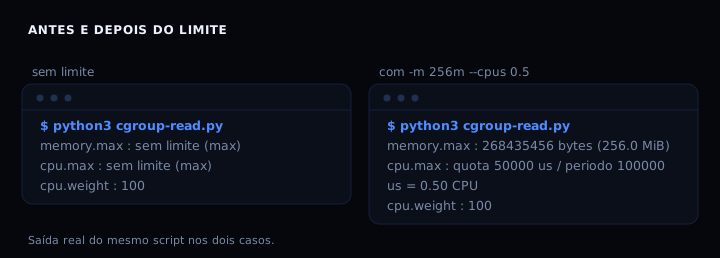
Without a limit, memory.max is max (no ceiling) and cpu.max is max 100000 (no quota). With -m 256m --cpus 0.5, the kernel writes 268435456 and 50000 100000. The CPU quota means: in every period of 100000 microseconds, the group may consume at most 50000 microseconds of CPU. That is half a processor.
The artifact: reads the cgroup of its own process
#!/usr/bin/env python3
# cgroup-read.py
# Reads the cgroup v2 files of its own process and shows what the kernel sees.
# Run inside a container with a limit to see the numbers change:
#   docker run --rm -m 256m --cpus 0.5 python:3.12-slim python3 cgroup-read.py
import pathlib

base = pathlib.Path('/sys/fs/cgroup')

def read(name):
    p = base / name
    if not p.exists():
        return None
    try:
        return p.read_text().strip()
    except OSError:
        return None

def human(n):
    n = int(n)
    for unit in ('B', 'KiB', 'MiB', 'GiB'):
        if n < 1024 or unit == 'GiB':
            return f'{n} {unit}'
        n /= 1024
    return f'{n} GiB'

mem_max = read('memory.max')
mem_cur = read('memory.current')
cpu_max = read('cpu.max')
cpu_w = read('cpu.weight')
pids_max = read('pids.max')

print('cgroup v2 of the current process')
print('===========================')
if mem_max is not None:
    if mem_max == 'max':
        print('memory.max    : no limit (max)')
    else:
        print(f'memory.max    : {mem_max} bytes ({human(mem_max)})')
if mem_cur is not None:
    print(f'memory.current: {mem_cur} bytes ({human(mem_cur)})')
    if mem_max and mem_max != 'max':
        pct = int(mem_cur) * 100 // int(mem_max)
        print(f'              : {pct}% of the limit in use')
if cpu_max is not None:
    parts = cpu_max.split()
    if parts and parts[0] == 'max':
        print('cpu.max       : no limit (max)')
    else:
        quota, period = parts[0], parts[1]
        cpus = int(quota) / int(period)
        print(f'cpu.max       : quota {quota} us / period {period} us = {cpus:.2f} CPU')
if cpu_w is not None:
    print(f'cpu.weight    : {cpu_w} (default 100; higher = more priority under contention)')
if pids_max is not None:
    print(f'pids.max      : {pids_max}')

# cgroup v1 (fallback on older hosts)
v1_mem = pathlib.Path('/sys/fs/cgroup/memory/memory.limit_in_bytes')
if v1_mem.exists() and mem_max is None:
    print('memory.limit_in_bytes (v1):', v1_mem.read_text().strip())
v1_cpu = pathlib.Path('/sys/fs/cgroup/cpu/cpu.cfs_quota_us')
if v1_cpu.exists() and cpu_max is None:
    print('cpu.cfs_quota_us (v1):', v1_cpu.read_text().strip())
The script installs nothing and runs in any container with Python 3.
How to verify
Run the script without a limit and with a limit, and check the difference. Expected output, copied from a real run:
Without a limit:
memory.max    : no limit (max)
cpu.max       : no limit (max)
cpu.weight    : 100
With -m 256m --cpus 0.5:
memory.max    : 268435456 bytes (256.0 MiB)
cpu.max       : quota 50000 us / period 100000 us = 0.50 CPU
cpu.weight    : 100
If memory.max shows max even with -m, the container is running on cgroup v1 or the runtime did not apply the limit. Check the Docker and kernel versions.
If it goes wrong
memory.max shows max even with -m 256m. The runtime may not have applied the limit, or the host uses cgroup v1 and the path is different. The script tries the v1 fallback (memory.limit_in_bytes). If it still does not show up, run docker inspect on the container and check HostConfig.Memory.
cpu.max shows max 100000 even with –cpus 0.5. Same problem: limit not applied. On cgroup v1, the files are cpu.cfs_quota_us and cpu.cfs_period_us. The script covers both.
The script fails with FileNotFoundError. The path /sys/fs/cgroup may not be mounted in the container (rare, but happens in restricted environments). Mount with --cgroupns host or run on the host directly.
The memory limit kills the process (OOM killed). That is expected: when memory.current reaches memory.max, the kernel invokes the OOM killer. The post Docker memory limits covers how to avoid it.
cgroup v1 and v2
| Version | Memory file | CPU file | When it appears |
|---|---|---|---|
| v2 (unified) | memory.max | cpu.max (quota period) | kernel >= 5.0, recent hosts |
| v1 (hierarchy) | memory/memory.limit_in_bytes | cpu/cpu.cfs_quota_us | older hosts, some managed environments |
Most current hosts use v2. The script detects which is present and uses the v1 fallback when needed.
FAQ
Is a container just a cgroup? No. A container is namespaces (isolation of view: processes, network, mounts) plus cgroup (resource limit) plus a file system image. The cgroup is the part that answers the question ‘how much can I use’.
What happens when the process exceeds the memory limit? The kernel kills the process (OOM kill) or returns an allocation error, depending on configuration. There is no swap by default unless you configure it.
What is cpu.weight for? When two groups contend for CPU and both are at the limit, the weight decides the proportion. Default 100. A group with weight 200 gets twice as much under contention.
How do I see the cgroup of a process on the host?
Read /proc/<pid>/cgroup. It points to the cgroup path in /sys/fs/cgroup. From there, read the files.
Do Docker and Kubernetes use cgroup differently? Kubernetes passes the pod limits to the runtime (containerd or CRI-O), which creates the cgroup. The mechanism is the same; the difference is who writes the files.
Sources: cgroups(7), kernel docs cgroup v2, Docker resource constraints. See also Docker memory limits and container without root.