22 Oct 2026 · linux, disco, diagnostico · 4 min
Disk full: how to find what is taking the space
The disk is full and df says 100%. What matters is not the total, it is who is occupying it. Three commands in sequence solve most cases: du to find the directory, find to find the file, and reading /proc for the case where the file was already deleted but still holds space because a process keeps it open.
The answer paragraph
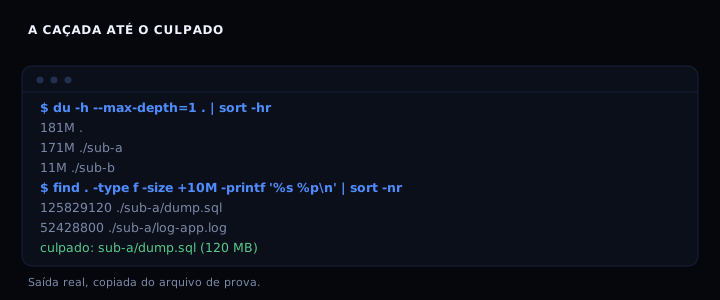
Run du -h --max-depth=1 | sort -hr to see which directory weighs the most. Then find . -type f -size +50M to list large files. If the space did not come back after deleting, look in /proc/*/fd for entries marked (deleted): the file is gone from ls, but the inode is still alive.
The artifact: three steps in one script
#!/usr/bin/env bash
# find-what-fills-disk.sh
# Usage: ./find-what-fills-disk.sh [directory] [minimum_size_in_MB]
set -euo pipefail

DIR="${1:-.}"
MIN="${2:-50}"

# 1. size per directory, one level, largest first
echo '=== 1. size per directory (one level) ==='
du -h --max-depth=1 "$DIR" 2>/dev/null | sort -hr

# 2. files larger than MIN MB, in bytes, largest first
echo

echo "=== 2. files larger than ${MIN}MB ==="
find "$DIR" -type f -size +"${MIN}M" -printf '%s %p\n' 2>/dev/null | sort -nr |
  while read -r size path; do
    mb=$(awk -v b="$size" 'BEGIN { printf "%.1f", b/1024/1024 }')
    printf '%10s MB  %s\n' "$mb" "$path"
  done

# 3. deleted files still holding space, via /proc (no lsof needed)
echo

echo '=== 3. deleted files still holding space (open fd) ==='
found=0
for fd in /proc/[0-9]*/fd/*; do
  [ -L "$fd" ] || continue
  target=$(readlink "$fd" 2>/dev/null || true)
  case "$target" in
    *'(deleted)'*)
      pid=$(echo "$fd" | sed -E 's#/proc/([0-9]+)/fd/.*#\1#')
      size=$(stat -L -c %s "$fd" 2>/dev/null || echo 0)
      mb=$(awk -v b="$size" 'BEGIN { printf "%.1f", b/1024/1024 }')
      if awk -v m="$mb" 'BEGIN { exit (m+0 > 0) ? 0 : 1 }'; then
        printf '%10s MB  pid=%s  %s\n' "$mb" "$pid" "$target"
        found=1
      fi
      ;;
  esac
done
[ "$found" -eq 0 ] && echo '(no deleted file still open found)'
The script installs nothing, writes no file and runs with the tools already present in a minimal Linux install.
How to verify
Run the script in a test directory and check the three sections. Expected output, copied from a real run (directory with 181 MB total):
=== 1. size per directory (one level) ===
181M  .
171M  ./sub-a
 11M  ./sub-b

=== 2. files larger than 50MB ===
   120.0 MB  ./sub-a/dump.sql
    50.0 MB  ./sub-a/log-app.log

=== 3. deleted files still holding space (open fd) ===
    30.0 MB  pid=2001844  .../segredo.log (deleted)
If section 3 shows an entry, the file was removed from the directory but the process still holds it open. The fix is to restart the process (or close the descriptor), not delete again.
If it goes wrong
du shows 181 MB but df says 10 GB used. du does not count space reserved for the root user (typically 5% on ext4) nor deleted files still open. Run section 3 of the script. If it is empty, check df -i: it may be inodes, not bytes.
find does not find the large file. find starts from the current directory by default. Pass an absolute path, for example ./find-what-fills-disk.sh /var/log 10. Files on different mount points do not show up; use df to see the mounts first.
section 3 lists nothing but the space did not come back. The file may have been deleted by another user or the process may have closed the descriptor between the removal and the read. Run lsof +L1 if lsof is installed; it shows the same data with more detail.
Alternatives
| Tool | What it does differently | When to use |
|---|---|---|
| ncdu | interactive interface, browse by directory | when you want to explore, not just the top |
| dust | visual bars, faster than du | when the directory has thousands of files |
| lsof +L1 | lists only deleted files still open | when du and df do not agree |
| du -sh * | total per entry, no recursion | for a quick look at the current directory |
The script above covers the common case without installing anything. ncdu and dust are convenient, but they require installation, which is not always possible on a production server.
FAQ
Why do du and df disagree? du sums the size of files that exist in the directory. df counts blocks allocated on the file system, including reserved space, metadata and deleted files still open. The difference is normal; what matters is the trend.
How do I find what fills a Docker container?
Enter the container with docker exec -it name bash and run the script there. The container file system is separate from the host, so running it on the host does not find the container files.
The large file is a log. Delete or rotate?
Rotate. Deleting a log open by a service does not free space until the service restarts. Use logrotate or truncate with : > file if you know the service reopens the descriptor. See also the post cron done right to schedule rotation.
What if it is the systemd journal?
Limit it with journalctl --vacuum-size=100M or --vacuum-time=7d. This is safe and immediate.
Can I run find on the whole system?
Yes, but with care: find / -type f -size +100M walks everything, including network mounts. Add -xdev to avoid crossing file systems.
Sources: du(1), find(1), lsof(8). See also what eats RAM and rsync backups you can actually restore.