24 Oct 2026 · seguranca, ssh, linux · 4 min
How to harden SSH: what to turn off and what to keep
Most SSH servers ship with password login enabled, root allowed in, and X11 forwarding turned on. Turning off those three and requiring a public key stops most automated attacks. The rest is tuning limits and ciphers.
What to turn off
PasswordAuthentication no removes the most attacked path. Password brute force is what fills the log with attempts. Without passwords, an attacker needs the private key, which changes the game.
PermitRootLogin no blocks direct root login. Even with a key, root cannot get in. Anyone who needs privilege logs in as a normal user and uses sudo.
X11Forwarding no disables the GUI tunnel. Almost nobody uses it, and it is extra attack surface.
AllowTcpForwarding no and AllowAgentForwarding no close TCP tunnels and agent forwarding. If you use a tunnel for a database or an internal service, keep AllowTcpForwarding yes inside a Match block for the user or host that needs it.
ClientAliveInterval 300 with ClientAliveCountMax 2 kills idle sessions after ten minutes. It avoids forgotten open terminals.
What to keep
PubkeyAuthentication yes is what remains. It is the method you want.
AuthenticationMethods publickey says only public keys count. No fallback to password.
UsePAM yes keeps PAM active. Needed for a second factor via PAM, such as Google Authenticator or Duo.
Subsystem sftp stays. Turning it off breaks clients that use SFTP and tools like rsync over SSH.
StrictModes yes checks key file permissions. Already the default, but explicit costs nothing.
LogLevel VERBOSE logs which key was used in each login. It helps audit who connected and when, without exposing sensitive data.
The artifact
Create the file /etc/ssh/sshd_config.d/99-hardening.conf. OpenSSH reads everything in sshd_config.d in alphabetical order, and the first occurrence of a directive wins.
# generate the SSH hardening file (review before applying)
mkdir -p /tmp/ssh-hardening
cat > /tmp/ssh-hardening/99-hardening.conf <<'EOF'
# ssh hardening: what to turn off and what to keep

# authentication
PermitRootLogin no
PasswordAuthentication no
KbdInteractiveAuthentication no
PubkeyAuthentication yes
AuthenticationMethods publickey
PermitEmptyPasswords no
MaxAuthTries 3
LoginGraceTime 30

# session
X11Forwarding no
AllowTcpForwarding no
AllowAgentForwarding no
AllowStreamLocalForwarding no
PermitTunnel no
ClientAliveInterval 300
ClientAliveCountMax 2
TCPKeepAlive no

# limits
MaxSessions 4
MaxStartups 10:30:100

# misc
UseDNS no
PrintMotd no
PrintLastLog yes
Banner none

# keep sftp
Subsystem sftp /usr/lib/openssh/sftp-server
EOF
echo "file generated:"
wc -l /tmp/ssh-hardening/99-hardening.conf
echo "--- contents ---"
cat /tmp/ssh-hardening/99-hardening.conf
Apply without dropping the current session:
sudo sshd -t && sudo systemctl reload ssh
sshd -t validates syntax. If it passes, reload applies without closing open connections.
How to verify
Confirm the effective policy:
sudo sshd -T | grep -E '^(permitrootlogin|passwordauthentication|kbdinteractiveauthentication|pubkeyauthentication|authenticationmethods|maxauthtries|logingracetime|x11forwarding|allowtcpforwarding|allowagentforwarding|clientaliveinterval|clientalivecountmax|tcpkeepalive|maxsessions|maxstartups|usedns|subsystem)'
Expected output, with the values you set:
permitrootlogin no
passwordauthentication no
kbdinteractiveauthentication no
pubkeyauthentication yes
authenticationmethods publickey
maxauthtries 3
logingracetime 30
x11forwarding no
allowtcpforwarding no
allowagentforwarding no
clientaliveinterval 300
clientalivecountmax 2
tcpkeepalive no
maxsessions 4
maxstartups 10:30:100
usedns no
subsystem sftp /usr/lib/openssh/sftp-server
Open another window and test key login before closing the current one.
If it goes wrong
Permission denied (publickey) right after applying. Cause: the public key is not in ~/.ssh/authorized_keys for the user, or permissions are wrong. Fix: chmod 700 ~/.ssh and chmod 600 ~/.ssh/authorized_keys, and confirm the file holds the key. Temporarily bring password back with PasswordAuthentication yes in a Match block for your IP.
sshd -t reports Deprecated option or Bad configuration. Cause: a directive that does not exist in the installed version, such as Protocol 2 on OpenSSH 9.x, which no longer exists. Fix: remove the line; the default is already right.
SFTP stopped working. Cause: the Subsystem sftp line was removed or points to a missing path. Fix: confirm /usr/lib/openssh/sftp-server exists and keep the line.
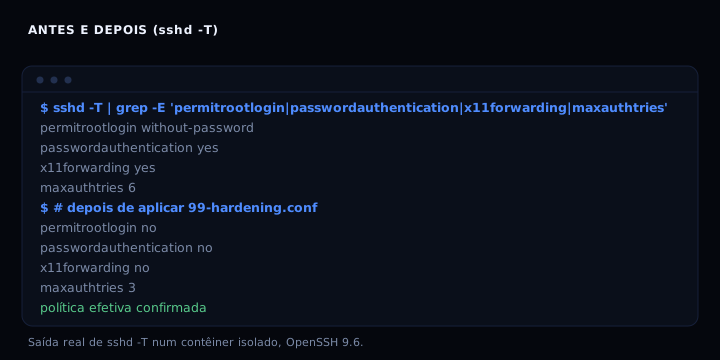
Before and after
| Directive | Before (default) | After |
|---|---|---|
| permitrootlogin | without-password | no |
| passwordauthentication | yes | no |
| authenticationmethods | any | publickey |
| maxauthtries | 6 | 3 |
| logingracetime | 120 | 30 |
| x11forwarding | yes | no |
| allowtcpforwarding | yes | no |
| allowagentforwarding | yes | no |
| clientaliveinterval | 0 | 300 |
| clientalivecountmax | 3 | 2 |
| tcpkeepalive | yes | no |
| maxsessions | 10 | 4 |
FAQ
Do I need to change the SSH port? No. Changing the port reduces log noise, but it is not security. Anyone scanning finds the port in seconds. Keep 22 and invest in keys and fail2ban.
What if I lose the private key? You lose access. That is why you keep a second key somewhere else, or console access through the provider. Do not disable passwords before you have two ways in.
Does it work with ed25519 and rsa keys? Yes. SSH accepts both. Prefer ed25519 for new keys: ssh-keygen -t ed25519.
Does reload drop my session? No. systemctl reload ssh reloads configuration for new connections. Open sessions continue.
Can I restrict by user or IP? Yes. Use Match blocks at the end of the file. Example: Match User deploy followed by AllowTcpForwarding yes allows tunnels only for that user. Order matters: Match applies until the next Match or end of file.
Sources
Official sshd_config documentation: man.openbsd.org/sshd_config.
OpenSSH 9.6, sshd_config manual: https://man.openbsd.org/sshd_config
OpenSSH documentation: https://www.openssh.com/manual.html
Internal links: see SSH key instead of password, SSH agent and fail2ban without locking yourself out.