08 Nov 2026 · linux, logrotate, disco · 4 min
How to keep logs from filling the disk
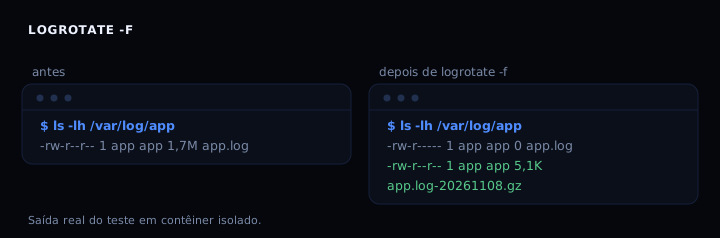
A log file that grows without limit is the most common cause of a full disk on a server. logrotate fixes it by running once a day: it renames the current log, creates a new empty one, and compresses the old one. This post has the full commented rule and a real test where 1.7 MB of log became 5.1 KB compressed.
What logrotate does
It does not delete logs, it organizes them. On each run the current file becomes app.log-20261108 (or app.log.1) and a new empty file takes its place. The old one can be compressed and, after a few days, removed. The service keeps writing to the new file because the name stays the same even though the inode changed.
The detail that trips people up: if the service keeps the file open by descriptor, it keeps writing to the renamed file and the disk does not free up. That is why the rule has to tell the service to reopen the file. Covered in “If it breaks”.
The full rule
/var/log/app/app.log {
    daily
    rotate 7
    compress
    delaycompress
    missingok
    notifempty
    create 0640 app app
    dateext
    dateformat -%Y%m%d
    su app app
    postrotate
        /bin/kill -HUP $(cat /run/app.pid 2>/dev/null) 2>/dev/null || true
    endscript
}
Each line:
daily: runs once a day. Switch toweeklyorsize 100Mif you prefer by size.rotate 7: keeps 7 old files. Withdaily, one week of history.compress: compresses rotated files with gzip.delaycompress: does not compress yesterday’s file, only older ones. Avoids problems with a service still holding the file.missingok: does not fail if the log does not exist.notifempty: does not rotate if the file is empty.create 0640 app app: creates the new file with the right owner and mode.dateextanddateformat: use a date in the name instead of.1,.2. Easier to find.su app app: runs rotation as userapp, so root is not needed.postrotate: sends SIGHUP so the service reopens the file. Replace the command with your service’s.
Save as /etc/logrotate.d/app and test with logrotate -d /etc/logrotate.d/app (debug mode, touches nothing).
How to verify
logrotate -f /etc/logrotate.d/app
ls -lh /var/log/app/
Expected output: app.log with 0 bytes and an app.log-YYYYMMDD.gz much smaller. In the measured test, 1.7 MB became 5.1 KB.
If it breaks
- The service keeps writing to the old file. Cause: the service did not reopen the file after rotation. Fix: add the right signal in
postrotate(SIGHUP, orsystemctl reload app) or usecopytruncate, which copies and empties the file without renaming. - logrotate says “error: destination … already exists”. Cause: two files with the same name from
dateexton the same day. Fix: remove the old file or run only once a day; logrotate does not overwrite. - Nothing rotates and the log keeps growing. Cause: directory permissions or
notifemptywith an empty file. Fix: checksuand permissions on/var/log/app; removenotifemptyif you want to rotate even when empty.
logrotate or an alternative
| Option | When to use | Note |
|---|---|---|
| logrotate | Service writes to its own file | System default, one file per config |
| copytruncate | Service does not accept a reload signal | Copies and empties; may lose lines during rotation |
| journalctl –vacuum-size | Logs in the systemd journal | Does not apply to a loose file |
| truncate -s 0 | Emergency, disk full right now | Loses history, does not rotate |
FAQ
Do I need root to run logrotate? No. Use the su user group directive and run as that user; the state directory (/var/lib/logrotate/status) must be writable by whoever runs it.
How often should it run? Once a day via cron or a systemd timer. More often only if the log grows fast; then use size 50M instead of daily.
Does logrotate delete logs on its own? Yes, after rotate N old files, the oldest is removed on the next rotation.
Can one rule rotate several files? Yes, use a glob: /var/log/app/*.log { ... }. All share the same rule.
How do I see what it would do without touching anything? logrotate -d /etc/logrotate.d/app. Debug mode prints the decisions and changes no file.
Sources
- man logrotate (version 3.21.0)
- logrotate on Debian
See also: disk full, how to find the culprit, ncdu to find what uses disk, cron done right and your own systemd service.