03 Nov 2026 · linux, systemd, servico · 5 min
How to turn your own script into a systemd service
A systemd service is a .service file with three sections: [Unit], [Service] and [Install]. systemd reads the file, runs the ExecStart command under the configured user and directory, and restarts the process when it dies if Restart is set. The three fields that change the behavior are User, WorkingDirectory and Restart; the memory limit goes in MemoryMax.
What each section does
[Unit] describes the service and its dependencies. Description is the text that shows up in systemctl status. After=network.target makes sure the network comes up first, but it does not create a hard dependency; use Wants= or Requires= if the service needs another unit. [Service] is where the process lives: Type, User, WorkingDirectory, EnvironmentFile, ExecStart, Restart, RestartSec, MemoryMax, StandardOutput, StandardError. [Install] tells systemctl enable which target to hook into; multi-user.target is the default for servers.
The artifact: full unit
[Unit]
Description=My example service
After=network.target

[Service]
Type=simple
User=myuser
Group=myuser
WorkingDirectory=/opt/my-service
EnvironmentFile=/opt/my-service/my-service.env
ExecStart=/opt/my-service/my-service.sh
Restart=on-failure
RestartSec=5
MemoryMax=256M
StandardOutput=journal
StandardError=journal
SyslogIdentifier=my-service

[Install]
WantedBy=multi-user.target
Type=simple means the main process is what ExecStart starts, and systemd considers the service active as soon as the process begins. Use oneshot for scripts that run and exit (backup, one-off task), forking for daemons that detach from the parent, and notify when the program tells systemd it finished starting through sd_notify.
User and Group define who runs. If you omit them, the service runs as root, which is the most common mistake in tutorials. WorkingDirectory is the working directory; without it, relative paths in the script break. EnvironmentFile points to a KEY=VALUE file; systemd reads the variables and injects them into the process. The file should be mode 0600.
# /opt/my-service/my-service.env
# chmod 600, owned by myuser
API_TOKEN=replace-with-a-real-value
LOG_LEVEL=info
Restart=on-failure restarts when the process exits with a non-zero code or is killed by a signal. RestartSec=5 waits five seconds between attempts. MemoryMax=256M kills the service through the cgroup OOM when it crosses the limit; use MemoryHigh to warn before that. StandardOutput=journal sends stdout to the journal, which makes journalctl -u easy.
Install and start
sudo install -o root -g root -m 0644 my-service.service /etc/systemd/system/
sudo systemctl daemon-reload
sudo systemctl enable --now my-service.service
daemon-reload re-reads the unit files; without it systemd does not see the change. enable –now enables it for the next boot and starts it now.
How to check
systemctl status my-service.service
journalctl -u my-service.service -f
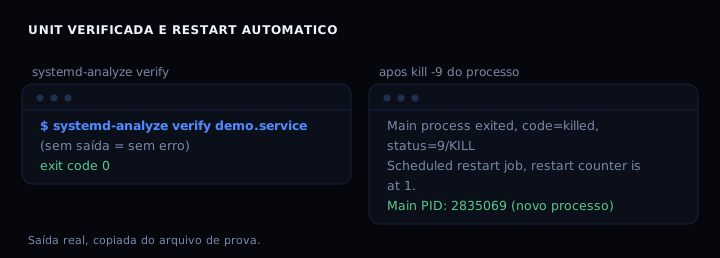
systemd-analyze verify /etc/systemd/system/my-service.service
Expected status output: Active: active (running), Main PID with the PID of the bash or binary, and Memory below 256M. systemd-analyze verify prints nothing when everything is fine; any error line points at the field and the reason. Test the restart by killing the process: sudo kill -9 and watch the journal show Scheduled restart job, restart counter is at 1 and a new PID.
When it goes wrong
216/GROUP. Cause: the user or group in User= does not exist, or the user service lacks permission. Fix: create the user with useradd, or remove User= and Group= to run as root and adjust later.
203/EXEC. Cause: ExecStart points at a missing file or one without execute permission. Fix: check the absolute path and run chmod +x on the script.
status=127 (command not found). Cause: systemd does not use your shell’s PATH; the command has no absolute path. Fix: use an absolute path in ExecStart and in every call inside the script.
Service does not restart. Cause: on-failure does not cover a clean exit with code 0, and on-success does not cover a failure. Fix: use Restart=always if you want a restart in any case, or on-abnormal for signal and timeout.
MemoryMax ignored. Cause: the kernel or cgroup v2 is not active, or the unit runs outside a cgroup. Fix: check systemctl show my-service -p MemoryMax and read memory.current of the cgroup; in a container use –memory.
Which type to pick
| Type | When to use | Note |
|---|---|---|
| simple | process stays in foreground | default; systemd considers it active on start |
| oneshot | script runs and exits | combine with RemainAfterExit=yes if you need active status |
| forking | daemon detaches from parent | systemd waits for the parent to exit; discouraged |
| notify | program reports via sd_notify | best for services with slow startup |
| idle | waits for other jobs to finish | rarely needed |
FAQ
Does the service load .bashrc? No. systemd does not read any profile file. Declare variables in EnvironmentFile or in Environment=.
Can I run as root? You can, but you should not. Create a dedicated user with useradd –system –no-create-home and use User= and Group=. Root only when the service needs a port below 1024 or a specific capability; then prefer AmbientCapabilities=CAP_NET_BIND_SERVICE.
How do I see the logs? journalctl -u my-service -e opens at the end; -f follows in real time; –since “1 hour ago” filters by time.
How do I disable without deleting? systemctl disable –now my-service.service stops it for boot and now; to pause temporarily, systemctl stop.
How do I pass arguments to the script? ExecStart=/opt/my-service/my-service.sh –port 8080. If you need a shell, use ExecStart=/bin/bash -c ‘…’ with careful quoting.
Sources
systemd.service(5) and systemd.exec(5), checked in November 2026. Memory limits in systemd.resource-control(5). For logs, journalctl to find the error. For secrets in a file, env and secrets in a file. For capping a container, how to cap container memory. For cron routines, cron done right.