07 Nov 2026 · linux, disco, tools · 4 min
ncdu: finding what fills the disk without cryptic commands
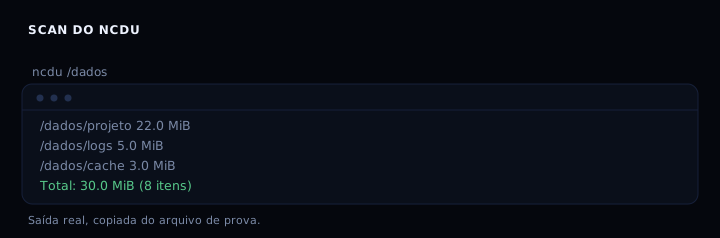
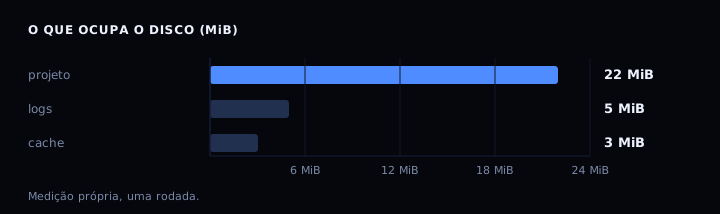
Disk full and you do not know where. du -sh * lists folders, but it does not sort and you cannot navigate. ncdu does both in a text screen: it scans the directory, sorts by size and lets you enter folders with the arrow keys. Measured in a test directory of 30 MiB: project 22 MiB, logs 5 MiB, cache 3 MiB. The culprit shows up on the first screen.
Install
Debian and Ubuntu: sudo apt install ncdu. Fedora: sudo dnf install ncdu. macOS: brew install ncdu. Arch: pacman -S ncdu. The author also ships static binaries for x86_64 and ARM at dev.yorhel.nl/ncdu, useful on servers without a package manager.
Basic scan
ncdu /var/log scans only the logs. ncdu / scans the root, but it is slow and may enter mounts. During the scan, one line shows the current item and the partial total. To avoid crossing file systems, use -x: remote mounts and /proc stay out. To ignore a pattern, --exclude .git. To ignore folders that carry CACHEDIR.TAG, --exclude-caches.
Navigate and act
Arrow keys to move, Enter to enter a folder, < or h to go to the parent. d deletes the selected item, asking for confirmation. n sorts by name, s by size, C by item count. g toggles the percentage bar. a toggles disk usage and apparent size. ? shows all shortcuts. q quits.
To only look, run with -r (read only): it disables delete and shell. That is the safe mode for auditing a production server.
Export and import
ncdu -o report.json /data scans and saves, without opening the interface. ncdu -f report.json opens it later, on the same or another machine. That lets you scan on a remote server and browse on your laptop. The man page shows the pipe form: ssh -C user@server ncdu -o- / | ncdu -f-. The -C in ssh compresses, useful on slow links.
On large servers, the export grows: about 600 to 700 KiB for 10 thousand files, scaling linearly. With millions of files, expect tens of megabytes.
The playbook
#!/usr/bin/env bash
set -euo pipefail

# If ncdu is missing, print instructions and exit without error.
if ! command -v ncdu >/dev/null 2>&1; then
    echo "ncdu not found."
    echo "Debian/Ubuntu: sudo apt install ncdu"
    echo "Fedora:        sudo dnf install ncdu"
    echo "macOS:         brew install ncdu"
    exit 0
fi

tmp="$(mktemp -d)"
trap 'rm -rf "$tmp"' EXIT
mkdir -p "$tmp/project/src" "$tmp/project/node_modules" "$tmp/logs" "$tmp/cache"
dd if=/dev/zero of="$tmp/project/node_modules/x.bin" bs=1M count=20 2>/dev/null
dd if=/dev/zero of="$tmp/project/src/app.js" bs=1M count=2 2>/dev/null
dd if=/dev/zero of="$tmp/logs/app.log" bs=1M count=5 2>/dev/null
dd if=/dev/zero of="$tmp/cache/thumb.db" bs=1M count=3 2>/dev/null

echo "=== scan and export ==="
ncdu -o "$tmp/report.json" "$tmp" >/dev/null
echo "report saved to $tmp/report.json"

echo "=== everyday commands ==="
echo "ncdu /var/log                 # scan only logs"
echo "ncdu -x /                     # do not cross file systems"
echo "ncdu --exclude .git /project  # ignore a pattern"
echo "ncdu -o report.json /data     # export to browse later"
echo "ncdu -f report.json           # open report"
echo "ncdu -r /                     # read only mode"
If it goes wrong
- Slow or stuck scan on
ncdu /: use-xand--exclude-kernfsto avoid /proc, /sys and remote mounts. - Message “Standard input is not a TTY”: ncdu needs a terminal. Use
-oto export and-fto browse, or run insidescript. - Numbers that do not match
df: hard links counted once per directory, crossed mounts, deleted but still open files. - Deleted something by mistake: by default ncdu asks for confirmation.
--no-confirm-deletedisables that protection and is not recommended. - Illegible colors:
--color offor--color dark.
ncdu 1.x and 2.x
Version 1.x is written in C and ships in the packages of most distributions. Version 2.x is rewritten in Zig and brings parallel scanning with -t8 and binary export with -O. The measurement in this post used 1.22, from 2025-03-05, MIT license.
Comparison
| Tool | Interface | Exports JSON | Deletes files | Note |
|---|---|---|---|---|
| du | text | no | no | standard, scriptable |
| ncdu | interactive text | yes | yes | the best known |
| dust | text | no | no | very fast |
| gdu | interactive text | yes | yes | rewritten in Go |
| dua | text | no | no | focus on speed |
| baobab | graphical | no | yes | ships with GNOME |
FAQ
Does ncdu replace du? No. du is standard and scriptable. ncdu is for investigating.
Does it work over SSH? Yes, that is the main use case: a server with no graphical interface.
How do I scan without crossing file systems?
ncdu -x /.
Can I exclude node_modules automatically?
ncdu --exclude node_modules /project. The pattern matches by name at any level.
How many files in the measurement? Eight items in total, adding up to 30 MiB. The largest was node_modules/x.bin at 20 MiB.
Sources
Official site at dev.yorhel.nl/ncdu, man page at manpages.debian.org. See also disk full, how to find it, duf and dust and measure disk without taking it down.