04 Nov 2026 · linux, disco · 4 min
duf and dust: where the disk space went
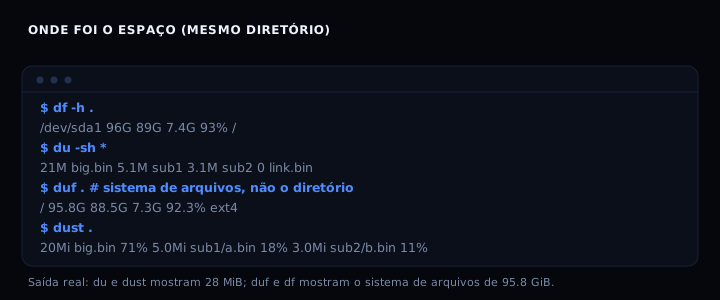
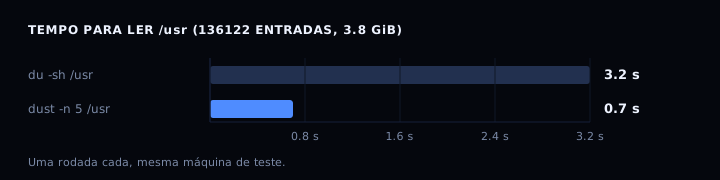
du answers “how heavy is this directory” and df answers “how much space is left on the disk”. They are two different questions and the new tools do not replace both: duf is a more readable df and dust is a du that draws the tree. In the same test directory with 28 MiB of files, du -sh * and dust . agreed on 28 MiB, while duf . and df -h . showed the 95.8 GiB filesystem. The time difference showed up on /usr: 3.2 s for du against 0.7 s for dust, across 136122 entries and 3.8 GiB.
What each one answers
df(andduf): filesystem space. Answers “will anything else fit on this disk?”.du(anddust): weight of a directory or file. Answers “what is eating the space?”.
Confusing the two is the most common mistake. duf . does not say how heavy the directory is; it says how big the whole disk is. dust does not say how much is left on the disk; it says where the space went.
The artifact: compare all four
A script that runs all four on the same target and leaves the output side by side. It still works if duf or dust are not installed: it warns and continues.
#!/usr/bin/env bash
set -euo pipefail

TARGET="${1:-.}"

echo "===== df (filesystem) ====="
df -h "$TARGET"

echo
echo "===== du (weight of the target) ====="
du -sh "$TARGET" 2>/dev/null
echo "--- largest entries ---"
du -sh "$TARGET"/* 2>/dev/null | sort -h | tail -n 20

if command -v duf >/dev/null 2>&1; then
    echo
    echo "===== duf (readable df, with colors and JSON) ====="
    duf "$TARGET"
    echo "--- JSON output ---"
    duf --json "$TARGET" | head -n 5
else
    echo
    echo "duf not installed. Debian/Ubuntu: apt install duf. Binary: github.com/muesli/duf/releases"
fi

if command -v dust >/dev/null 2>&1; then
    echo
    echo "===== dust (du as a tree, with bars) ====="
    dust -n 20 "$TARGET"
    echo "--- files only, no directories ---"
    dust -F -n 10 "$TARGET"
else
    echo
    echo "dust not installed. Cargo: cargo install du-dust. Binary: github.com/bootandy/dust/releases"
fi
Installation
- duf:
apt install dufon Debian 12 and Ubuntu 22.04 or later. Binaries at github.com/muesli/duf/releases (MIT). - dust:
cargo install du-dustor a binary at github.com/bootandy/dust/releases (Apache 2.0). - Neither is required.
duanddfalready ship with the system.
Options that matter
duf:
--json: structured output, good for scripts.--only local,networkand--hide-fs tmpfs: filter what shows up.--sort sizeand--output mountpoint,size,usage: sort and pick columns.--inodes: show inodes instead of blocks.
dust:
-n 20: how many lines to show (default is terminal height).-d 3: tree depth.-F: files only,-D: directories only.-z 10M: ignore entries smaller than 10 MiB.-e '\.log$': only what matches the regex;-vexcludes.-j: JSON output.-x: do not cross filesystems (likedu -x).
How to verify
Run the script on a small directory and check the agreement.
./compara-disco.sh /tmp
Expected output: the du -sh line and the dust total match (same number, same directory). df and duf show the disk, which is larger. If du and dust disagree, one of them is counting links or different filesystems: use du -x and dust -x.
If it goes wrong
dufshows 95.8 GiB for a 28 MiB directory: not a bug, that is the disk. Useduordustfor the directory weight.dustslower thanduon a network disk: raise the walkers with-T 16. On high-latency NFS, more threads overlap the stat calls.- Strange characters in the terminal:
dust -cdisables colors;duf --theme lightswitches the theme. permission deniedprinted once: both print a single permission message, unlikedu, which repeats per file.- oh-my-zsh defines an alias
duf: rununalias dufbefore using the binary.
Measurement
On /usr with 136122 entries and 3.8 GiB, du -sh took 3.2 s and dust -n 5 took 0.7 s. duf took 0.005 s, but only because it shows the filesystem instead of walking the directory. The dust speed comes from parallelizing the walk and not sorting everything before printing.
The duf README documents every option at github.com/muesli/duf. The dust configuration file is documented at github.com/bootandy/dust.
FAQ
Does duf replace du? No. duf is df with colors and JSON. For directory weight, use du or dust.
Does dust count hard links multiple times? No. Dust does not count hard links multiple times by default; use -s for apparent size.
Which to use in a script? du -sb for exact bytes, or duf --json / dust -j if you want structure. Avoid parsing the colored output.
Is ncdu still worth it? Yes, when you want to browse interactively and delete files on the spot. dust and du are for looking and deciding.
Sources
github.com/muesli/duf (duf 0.9.1, MIT license, consulted 04 Nov 2026). github.com/bootandy/dust (dust 1.2.7, Apache 2.0 license, consulted 04 Nov 2026). Internal links: /en/blog/disco-cheio-como-achar.html, /en/blog/medir-disco-sem-derrubar.html, /en/blog/ver-o-que-come-a-ram.html, /en/blog/rsync-copiar-e-retomar.html.