03 Nov 2026 · linux, systemd, cron, automacao · 4 min
Migrating from cron to systemd timers
A systemd timer is a pair of files: a .timer that says when to fire and a .service that says what to run. OnCalendar takes calendar expressions like cron, Persistent=true recovers a missed run when the machine was off, and the log goes to the journal instead of becoming email. Migration is replacing the crontab line with these two files and running systemctl enable –now.
Why switch
cron does not know whether the machine was off at the scheduled time: the run is lost. cron’s log depends on manual redirection and MAILTO. A systemd timer records the last run on disk, recovers it with Persistent=true, and sends stdout and stderr to the journal, queryable with journalctl -u. The downside is verbosity: two units instead of one line.
The artifact: .service and .timer pair
# /etc/systemd/system/backup.service
[Unit]
Description=Daily backup

[Service]
Type=oneshot
ExecStart=/opt/backup/backup.sh
StandardOutput=journal
StandardError=journal
SyslogIdentifier=backup
# /etc/systemd/system/backup.timer
[Unit]
Description=Daily backup (timer)

[Timer]
OnCalendar=*-*-* 03:00:00
Persistent=true
RandomizedDelaySec=0
Unit=backup.service

[Install]
WantedBy=timers.target
Type=oneshot is the natural partner of a timer: the service runs and exits, and systemd considers the activation done when the process leaves. OnCalendar=--* 03:00:00 fires every day at 3am; the syntax is year-month-day hour:minute:second, with * for any value. Persistent=true stores the last run on disk and, if the timer was inactive at the scheduled time (machine off), fires the service on boot. RandomizedDelaySec=0 disables the random delay; useful on a single machine, but in a fleet use a value to avoid hammering the target. Unit= names the service; if omitted, systemd looks for a service with the same name as the timer.
Install and start
sudo install -o root -g root -m 0644 backup.service backup.timer /etc/systemd/system/
sudo systemctl daemon-reload
sudo systemctl enable --now backup.timer
How to check
systemctl list-timers --all
systemd-analyze calendar "*-*-* 03:00:00"
systemctl status backup.timer
# force a run now:
sudo systemctl start backup.service
journalctl -u backup.service -e
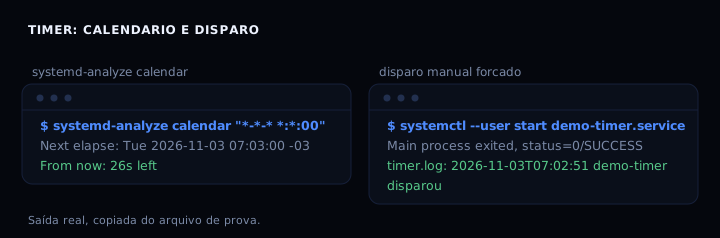
list-timers shows the next run (NEXT) and the last (LAST). systemd-analyze calendar validates the expression and prints the next elapse with the countdown. Forcing the run with systemctl start backup.service runs the service once without waiting for the timer; that is how you test the script.
When it goes wrong
Timer does not fire. Cause: invalid OnCalendar expression or inactive timer. Fix: validate with systemd-analyze calendar; check systemctl status backup.timer, which should be active (waiting) with a Trigger in the future.
Service does not run. Cause: wrong Unit= name or missing .service file. Fix: check the name in backup.timer and run systemctl daemon-reload.
Missed run not recovered. Cause: Persistent only works with OnCalendar; monotonic timers (OnBootSec) do not persist. Fix: use OnCalendar for wall-clock routines; for monotonic, accept the loss.
Timer fires only once. Cause: RemainAfterExit=yes on the oneshot service keeps it active, so the timer does not re-fire. Fix: remove RemainAfterExit on a service called by a timer.
Log does not show up. Cause: StandardOutput not set or journal not queried. Fix: StandardOutput=journal and StandardError=journal in the .service; read with journalctl -u backup.service.
Table: cron or timer
| Feature | cron | systemd timer |
|---|---|---|
| Schedule syntax | 5 fields | OnCalendar (calendar) |
| Recover missed run | no | Persistent=true |
| Log | file or email | journalctl -u |
| Dependency on another service | no | After=, Requires= |
| Concurrency (no overlap) | manual flock | not native; use flock in the script |
| Complexity | one line | two files |
FAQ
Can I migrate all jobs at once? Yes, but do them one at a time and check list-timers. Jobs that need a specific PATH work better with Environment= or EnvironmentFile.
Does the timer run while the machine is suspended? A calendar timer (OnCalendar) does not fire during suspension; on wake, if Persistent=true, it recovers if the time passed. A monotonic timer pauses with the machine.
How do I see the next run? systemctl list-timers shows NEXT and the remaining time. systemd-analyze calendar “--* 03:00:00” prints the next elapse.
How do I disable it? systemctl disable –now backup.timer. The service may keep running if already active; stop it with systemctl stop backup.service.
Does cron leave the system? No. The two coexist. Migrate what gains from the journal and recovery; leave cron for what is simple.
Sources
systemd.timer(5) and systemd.time(7), checked in November 2026. For services, systemd.service(5). For cron, cron done right. For logs, journalctl to find the error. For secrets in a file, env and secrets in a file.