09 Nov 2026 · linux, terminal · 4 min
Zellij: the multiplexer that shows shortcuts on screen
Zellij is a Rust terminal multiplexer that, unlike tmux, shows in the status bar the shortcuts for the mode you are in. You do not memorize a prefix: the screen remembers. It installs as a single binary and configuration is a short KDL file.
What changes compared to tmux
tmux requires memorizing a prefix plus key combination, and the status bar only shows the session name. Zellij replaces that with modes: normal, pane, tab, resize. When you enter a mode, the bottom bar lists exactly which keys work at that moment. To split the screen, you press Ctrl+p and the bar itself says that d creates a pane below and r creates one to the right. That removes the main friction for people who use a multiplexer once a week and forget the shortcuts.
The other strong point is automatic session resurrection. Zellij serializes tabs, panes and working directories to the cache and, on reopen, recreates the layout. In tmux that requires an external plugin.
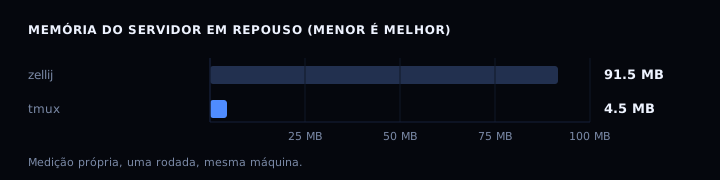
The cost is memory. The Zellij server consumes about 91 MB at rest, against about 4.5 MB for the tmux server. For a laptop or a small server, that matters; for a workstation, it does not.
Installation
A static binary for Linux x86_64, with no library dependency:
mkdir -p "$HOME/.local/bin"
curl -sL https://github.com/zellij-org/zellij/releases/latest/download/zellij-x86_64-unknown-linux-musl.tar.gz \
  | tar -xz -C "$HOME/.local/bin"
chmod +x "$HOME/.local/bin/zellij"
zellij --version
If ~/.local/bin is not in PATH, add the line export PATH="$HOME/.local/bin:$PATH" to ~/.bashrc and reopen the terminal.
The configuration I use
The file lives at ~/.config/zellij/config.kdl. A short, commented start:
mkdir -p "$HOME/.config/zellij"
cat > "$HOME/.config/zellij/config.kdl" <<'EOF'
// Bar with shortcuts for the active mode
pane_frames true

// Resurrect closed sessions automatically
session_serialization true

// On terminal loss, detach instead of killing the session
on_force_close "detach"

// Default shell for new panes
default_shell "bash"
EOF

echo "written: $HOME/.config/zellij/config.kdl"
Accepted values are documented by the binary itself: zellij setup --dump-config prints the full default configuration, with every option commented.
The three daily operations
Create a named session:
zellij --session work
# or, from outside the session:
zellij -s work
Split the screen. Inside the session, press Ctrl+p to enter pane mode; the bar shows the keys. From the command line, without UI:
zellij --session work action new-pane --direction right
zellij --session work action new-pane --direction down
Reattach after closing the terminal:
zellij list-sessions
zellij attach work
# shortcut:
zellij a work
How to verify
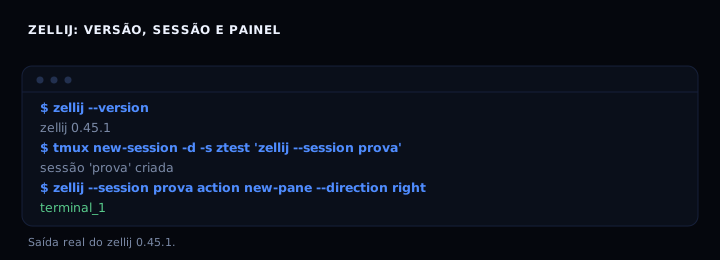
zellij --version
# expected: zellij 0.45.1

zellij list-sessions
# expected: lists active sessions, one per line
To prove the split and reattach, create the session proof, split with action new-pane --direction right and check the response terminal_1. Then detach and reattach: the pane is still there.
If it goes wrong
zellij: command not found: the binary is not in PATH. Runwhich zellij; if empty, add~/.local/binto PATH in~/.bashrc.Session 'work' not foundwhen reattaching: the name is wrong or the session died. Check withzellij list-sessionsand use the exact name.- Shortcuts do not appear in the bar:
pane_framesdisabled or terminal without drawing character support. Enablepane_frames trueand, if needed,simplified_ui true.
Zellij or tmux
| Item | Zellij | tmux |
|---|---|---|
| Shortcuts visible on screen | yes | no |
| Configuration | KDL | conf style |
| Session resurrection | automatic | external plugin |
| Server memory at rest | ~91 MB | ~4.5 MB |
| Plugin ecosystem | WASM | C |
Choose Zellij if you use a multiplexer occasionally and do not want to memorize shortcuts. Choose tmux if memory is scarce or you already have a mature configuration.
FAQ
Does Zellij fully replace tmux?
For interactive use, yes. For scripts calling tmux send-keys on remote servers, tmux is still more common; Zellij has zellij action send-keys, but the syntax differs.
Do I need root to install?
No. The binary goes in ~/.local/bin and configuration in ~/.config/zellij, all in the user directory.
Does it work over SSH?
Yes. The session runs on the remote server; if the connection drops, use zellij a name on reconnect. Automatic resurrection helps, but does not replace session backup.
How do I change the prefix?
Zellij has no single prefix: each mode has its trigger (Ctrl+p for pane, Ctrl+t for tab, Ctrl+r for resize). You change the triggers in the keybinds section of config.kdl.
Worth it for someone who already masters tmux? If your current configuration solves your problems, no. The switch only pays off if you want visible shortcuts or automatic resurrection without a plugin.
See also tmux in practice, terminal that looks clean and what bash is.