08 Nov 2026 · linux, usuarios, permissoes · 4 min
Creating users and groups and granting access to a folder
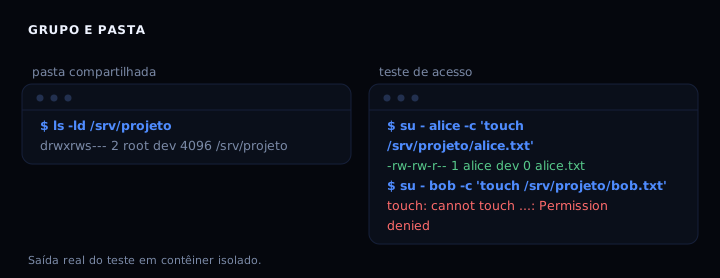
Creating the user is the easy part; what breaks production is the folder nobody in the group can write to, or the opposite, everybody can. The recipe that works is a group, a folder owned by root:group with mode 2770, plus setgid so the group is inherited by new files. Tested in a clean container: alice, in the group, creates a file; bob, outside the group, gets “Permission denied”.
What each part solves
groupaddcreates the group that will share the folder.useradd -G groupputs the user in the group without removing the others.chown root:group foldersets who owns it and which group accesses it.chmod 2770 foldergives read, write and execute to owner and group, nothing to others, and turns on the setgid bit.- setgid (
2in front) makes every new file in the folder inherit the folder’s group, not the creating user’s primary group.
Without setgid, alice creates a file with group alice and bob, even in group dev, cannot edit it. That is the most common mistake.
Before you run
Check whether the group already exists with getent group dev. If the user already exists, the script does not recreate it, it only adds it to the group. That avoids losing the home directory or SSH key. On a server with LDAP or SSSD, useradd can clash with network users; in that case use your infrastructure’s user base or adapt the script.
Applying without logging out
After adding the user to the group, the current session does not see the change. Use newgrp dev to open a shell with the group active, or log out and back in. In a provisioning script, run the tests with sg dev -c '...'.
The artifact
#!/bin/bash
set -euo pipefail

GROUP=dev
FOLDER=/srv/projeto
USERS=(alice bob)

if ! getent group "$GROUP" >/dev/null; then
    groupadd "$GROUP"
fi

for u in "${USERS[@]}"; do
    if ! id -u "$u" >/dev/null 2>&1; then
        useradd -m -s /bin/bash -G "$GROUP" "$u"
    else
        usermod -aG "$GROUP" "$u"
    fi
done

mkdir -p "$FOLDER"
chown root:"$GROUP" "$FOLDER"
chmod 2770 "$FOLDER"

mkdir -p /etc/sudoers.d
cat > /etc/sudoers.d/90-"$GROUP" <<'EOF'
%dev ALL=(root) NOPASSWD: /usr/bin/systemctl restart app.service, /usr/bin/journalctl -u app.service
EOF
chmod 0440 /etc/sudoers.d/90-"$GROUP"
if command -v visudo >/dev/null 2>&1; then
    visudo -cf /etc/sudoers.d/90-"$GROUP"
fi

echo "Pronto. Grupo $GROUP, pasta $FOLDER (2770), sudoers em /etc/sudoers.d/90-$GROUP."
Run as root. Change GROUP, FOLDER and USERS at the top. Existing users join the group without losing their current groups, because of -a in usermod.
How to verify
ls -ld /srv/projeto
su - alice -c 'touch /srv/projeto/teste.txt'
ls -l /srv/projeto/teste.txt
su - bob -c 'touch /srv/projeto/bob.txt'   # should fail
Expected output: folder with drwxrws--- owned by root:dev; alice’s file with group dev; bob gets “Permission denied”.
If it breaks
- User cannot write to the folder. Cause: user is not in the group or the session was not reopened. Fix:
usermod -aG group userand log in again; groups are read at login. - File created has the user’s group, not the folder’s. Cause: the setgid bit is off. Fix:
chmod g+s folderorchmod 2770 folder. - sudoers broke sudo. Cause: wrong syntax in the file. Fix: edit with
visudoand validate withvisudo -cf /etc/sudoers.d/90-dev; the script already validates ifvisudoexists.
User, group or sudo
| Need | Use | Note |
|---|---|---|
| Share a folder between people | Group + folder 2770 | setgid solves inheritance |
| Grant one user only | setfacl -m u:user:rwx folder |
ACL, finer than a group |
| Allow a specific command as root | scoped sudoers | Never %group ALL=(ALL) ALL |
| Create a service user | useradd -r -s /usr/sbin/nologin |
No shell, no home |
FAQ
Do I need root? Yes, to create users and change folder ownership. The sudoers in the script allows only restart and journalctl of the service, not free root.
How do I remove a user from a group? gpasswd -d user group or deluser user group.
What is the setgid bit on a folder? It makes new files inherit the folder’s group. On a regular file it means something else (run with group), but on a folder it is inheritance.
How do I audit who is in the group? getent group dev lists the members; groups user shows a account’s groups. In an audit, compare with the expected list.
What changes with ACL? With setfacl you grant permission to a specific user or group without creating a new group. Use it for one-off sharing; for a team, a group is easier to audit.
Can I reuse the same script for several projects? Yes. Duplicate the folder and group, or use ACL if you want to share one folder across different groups.
Why not give the group full sudo? Because whoever takes over an account in that group becomes root. Minimum scope: only the commands the work needs.
Sources
See also: permissions in detail, running a container as non-root, your own systemd service and cron done right.