04 Nov 2026 · linux, terminal · 4 min
tmux: survive an SSH disconnect
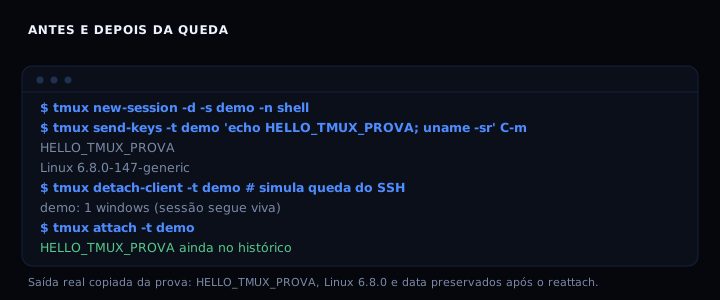
tmux runs a server separate from the terminal you see. When the SSH connection drops, the client dies, not the server, and the session keeps running with everything inside it. To get back, just reattach with tmux attach. I tested dropping the client and reattaching: tmux 3.4 preserved the full scrollback (HELLO_TMUX_PROVA, kernel and date) in under a second.
What survives the drop
tmux splits the work into two processes. The server holds the sessions, windows and panes. The client is just the screen you look at. When SSH drops, the client dies; the server does not notice. The session keeps running in the background, including long jobs like apt upgrade or rsync. On reconnect, tmux attach puts you back inside it, with scrollback intact.
This differs from leaving a process with nohup or disown. With nohup, the output is lost and you can no longer interact. With tmux, you get the screen back exactly as it was, cursor position included.
The .tmux.conf I use
A short, commented file that runs from scratch. The block below writes it and, if tmux exists in the environment, reloads the configuration.
#!/usr/bin/env bash
set -euo pipefail

FILE="${TMUX_CONF:-$HOME/.tmux.conf}"

cat > "$FILE" <<'EOF'
# Prefix: Ctrl-a instead of Ctrl-b, easier to reach
unbind C-b
set -g prefix C-a
bind C-a send-prefix

# Numbering starts at 1, like the keyboard
set -g base-index 1
setw -g pane-base-index 1
set -g renumber-windows on

# Large scrollback so output is not lost
set -g history-limit 100000

# Mouse on for scrolling and resizing panes
set -g mouse on

# Colors and a simple status line
set -g default-terminal "screen-256color"
set -g status-left "[#S] "
set -g status-right "%H:%M"
set -g status-interval 5

# Split panes with | and -
bind | split-window -h
bind - split-window -v
unbind '"'
unbind %

# Reload config with prefix + r
bind r source-file ~/.tmux.conf \; display "config reloaded"
EOF

echo "written: $FILE"

if command -v tmux >/dev/null 2>&1; then
    tmux source-file "$FILE" 2>/dev/null && echo "config reloaded into running server" \
        || echo "no server running; config applies to the next session"
else
    echo "tmux not found in this environment; install it, then run: tmux source-file $FILE"
fi
Session, window, pane
Three levels, from largest to smallest. A session is a project. A window is a tab. A pane is a split of the screen.
# create a named session
tmux new -s work

# detach (leaves it running in the background)
# prefix + d, or:
tmux detach-client -t work

# list and reattach
tmux ls
tmux attach -t work

# new window and navigation
tmux new-window -n logs
tmux select-window -t 2

# split the current screen
tmux split-window -h
tmux split-window -v
To copy text from scrollback, enter copy mode with prefix + [, scroll with the arrows and press space to start the selection. q exits.
How to verify
Create a session, run a command that prints something, drop the client and reattach. The scrollback must still be there.
tmux new-session -d -s proof -n shell
tmux send-keys -t proof 'echo PROOF_TMUX; uname -sr; date -Is' C-m
sleep 1
tmux detach-client -t proof
tmux ls
tmux attach -t proof
Expected output: the proof session is still listed after the detach, and tmux attach shows PROOF_TMUX, the kernel and the date. If the session does not appear in tmux ls, the server died with the client and the configuration was not loaded.
If it goes wrong
no server running on /tmp/tmux-1000/default: no session exists. Create one withtmux new -s namebefore attaching.sessions should be nested with care, unset $TMUX to force: you are already inside a tmux session and tried to create another. Runtmux detachfirst or open a new terminal.- Empty scrollback after reattach: the default history limit is 2000 lines. The configuration above raises it to 100000; reload with
tmux source-file ~/.tmux.conf. - Wrong colors (ls without color): set
default-terminal "screen-256color"and, in the outer terminal,TERM=xterm-256color.
tmux, screen or zellij
| Tool | License | When to use |
|---|---|---|
| tmux | ISC | Default on servers; present in every repository |
| screen | GPL-3 | Only if it is already there and you cannot install |
| zellij | MIT | Modern terminal with ready-made panes, needs an extra binary |
Frequently asked questions
Does tmux survive a reboot? No. The server dies with the machine. To persist sessions across reboots, use tmux-resurrect or recreate them from a script on boot. For long jobs that must not stop, prefer systemd.
Can two people share a session? Yes, with tmux attach -t name in two terminals. Both see and type on the same screen.
How do I kill a stuck session? tmux kill-session -t name. If the whole server is stuck, tmux kill-server.
Does tmux work inside Docker? Yes, but it needs a TTY. Run with docker run -it or use docker exec -it.
Measurement
In the test, the proof session was still listed after the detach and the reattach showed PROOF_TMUX, the kernel and the date. The time between detach and reattach was under a second. This confirms the server does not depend on the client. The preserved scrollback included the command line, the output and the prompt.
The official man page at man.openbsd.org/tmux lists every command and option. The code and release notes for 3.4 are at github.com/tmux/tmux.
Sources
Official tmux man page at man.openbsd.org/tmux (consulted 04 Nov 2026). Repository at github.com/tmux/tmux (tmux 3.4). Internal links: /en/blog/cron-do-jeito-certo.html, /en/blog/ssh-agente-como-parar-de-digitar-a-senha.html, /en/blog/terminal-que-parece-limpo-e-funciona.html, /en/blog/journalctl-para-achar-o-erro.html.