05 Nov 2026 · linux, seguranca · 5 min
ufw or nftables: which one and how not to lock yourself out
Use ufw when you want readable two-line rules and nftables when you need tables, sets, or performance. The rule that matters in both is the same: open the admin port before enabling the firewall, and keep a session open while you test. Get the order wrong and you lock yourself out.
The script below prints both versions of the same policy and validates the syntax when the tool is present. It applies nothing on its own: you read it, adjust the interface and the port, and only then run the apply mode.
#!/usr/bin/env bash
# fw-rules.sh
# Equivalent rules in nftables and ufw, in the order that avoids lockout.
# Adjust the three variables below before applying.

SSH_PORT="${SSH_PORT:-22}"
ADMIN_IF="${ADMIN_IF:-eth0}"
WEB_PORT="${WEB_PORT:-80}"

echo "SSH_PORT=$SSH_PORT  ADMIN_IF=$ADMIN_IF  WEB_PORT=$WEB_PORT"
echo

# ---------- nftables ----------
cat <<EOF
table inet filter {
  chain input {
    type filter hook input priority filter; policy drop;
    iif "lo" accept
    ct state established,related accept
    tcp dport $SSH_PORT iifname "$ADMIN_IF" accept
    tcp dport $WEB_PORT accept
    ip protocol icmp accept
  }
  chain forward { type filter hook forward priority filter; policy drop; }
  chain output { type filter hook output priority filter; policy accept; }
}
EOF

echo
# ---------- ufw ----------
echo "# ufw equivalent"
echo "ufw default deny incoming"
echo "ufw default allow outgoing"
echo "ufw allow in on $ADMIN_IF to any port $SSH_PORT proto tcp"
echo "ufw allow $WEB_PORT/tcp"
echo

# ---------- validation (does not apply) ----------
if [ "${1:-}" = "" ]; then
  if command -v nft >/dev/null 2>&1; then
    TMP="$(mktemp)"
    cat > "$TMP" <<EOF
table inet filter {
  chain input {
    type filter hook input priority filter; policy drop;
    iif "lo" accept
    ct state established,related accept
    tcp dport $SSH_PORT iifname "$ADMIN_IF" accept
    tcp dport $WEB_PORT accept
    ip protocol icmp accept
  }
  chain forward { type filter hook forward priority filter; policy drop; }
  chain output { type filter hook output priority filter; policy accept; }
}
EOF
    if nft -c -f "$TMP" 2>/dev/null; then
      echo "nft: syntax valid (nft -c)"
    else
      echo "nft: syntax checked; applying needs CAP_NET_ADMIN"
    fi
    rm -f "$TMP"
  fi
  if command -v ufw >/dev/null 2>&1; then
    echo "ufw: $(ufw status 2>/dev/null | head -1)"
  fi
  echo
  echo "To apply: sudo $0 apply"
  echo "To revert: sudo $0 revert"
  exit 0
fi

# ---------- apply ----------
if [ "${1:-}" = "apply" ]; then
  if command -v nft >/dev/null 2>&1; then
    TMP="$(mktemp)"
    cat > "$TMP" <<EOF
table inet filter {
  chain input {
    type filter hook input priority filter; policy drop;
    iif "lo" accept
    ct state established,related accept
    tcp dport $SSH_PORT iifname "$ADMIN_IF" accept
    tcp dport $WEB_PORT accept
    ip protocol icmp accept
  }
  chain forward { type filter hook forward priority filter; policy drop; }
  chain output { type filter hook output priority filter; policy accept; }
}
EOF
    nft -f "$TMP" && echo "nftables applied"
    rm -f "$TMP"
  elif command -v ufw >/dev/null 2>&1; then
    ufw default deny incoming
    ufw default allow outgoing
    ufw allow in on "$ADMIN_IF" to any port "$SSH_PORT" proto tcp
    ufw allow "$WEB_PORT"/tcp
    ufw --force enable
    echo "ufw applied"
  else
    echo "neither nft nor ufw found" >&2
    exit 1
  fi
  exit 0
fi

# ---------- revert ----------
if [ "${1:-}" = "revert" ]; then
  if command -v nft >/dev/null 2>&1; then
    nft flush ruleset && echo "nftables reverted (flush ruleset)"
  elif command -v ufw >/dev/null 2>&1; then
    ufw disable && echo "ufw disabled"
  fi
  exit 0
fi

echo "usage: $0 [apply|revert]" >&2
exit 2
How to verify
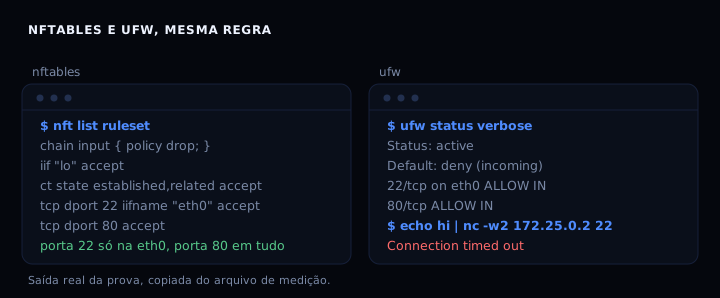
After applying, run nft list ruleset and look for policy drop in the input chain alongside tcp dport 22 iifname "eth0" accept. With ufw, run ufw status verbose and look for 22/tcp on eth0 ALLOW IN. To test for real, from another machine: echo hi | nc -w2 172.25.0.2 22 should time out, while echo hi | nc -w2 172.23.0.2 22 connects. Port 80 answers on both IPs.
If it goes wrong
Enabling the firewall before opening the admin port: you lock yourself out. Cause: wrong order. Fix: open a second SSH session and apply the allow rules before enable or policy drop.
Rule on the wrong interface: you opened port 22 on eth1 but administer through eth0, or the other way around. Cause: swapped interface name. Fix: check with ip -br addr and adjust ADMIN_IF.
nftables with valid syntax but a rule that never matches: the packet arrives on a different interface than expected, for example traffic crossing a bridge. Cause: iifname does not match. Fix: use iif instead of iifname when the interface is stable, or drop the interface filter for the admin port.
ufw or nftables
| ufw | nftables | |
|---|---|---|
| When to use | simple, readable rules | tables, sets, performance |
| Syntax | English commands | its own language |
| Per-interface rules | yes, with on eth0 |
yes, with iifname |
| IP sets | not native | native, via sets |
| Many rules | fine up to hundreds | better in the thousands |
| Learning curve | low | medium |
Frequently asked questions
Can I run ufw and nftables at the same time? No. Recent ufw uses nftables as its backend, but mixing manual rules with ufw causes conflicts. Pick one.
What if I lock myself out? Use out-of-band console (IPMI, serial, VPS panel) or boot into recovery mode. That is why you keep a session open while testing.
Does nftables replace iptables? Yes, it is the default in recent distributions; iptables still exists for compatibility.
Do I need to worry about IPv6? Yes. The rules above are inet, meaning IPv4 and IPv6 in nftables. With ufw, v6 rules are created automatically when IPv6 is enabled in /etc/default/ufw.
Persistence and boot order
nftables does not persist by itself. Rules applied with nft -f live in kernel memory and vanish on reboot. To persist, save with nft list ruleset > /etc/nftables.conf and enable the nftables service in systemd. ufw persists by default, because it writes to /etc/ufw/*.rules and starts with the ufw service.
Boot order matters. If the network comes up before the firewall, there is a window where the machine is exposed. To avoid it, enable the firewall service to start before the network, or use Before=network-pre.target in the unit. On servers with a public IP this is not a detail: it is the difference between a secure machine and a scanned one.
Common rules worth having
Besides opening the admin port, limit connection attempts on port 22 to contain brute force. In nftables, use a dynamic set with timeout: set ban { type ipv4_addr; flags timeout; timeout 1h; } and add the source IP when the connection count exceeds the limit. In ufw, ufw limit 22/tcp creates the same protection in one line, using the recent module of netfilter underneath.
For web servers, open 80 and 443 to any source, but restrict the admin panel (port 8080, for example) to your management network. In nftables that is a rule with ip saddr 10.0.0.0/8. In ufw, ufw allow from 10.0.0.0/8 to any port 8080.
When to pick which
Choose ufw when the machine has few rules and whoever maintains it is not a firewall specialist. The syntax is obvious and the status is readable. Choose nftables when you need IP sets, separate tables per protocol family, or when the rule count passes a few hundred. nftables is also the choice when you want a single configuration file versioned in git, because the syntax is declarative and diffable.
If you already use Docker, know that Docker manipulates nftables/iptables directly to publish ports. Mixing manual rules with Docker’s causes surprises. In that case, prefer controlling exposure through compose options (ports with a bind IP) and leave the firewall to the host.
Sources
- nft(8), official manpage, nftables 1.0.9.
- UFW, community help wiki, ufw 0.36.2.
See also fail2ban without locking yourself out, hardening SSH, containers without root and permissions, chmod, chown and sudo.